
Roofing CRM Software Drives Revenue Growth: From Lead to Loyalty
While a roofing CRM dramatically improves back-office organization, its true power lies in its financial impact. In a competitive market, a CRM transitions your business from reactive order-taking to proactive revenue generation and customer retention.
Companies spend thousands on roofing lead generation but invest almost nothing in nurturing the customers they already have. This is where roofing CRM software helps drive revenue and improve retention by centralizing lead management, automating field and office workflows, and streamlining customer communication.
Roofing CRM software, when implemented correctly, fixes the equation. It tightens your sales process on the front end and builds a retention engine on the back end. For roofing contractors trying to scale without proportionally growing their headcount, that combination is exactly what sustainable growth looks like.
Key Takeaways
- Most roofing companies lose revenue due to missed follow-ups, not poor sales performance.
- A roofing CRM helps increase both revenue and customer retention through better sales and customer management.
- Roofing-specific CRM software includes features like job costing, insurance tracking, aerial measurements, and mobile access.
- Automated follow-ups, lead routing, and pipeline visibility have the biggest impact on conversion rates.
- A CRM helps turn past customers into repeat clients, referral sources, and positive reviews.
- If you're still managing leads through spreadsheets and manual processes, it's time for a more scalable system.
Where Roofing Revenue Goes Before It Ever Reaches Your Bank Account?
Most roofing contractors think their biggest problem is getting more leads. It's not. The real problem is what happens to the leads they already have.
The money disappears in the hours and days between conversations, in the silence after an estimate is sent, in the follow-up that never happened, in the customer relationship that ended the moment the final invoice was paid.
Here's where it actually goes:
| The Revenue Leak | How It Drains Your Profits |
|---|---|
| Missed Lead Follow-Ups | Unanswered calls and delayed estimates hand jobs directly to competitors. |
| Unrevisited Estimates | Qualified prospects go cold because sales reps lack structured follow-up tasks |
| Crew Scheduling Delays | Gaps in crew coordination reduce the total number of jobs completed per month |
| Material Ordering Mistakes | Incorrect orders and delivery delays create project waste and shrink profit margins |
| Communication Breakdowns | Disconnected data between office and field crews leads to costly project rework |
| Slow Invoicing & Collection | Delayed billing and missing payment reminders choke company cash flow |
| Lost Referrals & Repeat Work | Failing to engage past clients leaves easy word-of-mouth revenue on the table |
| Scattered Customer Data | Notebooks, emails, and spreadsheets damage the customer experience during warranty calls |
How a Roofing CRM Increases Revenue and Improves Customer Retention: Real World Use Cases
A roofing CRM doesn't just help you close more jobs; it helps you get more value from every customer relationship. By automating follow-ups, improving sales visibility, and keeping customers engaged long after a project is complete, a CRM drives both immediate revenue and long-term growth.
1. Faster Lead Response and Better Lead Management
When a lead comes in through your website, referrals, canvassing efforts, or storm-response campaigns, a roofing CRM captures it automatically and assigns it to the right sales rep.
Faster response times increase the chances of booking inspections and winning more roofing jobs before competitors can respond.
Real-world example: After a major hailstorm, a roofing company received 47 leads in less than 24 hours. With automated lead assignment and instant notifications, the team contacted most prospects the same day and significantly increased its conversion rate compared to a manual process.
2. Automated Follow-Ups That Recover Lost Revenue
Many roofing estimates go cold simply because no one follows up consistently. A CRM automates emails, texts, reminders, and follow-up tasks, ensuring every prospect receives timely communication. This keeps opportunities moving through the pipeline and improves conversion rates without adding administrative work.
Real-world example: A homeowner received a $16,500 roofing estimate but needed time to make a decision. Automated follow-up messages kept the conversation active, ultimately helping secure the project and creating future opportunities through referrals and additional services.
3. Pipeline Visibility and Sales Performance Tracking
A roofing CRM gives managers real-time visibility into every lead, estimate, and sales activity. This makes it easier to identify bottlenecks, coach sales reps, and prevent deals from slipping through the cracks. Better visibility leads to better decision-making and stronger sales performance.
Real-world example: One roofing company discovered that deals were consistently stalling after estimates were sent. CRM reporting helped identify the issue, enabling targeted coaching that improved close rates and increased monthly revenue.
4. Faster Estimates and More Professional Proposals
Many roofing CRM platforms integrate with aerial measurement tools and proposal builders, allowing contractors to create accurate estimates and branded proposals quickly. Faster turnaround times and professional presentations help build trust and improve close rates.
Typical scenario: Two contractors inspect the same property. One takes three days to send a basic PDF estimate, while the other delivers a detailed, branded proposal within hours of the inspection.
In many cases, a faster, more professional proposal creates a stronger first impression and shortens the homeowner's decision-making process.
5. Better Job Profitability and Business Insights
Beyond sales, a CRM helps track labor costs, material expenses, project timelines, and job profitability. This gives roofing companies a clearer understanding of which projects generate the highest margins and where operational improvements are needed.
Typical scenario: A roofing company notices strong revenue growth but shrinking profits. After reviewing CRM reports, management discovers that certain project types consistently experience material overruns and scheduling delays.
With better visibility into job performance, they can adjust pricing, improve resource allocation, and protect profitability on future projects.
6. Turning Past Customers Into Future Revenue
The relationship shouldn't end once the roof is installed. A roofing CRM automates post-project communication, review requests, warranty reminders, maintenance offers, and referral campaigns. These touchpoints help generate repeat business, positive reviews, and customer referrals, thereby lowering acquisition costs and creating new revenue opportunities.
Real-world example: A satisfied homeowner received an automated review request, a seasonal maintenance offer, and a referral incentive after project completion. What could have been a one-time customer relationship resulted in additional service revenue and a new roofing project from a referral.
Not Sure Where Your Sales Process Is Leaking Revenue?
Before choosing a roofing CRM, it helps to audit where your current process is breaking down. Are leads going cold after estimates? Are follow-ups inconsistent across your sales team? Is your post-project communication nonexistent?
Most roofing contractors find that two or three specific bottlenecks account for the majority of their revenue loss, and fixing those should drive the CRM decision.
See how Sunbase Roofing CRM addresses the specific gaps in a roofing sales process.
Which CRM Features Actually Move the Revenue Needle?
Not all CRM features matter equally. Here's how to evaluate roofing CRM platforms based on business impact rather than feature count:
| CRM Feature | What It Does | Direct Business Impact |
|---|---|---|
| Lead Capture + Auto-Routing | Automatically captures and assigns new leads to the right sales rep. | Faster response times and fewer missed roofing leads |
| Sales Automation Workflows | Automates emails, texts, reminders, and follow-ups | Consistent follow-ups without manual effort |
| Proposal Builder with Design Templates | Creates professional, branded estimates and proposals quickly | Faster proposal delivery and higher close rates |
| Pipeline Dashboard | Provides a real-time view of lead and sales activity. | Better visibility and sales team accountability |
| Job Costing Module | Tracks labor, materials, and project expenses | Improved profitability and margin visibility |
| Aerial Measurement + Design Integration | Generates measurements and designs without manual site calculations | Faster, more accurate roofing and solar estimates |
| Post-Project Communication Sequences | Automates review requests, referral campaigns, and follow-ups | More reviews, referrals, and repeat business |
| Mobile App Access | Enables field teams to access and update job information from anywhere. | Real-time updates and improved team coordination |
| Reporting and Analytics | Tracks KPIs, sales performance, and operational metrics. | Better decision-making and marketing optimization |
| Insurance Claim Tracking | Organizes claim documentation and approval workflows | Faster processing of storm-damage projects |
| Solar Proposal & System Design Tools | Creates solar designs and proposals within the same platform | Easier solar cross-selling and higher revenue per customer |
| Accounting Software Integration | Syncs invoices, payments, and financial records | Reduced manual entry and more accurate billing |
| Project Management Dashboard | Tracks project progress, schedules, crews, and milestones. | Complete visibility across active roofing projects. |
When evaluating the best CRM software for your roofing business, run every feature through one question: does this directly help us close more jobs, serve customers better, or reduce wasted time? If a feature doesn't map clearly to one of those three outcomes, it's not a priority.
How a Roofing CRM Automates the Sales Process?
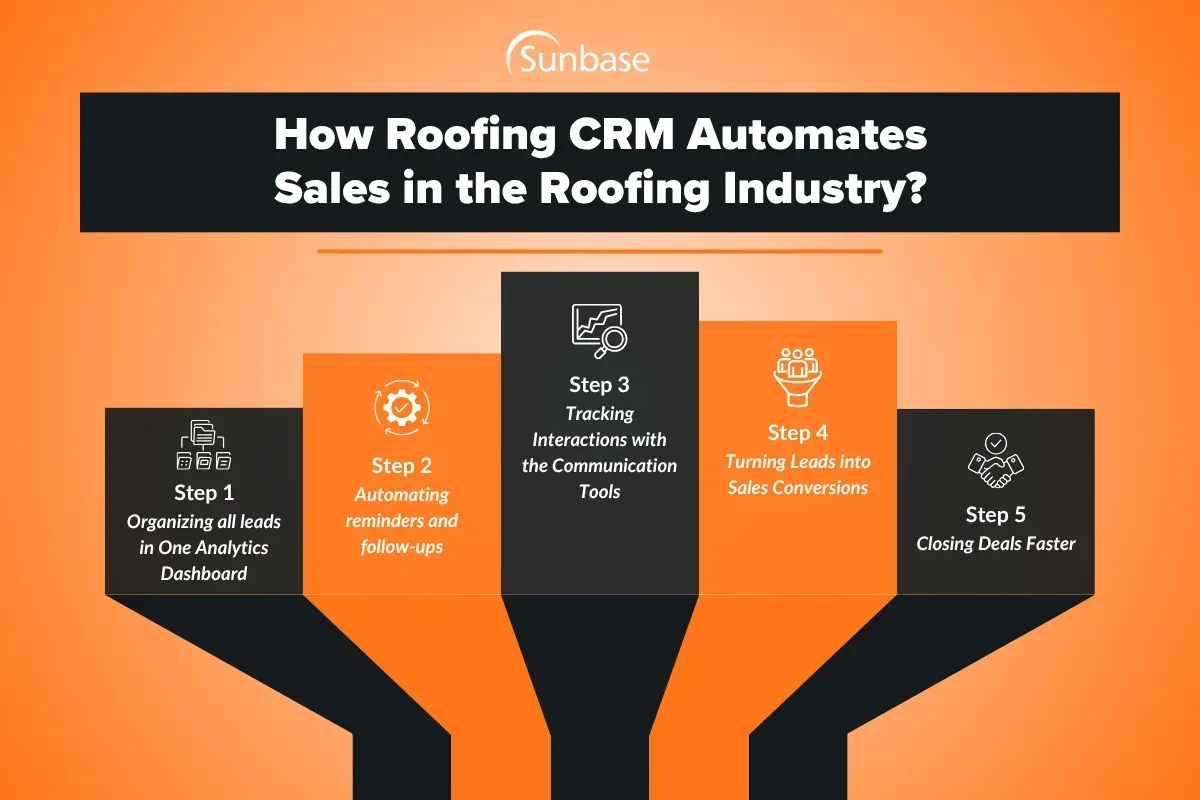
Roofing CRM software helps your roofing company scale more sales conversions with high-quality leads. Let's see how roofing software does that:
Step 1: Lead Capture & Assignment
Every roofing lead represents potential revenue, but only if someone follows up quickly. A roofing CRM automatically captures leads from your website, referrals, paid ads, and canvassing efforts, then routes them to the right sales rep. Instead of sitting in an inbox waiting for someone to notice them, leads are assigned and ready for action immediately.
Step 2: Instant Customer Response
Most homeowners contact multiple contractors before making a decision. A roofing CRM sends an automated text or email as soon as an inquiry comes in, letting the homeowner know their request has been received. This simple step keeps prospects engaged while your sales team prepares to make personal contact.
Step 3: Scheduling the Inspection
Once the appointment is booked, the CRM handles the logistics. Homeowners receive automatic confirmations and reminders, while sales reps can access property details and appointment information on their phones. The result is fewer missed appointments and a smoother customer experience.
Step 4: Estimate Delivery & Follow-Up
Many roofing jobs are lost after the estimate is sent, not because the price was wrong, but because nobody followed up. A CRM solves this by automatically scheduling follow-up emails, texts, and reminders. Every estimate stays visible until the customer makes a decision.
Step 5: Contract Approval & Project Handoff
When a customer approves the proposal, the CRM moves the project to the next stage automatically. Office staff, project managers, and crews can instantly access job details without relying on phone calls or manual updates. Everyone starts with the same information from day one.
Step 6: Turning Customers Into Repeat Business
The relationship shouldn't end when the roof is complete. A roofing CRM can automatically send review requests, maintenance reminders, and referral campaigns after the job is finished. This keeps your company top of mind and helps generate future revenue from past customers.
How to Choose the Right Roofing CRM Software?
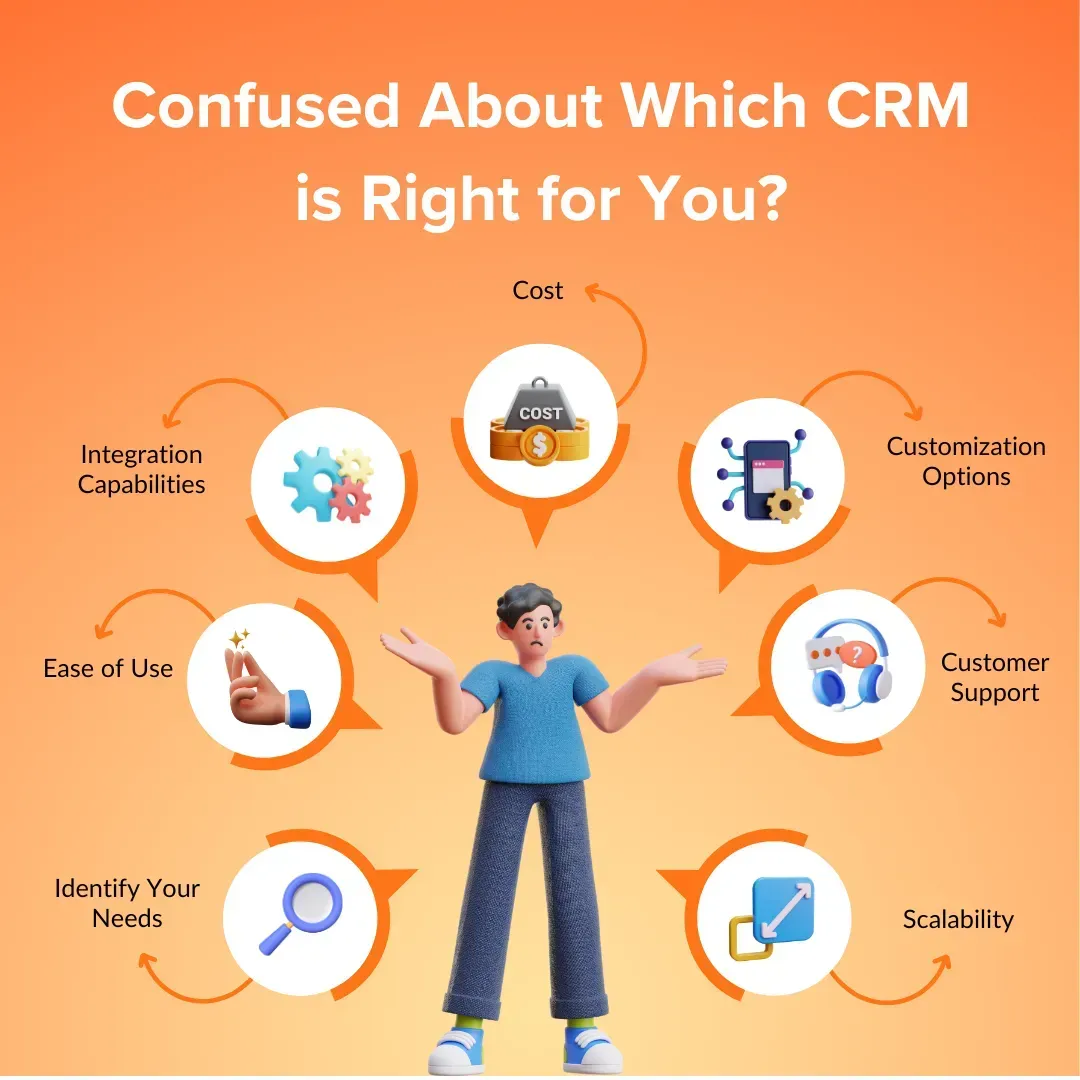
The best roofing CRM for your business isn't necessarily the one with the most features. It's the one your team will actually use, that solves your specific bottlenecks, and that grows with your operation.
1. Is It Designed Specifically for Roofing Contractors?
Generic CRM software forces you to configure workarounds for roofing-specific workflows: insurance claims, aerial measurements, crew scheduling, job site tracking.
A roofing CRM that's designed specifically for the industry has these built in from the start. Evaluate whether the platform understands roofing terminology, roofing project structures, and the actual sales cycle of a roofing company.
2. How Much Does It Reduce Manual Data Entry?
One of the most immediate ROI signals of any CRM software adoption is a reduction in manual data entry.
If your team still has to manually re-enter data from one system to another, sync spreadsheets, or update customer information across multiple platforms, you haven't solved the inefficiency; you've just added another tool to the stack.
Look for roofing CRM platforms with native integrations for estimates and proposal tools, accounting software, payment processing, and roofing apps your team already uses.
3. Is It Mobile-First?
Your sales reps are at job sites, not at desks. A roofing CRM that isn't genuinely mobile-friendly not just "mobile-accessible," but designed for field use will see adoption drop off fast.
Invest in mobile apps that allow reps to log customer interactions, update job details, take photos, and access roofing estimates without needing to return to the office.
4. Does It Support the Way You Manage Leads?
Whether your roofing business generates leads through door-to-door canvassing, digital marketing, storm-response campaigns, or referral networks, your CRM needs to accommodate your specific lead sources.
Look for customizable workflows, lead source tracking, and territory management features that map to how your business actually acquires roofing leads.
Huge projects? Here are the proven solutions for managing complex industrial roofing projects.
5. Does It Include Proposal and Design Capabilities?
The fastest-growing roofing CRM platforms now include built-in proposal design tools, not just templated PDFs, but branded, interactive proposals that display materials, pricing, project timelines, and optional add-ons in a format homeowners can actually engage with.
For contractors who also offer solar, look for a CRM that integrates solar design tools, allowing your team to move from a roofing estimate to a solar proposal without switching platforms.
The best CRM software in this space eliminates the need for standalone proposal software, separate solar CRM tools, and disconnected design apps by consolidating them into one workflow.
Conclusion
Stopping revenue leaks and building long-term retention requires moving past scattered spreadsheets and disconnected tools.
By centralizing lead capture, automated follow-ups, aerial estimates, and post-project communication into a single connected workflow, roofing contractors can scale operations smoothly without increasing administrative overhead.
Sunbase serves as an all-in-one platform designed for trade contractors, uniting sales reps, office staff, and field crews under one system to keep deals moving from lead capture to long-term client retention.
If your team wants to plug revenue leaks, shorten sales cycles, and build a predictable client retention engine, explore Sunbase Roofing CRM Software to see how it can help.
FAQs
Can a roofing CRM also handle solar projects?
Yes, the best roofing CRM software platforms in 2026 support both roofing and solar workflows in a single system. This includes solar proposal design, system layout tools, utility data integration, and solar-specific pipeline stages alongside standard roofing project management. For contractors operating in both trades, a unified CRM removes the need to maintain separate solar CRM software and roofing software in parallel.
What's the difference between a roofing CRM and generic project management software?
Project management software tracks tasks and timelines. A roofing CRM manages the entire customer lifecycle from first lead contact through proposal, signed contract, project delivery, and post-project retention. It includes sales automation, pipeline visibility, proposal design, and customer communication tools that a standard project management platform doesn't provide.
What's the difference between a roofing CRM and a generic CRM?
A generic CRM manages contacts and deal stages. A roofing CRM is built around the specific workflows of the roofing industry, including aerial measurements, insurance claims tracking, crew scheduling, job costing, and roofing-specific project management features that generic platforms require extensive customization to replicate.
What should I look for in the best roofing CRM software?
Look for: roofing-specific features (job costing, aerial measurements, insurance claims), mobile-first design for field reps, automated follow-up capabilities, integration with your accounting software, lead source tracking, and reporting that maps directly to business decisions.
One Platform.
Zero Chaos.
Run Your Entire Business in One Platform
Sunbase replaces your CRM, proposals, scheduling, job tracking, and reporting tools — all inside one clean, connected platform.
About Sunbase
The All-In-One Platform to Run Your Entire Business
Sunbase helps you organize operations, streamline daily workflows, and manage everything - from first customer contact to final project deliver- in one connected system.
Our Mission
- Organize your business.
- Optimize your workflow.
- Automate your dailytasks
Why Businesses Choose Sunbase
One Connected Workflow
Replace scattered tools and manual processes with a single platform that brings together your team, tasks, customers, jobs, and performance data.
🌎 Global Presence
Serving the United States, Canada, India, LATAM, Australia, and 10+ international markets.
👥 11,000+ Users
Trusted by contractors, installers, project managers, sales teams, and field technicians.
🏗️ Built for All Sizes
From small contracting teams to fast-growing enterprises, Sunbase adapts to your workflow.
Stop Managing Your Business Manually. Automate It.
Sunbase automates workflows, reduces mistakes, and helps your team get more done - without hiring extra staff or juggling multiple tools.
Still Managing Your Business Across Multiple Tools?
Bring your CRM, proposals, projects, and operations into one platform built for contractors.