
Construction Estimating Software for Building Detailed Estimates and Customer-Ready Proposals
*Contact us for a quote based on your team size
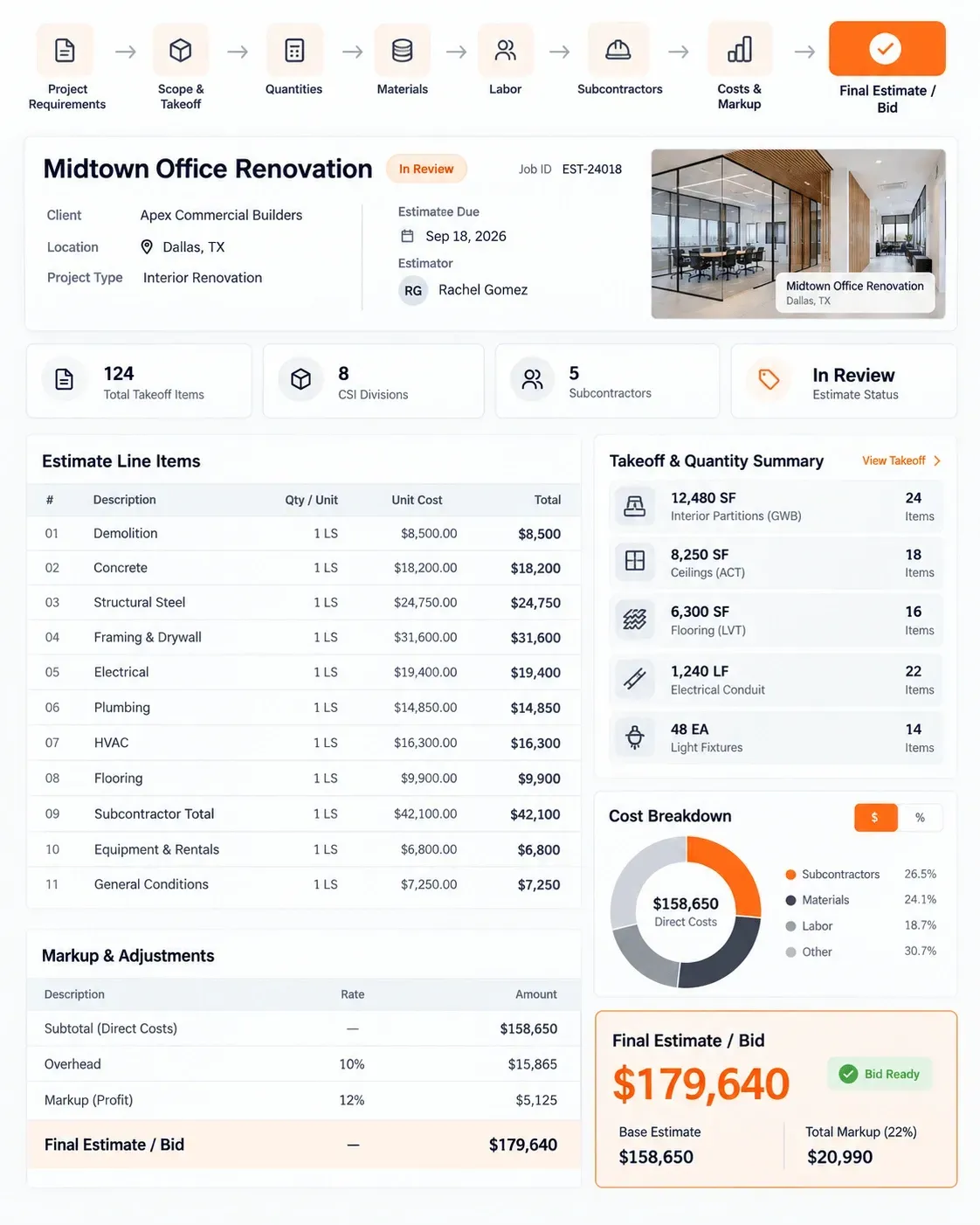
Construction Estimating Software
WHAT IS CONSTRUCTION ESTIMATING SOFTWARE?
Construction estimating software helps contractors turn project requirements, quantities, labor, materials, subcontractor costs and other job expenses into a structured estimate before work is awarded.
Construction proposal software takes the approved scope and pricing from the estimate and presents it in a customer-facing document for review, revision and approval.
It gives estimating teams a consistent way to calculate project cost, apply markup, review selling price and prepare the pricing information that moves into a bid or customer proposal.
Build the Estimate Around the Project Scope
Project Requirements → Scope → Quantities → Labor & Materials → Cost → Markup → Selling Price
Sunbase Construction Estimating & Proposal Software keeps key estimating information organized around the project opportunity, including:
Scope | Quantities | Labor | Materials | Subcontractors | Equipment | Cost | Markup | Selling Price | Estimate Status
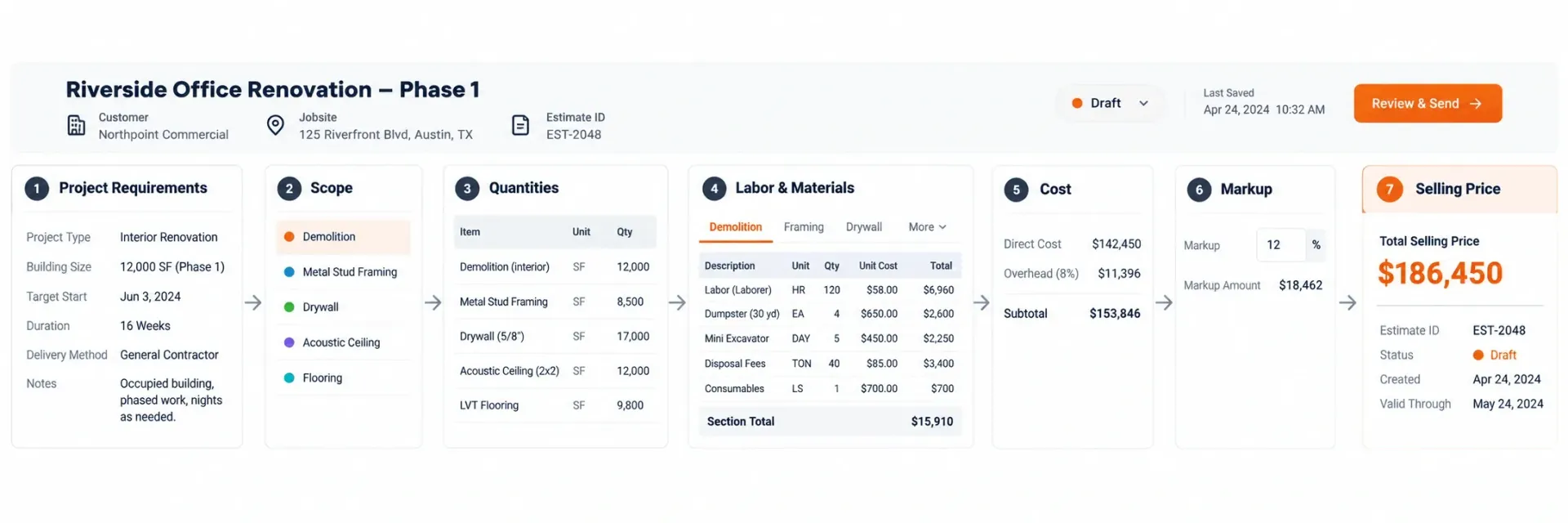
Project Requirements & Scope
Turn Project Requirements Into a Clear Construction Scope
A construction estimate is only as useful as the scope behind it.
Sunbase Construction Estimating & Proposal Software helps estimating teams organize the work required for the project before quantities and pricing are calculated.
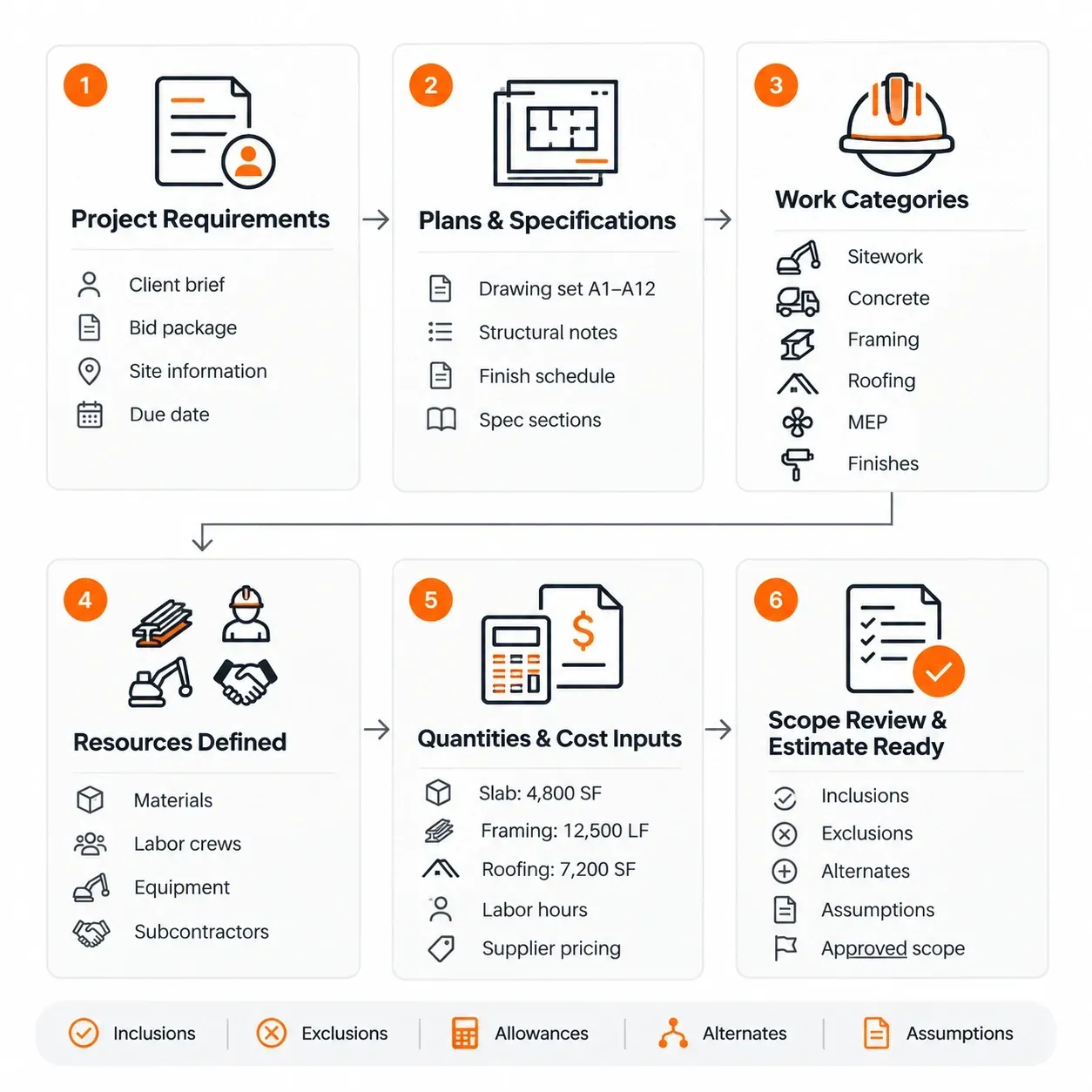
Define What Is Included in the Estimate
- Project requirements
- Plans & Specifications
- Work categories and trade scopes
- Materials and specified products
- Labor requirements
- Subcontracted work
- Equipment requirements
- Allowances
- Optional or alternate work
- Exclusions
- Notes and assumptions
Build the Estimate From the Scope
Project Requirements → Scope of Work → Work Items → Quantities → Cost
Keeping the scope structured before pricing helps estimators understand what is being included, what needs to be quantified and where costs need to be assigned.
Construction Quantities & Costing
Build the Estimate From Quantities, Labor and Material Costs
Once the project scope is defined, estimators need to translate that scope into measurable quantities and cost components. Sunbase Construction Estimating & Proposal Software helps teams structure the estimate around the work, resources and costs required to deliver the project.
Break the Estimate Into Cost Components
- Material quantities
- Labor hours or labor units
- Subcontractor costs
- Equipment costs
- Allowances
- Other direct costs
- Waste or quantity adjustments
- Unit costs
- Extended costs
From Quantity to Project Cost
Scope Item → Quantity → Unit Cost → Labor / Material / Subcontractor Cost → Total Cost
Estimators can review the cost behind each part of the project before markup and selling price are applied.
Keep Cost Detail Visible
Item | Quantity | Unit | Material Cost | Labor Cost | Subcontractor Cost | Equipment Cost | Total Cost
This gives estimating teams a clearer view of where project cost is coming from and which parts of the estimate have the greatest impact on the final price.
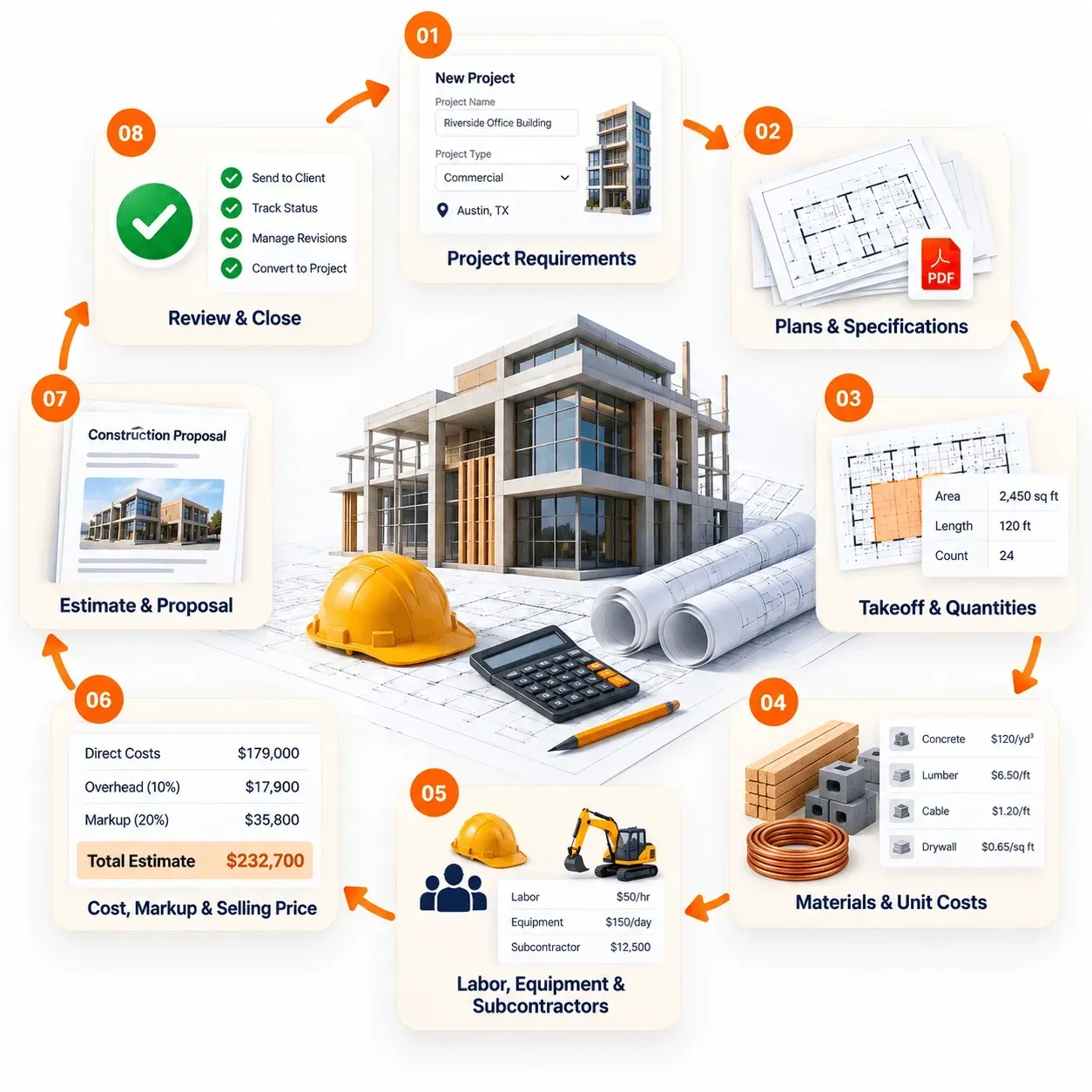
Markup, Margin & Selling Price
Turn Estimated Project Cost Into the Final Selling Price
A construction estimate should show more than what the project is expected to cost. Estimators also need to apply markup, review margin and understand how pricing decisions affect the final selling price. Sunbase Construction Estimating & Proposal Software helps teams move from direct project cost to customer-facing price without losing visibility into the numbers behind it.
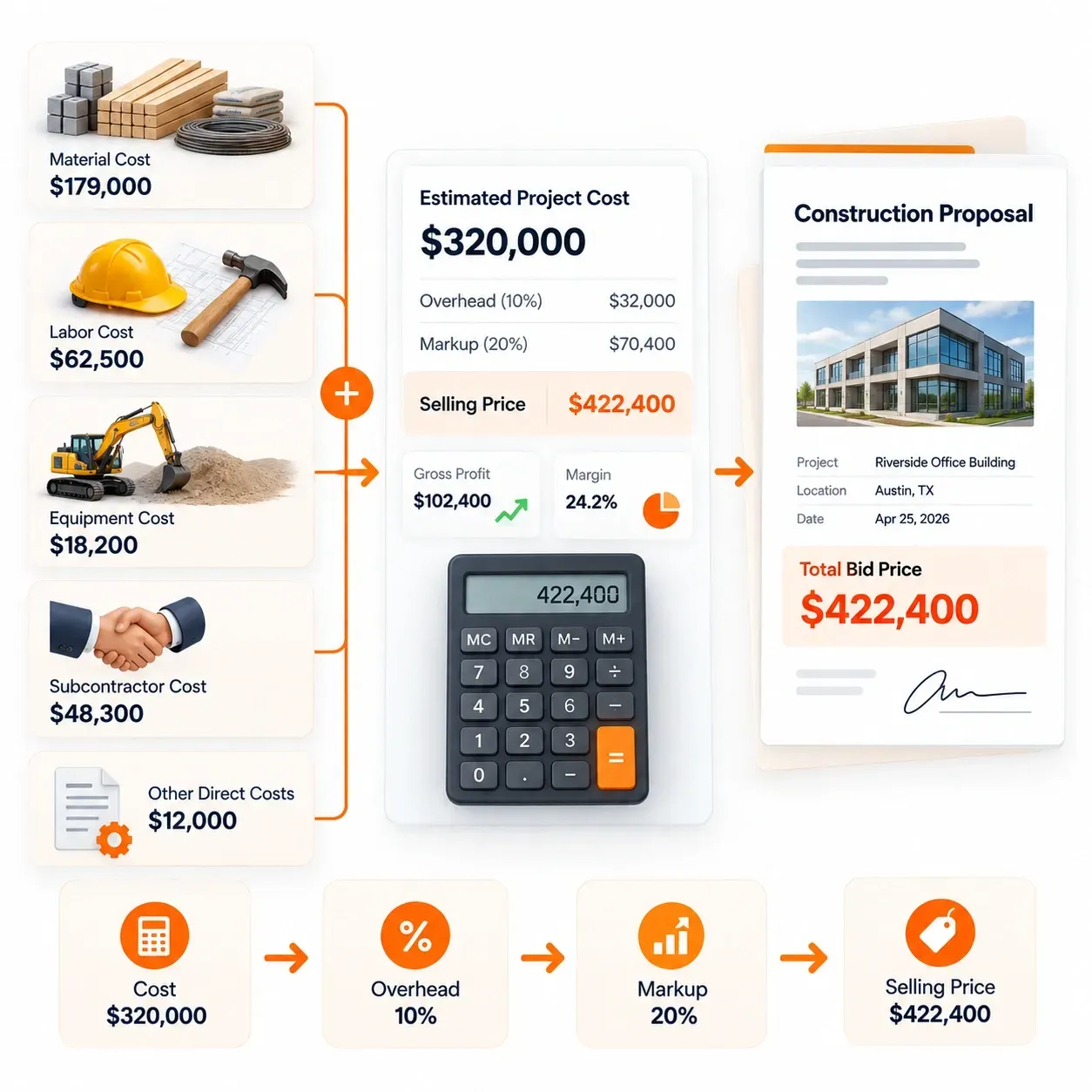
Review the Numbers Before the Estimate Is Finalized
- Material cost
- Labor cost
- Subcontractor cost
- Equipment cost
- Other direct costs
- Allowances
- Overhead
- Markup
- Selling price
- Gross profit
- Margin
From Cost to Selling Price
Estimated Cost → Overhead → Markup → Selling Price → Gross Profit → Margin
See the Financial Impact of Pricing Changes
Estimators can compare the relationship between:
Project Cost | Markup | Selling Price | Gross Profit | Margin
This gives teams a clearer view of whether the estimate is priced appropriately before it moves into the proposal or approval stage.
Reusable Estimate Templates
Build Construction Estimates Faster Without Starting From Scratch
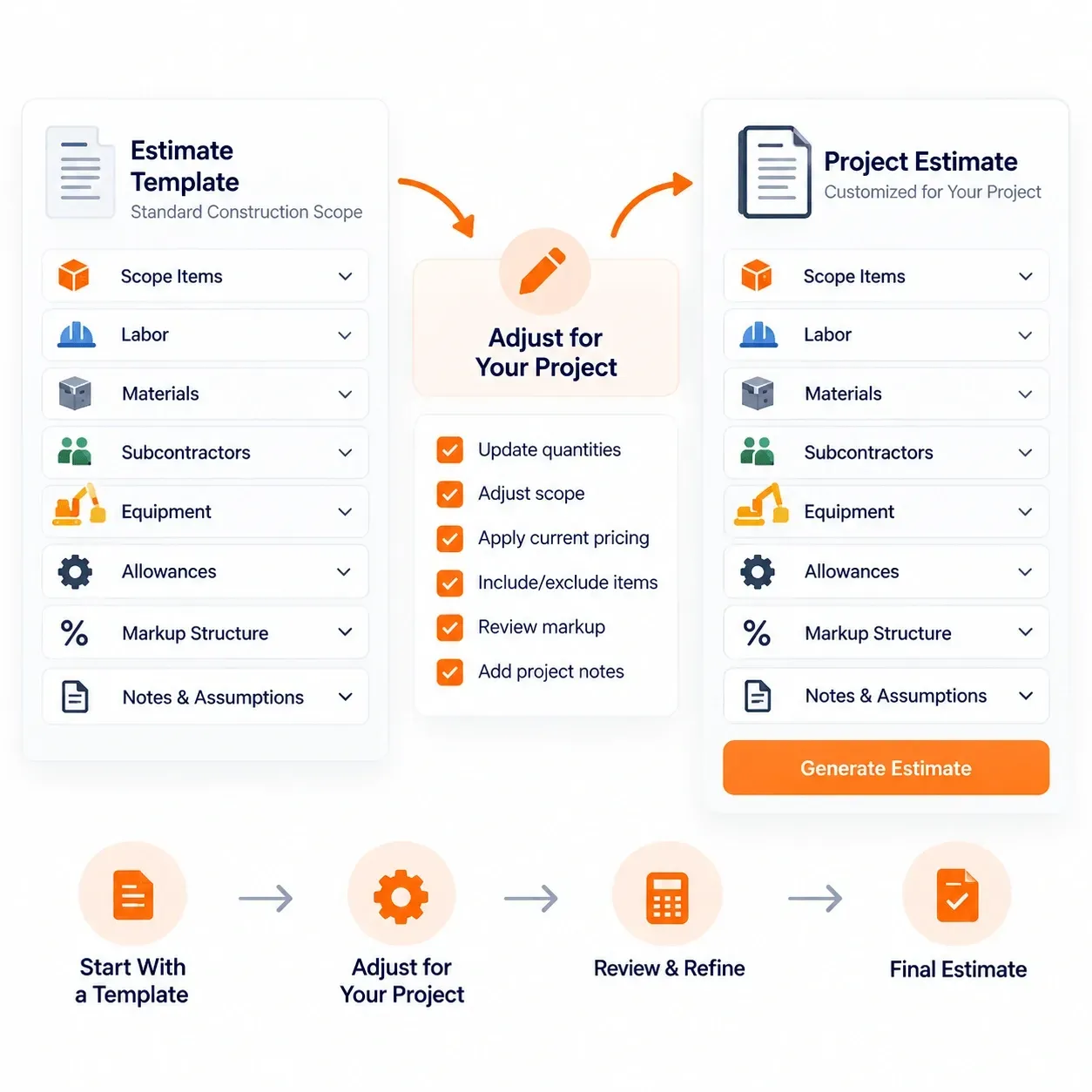
Construction teams often estimate similar types of work repeatedly. Sunbase Construction Estimating & Proposal Software can help standardize common scope items, cost structures and pricing logic so estimators can reuse proven estimate structures instead of rebuilding every estimate manually.
Reuse the Parts of the Estimate That Stay Consistent
- Common scope items
- Standard labor entries
- Material groups
- Subcontractor allowances
- Equipment costs
- Waste or quantity rules
- Markup structures
- Optional work
- Exclusions and assumptions
- Proposal-ready descriptions
Start With a Template, Then Adjust for the Project
Estimate Template → Project-Specific Scope → Quantities → Cost Review → Final Estimate
Estimators can begin with a repeatable structure, then adjust quantities, pricing and scope based on the actual project requirements.
Keep Estimating More Consistent
Template | Scope | Quantity Rules | Cost Structure | Markup | Proposal Content
This helps reduce unnecessary rebuilding while keeping each estimate specific to the project being priced.
Customer Proposal
Turn the Approved Estimate Into a Clear Construction Proposal
Once the estimate is reviewed internally, the pricing and scope need to be presented in a format the customer can understand and approve. Sunbase Construction Estimating & Proposal Software helps teams turn approved estimate data into a customer-ready proposal without rebuilding the scope, pricing and project details in a separate document.
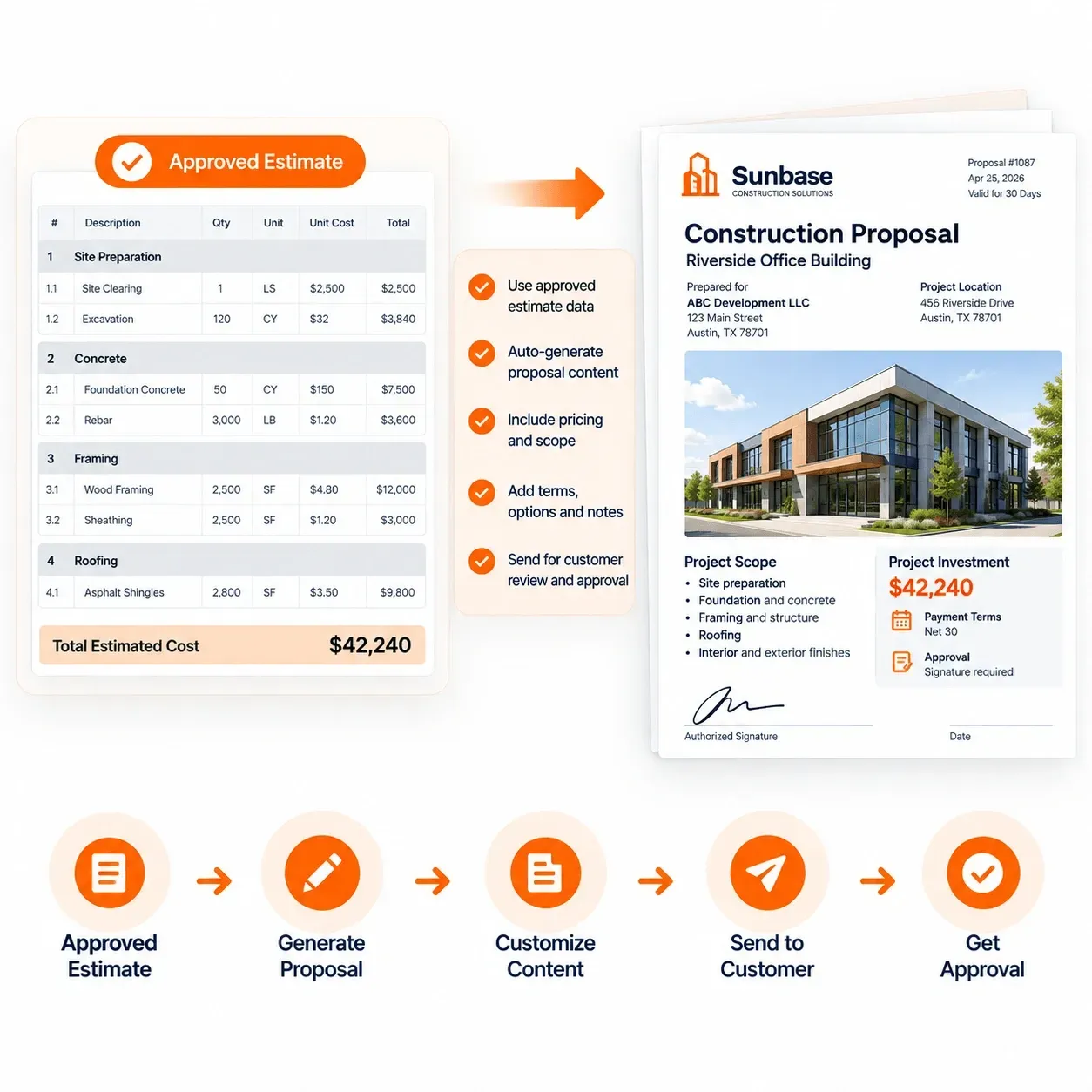
Build the Proposal From Approved Estimate Data
- Customer and project information
- Scope of work
- Included work
- Materials or specified products
- Pricing
- Optional work or alternates
- Payment terms
- Assumptions and exclusions
- Supporting documents
- Approval or signature fields
From Estimate to Proposal
Approved Estimate → Proposal Content → Customer Review → Approval
Keep the Estimate and Proposal Aligned
When scope or pricing changes before approval, the proposal should reflect the latest approved estimate rather than relying on manually updated documents.
This helps sales and estimating teams keep scope, pricing and proposal content consistent through the customer decision process.
Proposal Options
Present Alternates and Optional Work Without Rebuilding the Estimate
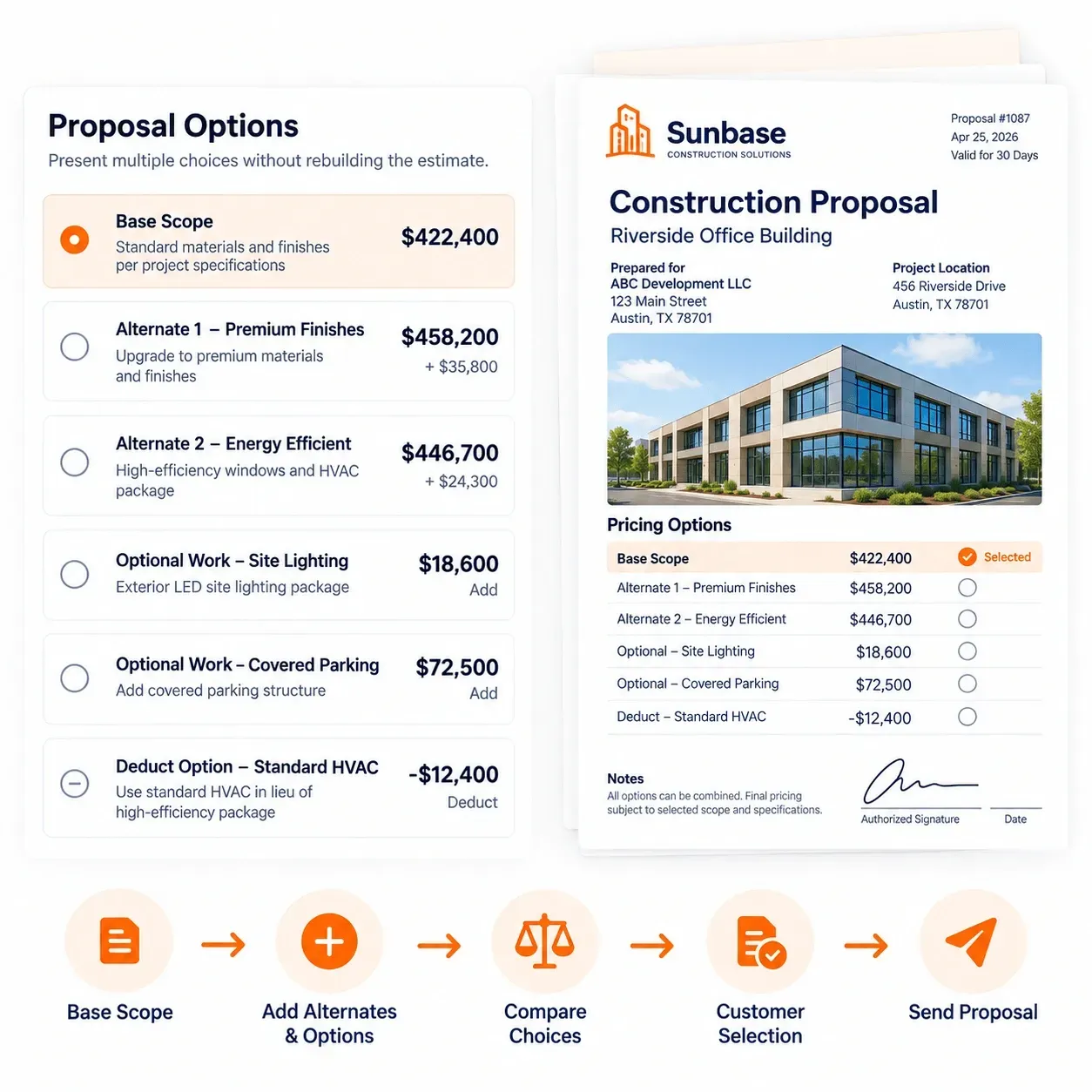
Construction proposals often need to show alternate scopes, material choices or optional work before the customer makes a final decision. Sunbase Construction Estimating & Proposal Software can organize those options around the same estimate so teams can present clear choices without creating separate proposals for every variation.
Give Customers Clear Pricing Options
- Base scope
- Optional work
- Alternate materials
- Upgrades
- Add-ons
- Allowances
- Deduct options
- Alternate pricing
- Revised scope combinations
Compare Options Before Approval
Base Bid → Add Alternate → Deduct Alternate → Optional Work → Customer Selection
Each option can show the relevant:
Scope | Materials | Quantity | Price | Difference | Included Work
Keep the Selected Option With the Final Proposal
Once the customer chooses an option, the approved scope and pricing can move forward without losing the estimate history behind the decision.
Proposal Revisions & Approval
Manage Construction Proposal Changes Without Losing the Pricing History
Construction proposals often change before a project is awarded. Scope may be revised, alternates may be added or removed, and pricing may change during negotiation. Sunbase Construction Estimating & Proposal Software helps teams manage those revisions while keeping the current proposal aligned with the latest approved estimate.
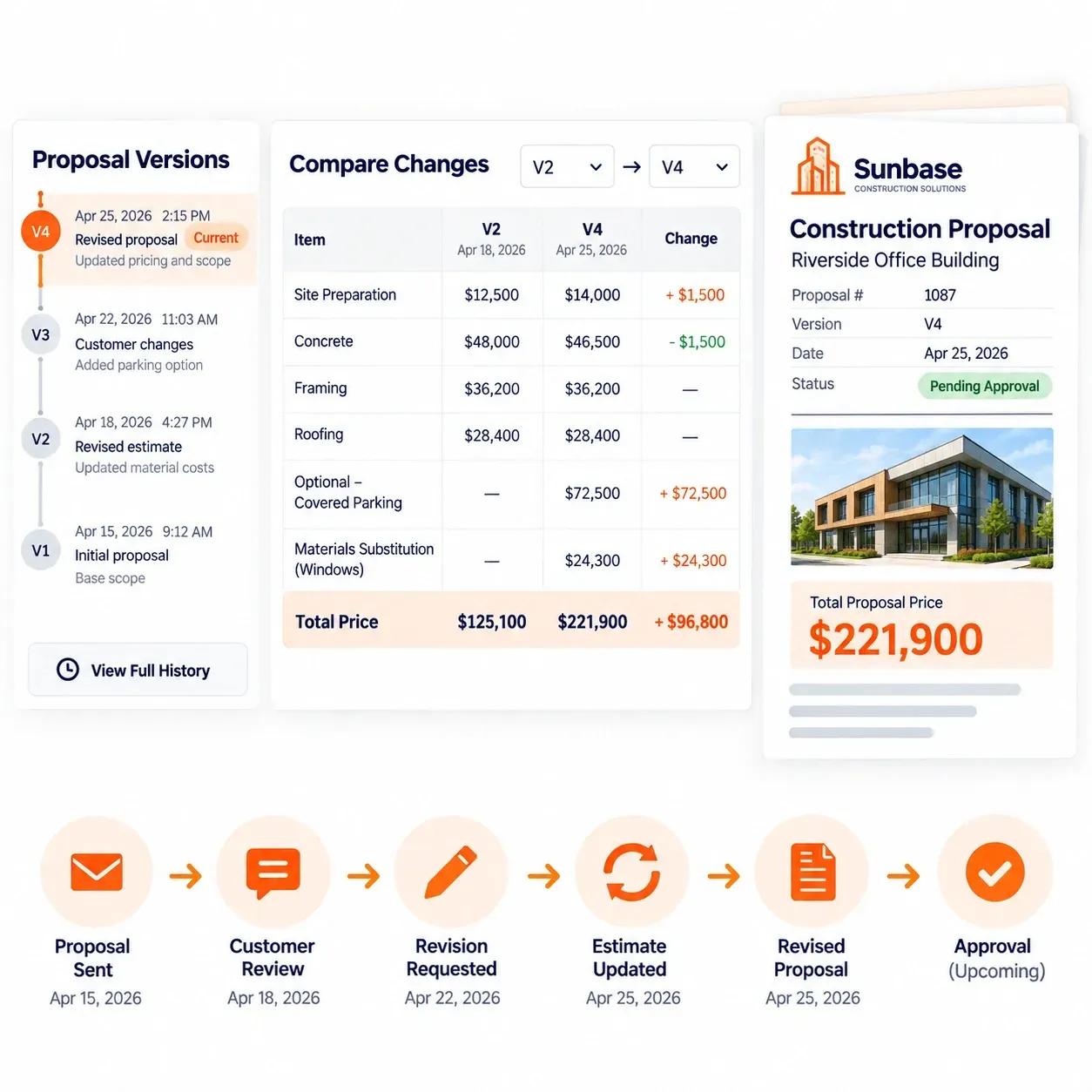
Track What Changes Before Approval
- Scope revisions
- Quantity changes
- Material substitutions
- Optional work
- Allowances
- Pricing updates
- Proposal versions
- Customer comments
- Approval status
- Signature status
Keep the Revision Process Clear
Proposal Sent → Customer Review → Revision Requested → Estimate Updated → Revised Proposal → Approval
Move Forward With the Final Approved Version
Once the customer approves the proposal, the selected scope, pricing and project information can move into the next stage without relying on outdated versions or disconnected documents.
Estimate-to-Project Handoff
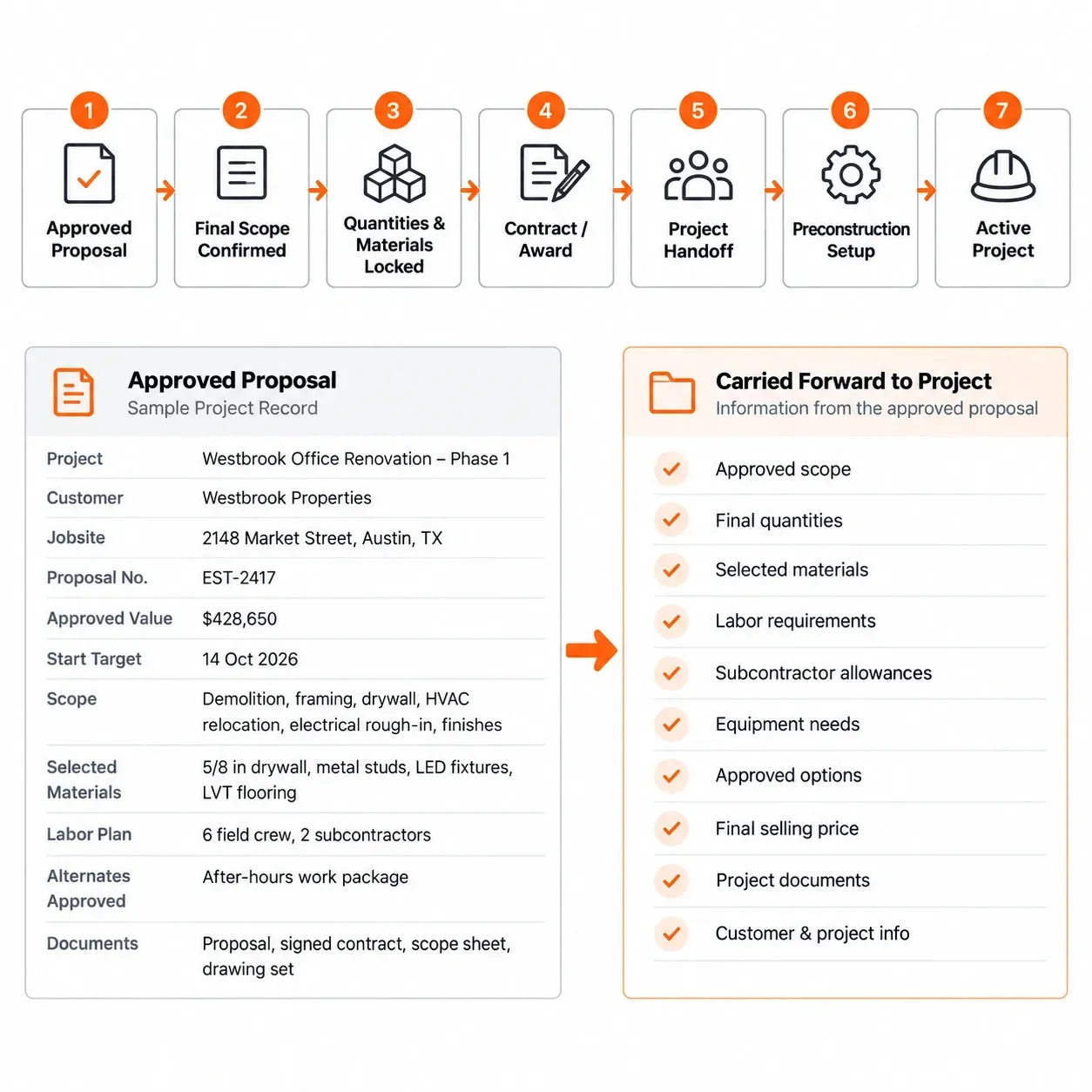
Carry the Approved Scope and Pricing Into the Construction Project
Once the proposal is approved, the final scope and pricing should not have to be rebuilt inside the project workflow. Sunbase Construction Estimating & Proposal Software can carry the approved estimate information forward so operations start with the same commercial details that were agreed during the sale.
Move the Final Job Information Forward
- Approved scope of work
- Final quantities
- Selected materials
- Labor requirements
- Subcontractor allowances
- Equipment requirements
- Approved alternates or options
- Final selling price
- Proposal and contract documents
- Customer and project information
From Approved Proposal to Active Project
Approved Proposal → Final Scope → Contract / Award → Project Handoff → Preconstruction
The project team can begin with the approved scope, quantities, pricing and supporting documents rather than reconstructing the job from emails, spreadsheets or proposal files.
Keep Sales and Operations Aligned
What Was Estimated → What Was Approved → What Needs to Be Delivered
This creates a cleaner handoff between estimating, sales and project teams before procurement, scheduling and field execution begin.
Construction Estimate Workflows
Support Different Types of Construction Estimates
Construction companies price different kinds of work in different ways. Sunbase Construction Estimating & Proposal Software can support multiple estimating structures while keeping scope, quantities, costs and proposal details organized around the project.
General Contracting
Project Scope → Trade Packages → Quantities → Subcontractor / Material / Labor Cost → Bid
Build estimates across multiple trades and cost categories before preparing the final bid.
Commercial Construction
Bid Documents → Scope Review → Quantities → Cost Build-Up → Alternates → Submission
Manage larger estimates with multiple work packages, allowances, alternates and bid requirements.
Residential Construction
Project Requirements → Scope → Materials & Labor → Price → Customer Proposal
Create clear estimates and proposals for new construction, additions or other residential projects.
Renovation & Remodeling
Existing Conditions → Revised Scope → Quantities → Options → Estimate → Proposal
Handle changing scope, optional work and revisions before the customer approves the project.
Specialty Contractors
Trade Scope → Takeoff / Quantities → Labor → Materials → Equipment → Bid
Build trade-specific estimates for subcontractors and specialty construction companies.
Alternates & Optional Work
Base Scope → Add / Deduct Alternates → Revised Price → Proposal
Support estimates where customers or project teams need to compare different scope or pricing configurations before award.
Estimator & Sales Visibility
Give Estimating and Sales Teams a Clear View of Every Construction Quote
Estimating and sales teams need to know which opportunities are waiting on pricing, which estimates are still being prepared, which proposals have been sent and which jobs are close to approval.
Sunbase Construction Estimating & Proposal Software gives both teams visibility into the commercial status of each project without relying on separate spreadsheets or manual updates.
01
Estimating Team
Estimate Requests | Assigned Estimator | Due Dates | Scope Status | Quantities | Cost Review | Estimate Status | Revisions
See what needs to be priced, what is in progress and which estimates are waiting on review.
02
Sales Team
Project Opportunity | Estimate Status | Proposal Status | Customer Review | Revisions | Approval | Next Action
See where each quote stands without repeatedly checking with the estimating team.
03
Management
Estimate Volume | Open Estimates | Estimates Due | Average Turnaround | Proposal Value | Revisions | Approved Estimates
Track estimating workload and understand how pricing activity is moving toward awarded work.
Construction Estimating vs Generic Quoting
Why Construction Estimating Needs More Than a Basic Quote Builder
A generic quoting tool can create line items, prices and PDFs, but construction estimating usually requires more detail around the
scope, quantities, labor, materials, subcontractors, equipment and cost structure behind the final price.
Generic Quoting Tool
Line Items → Price → PDF
Usually focused on:
- Products or services
- Quantity
- Unit price
- Discounts
- Total price
- Basic proposal output
Project Requirements → Scope → Quantities → Labor & Materials → Subcontractors → Cost → Markup → Selling Price → Proposal → Approval
Built around construction estimating information such as:
- Scope of work
- Trade or work categories
- Material quantities
- Labor requirements
- Subcontractor costs
- Equipment costs
- Allowances and alternates
- Markup and margin
- Proposal revisions
- Approved project handoff
Construction Estimating Integrations
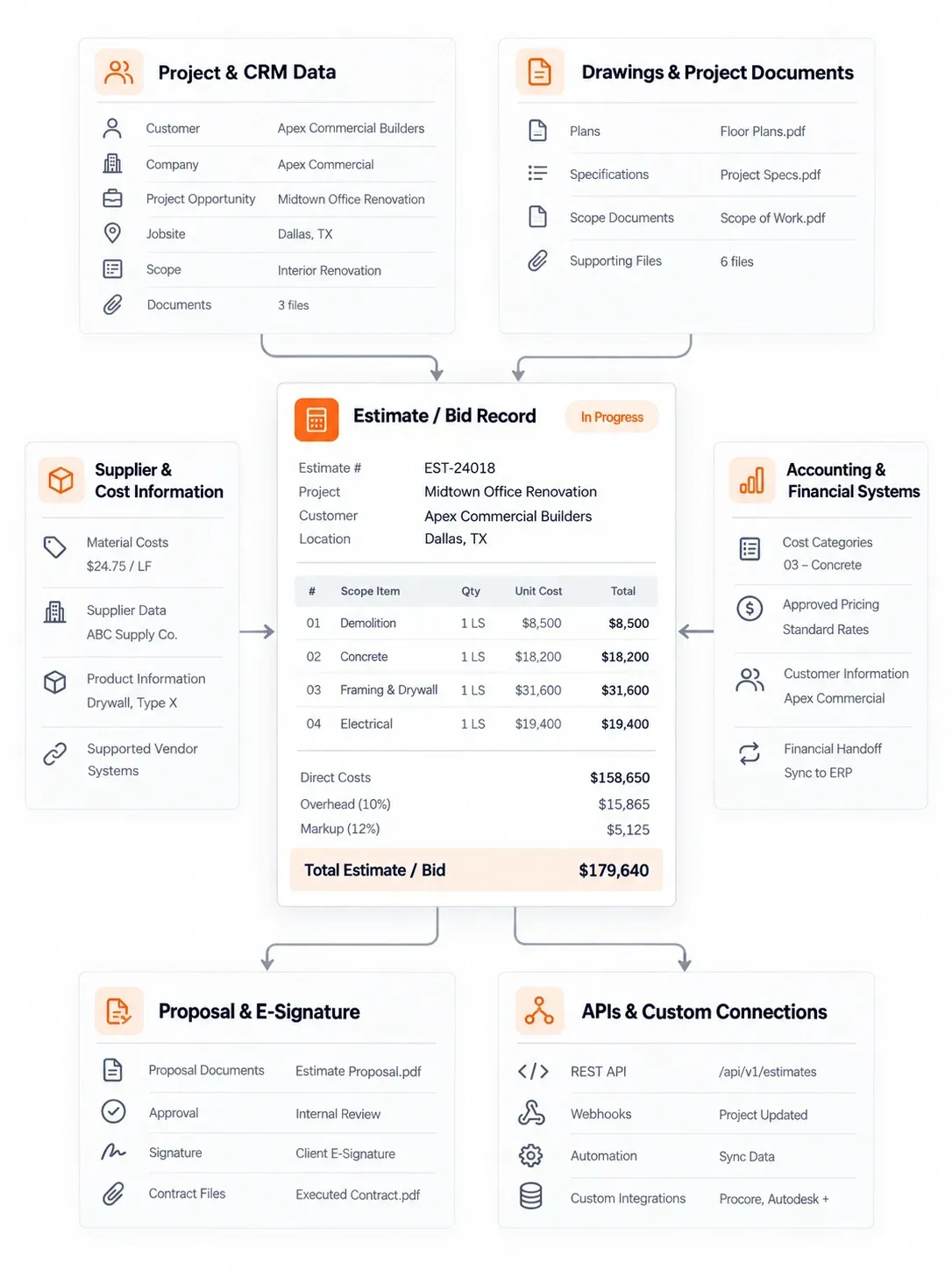
Connect Estimating With the Systems Your Construction Team Already Uses
Construction estimating often depends on project data, documents, supplier information, accounting systems and CRM records before a bid is submitted. Sunbase Construction Estimating & Proposal Software can connect those systems so estimators do not have to rebuild the same information across separate tools.
Project & CRM Data
Customer | Company | Project Opportunity | Jobsite | Scope | Documents
Bring qualified project information into the estimating workflow without re-entering basic sales data.
Drawings & Project Documents
Plans | Specifications | Scope Documents | Supporting Files
Keep estimating information aligned with the documents used to prepare the bid.
Supplier & Cost Information
Material Costs | Supplier Data | Product Information | Supported Vendor Systems
Use connected cost or supplier information where supported.
Accounting & Financial Systems
Cost Categories | Approved Pricing | Customer Information | Financial Handoff
Move relevant estimate or project information into downstream financial workflows where supported.
Proposal & E-Signature
Proposal Documents | Approval | Signature | Contract Files
Keep proposal and approval information associated with the estimate and project.
APIs & Custom Connections
REST API | Webhooks | Automation | Custom Integrations
Connect additional estimating, pricing or operational systems based on the tools your construction team uses.
Configurable Construction Estimating
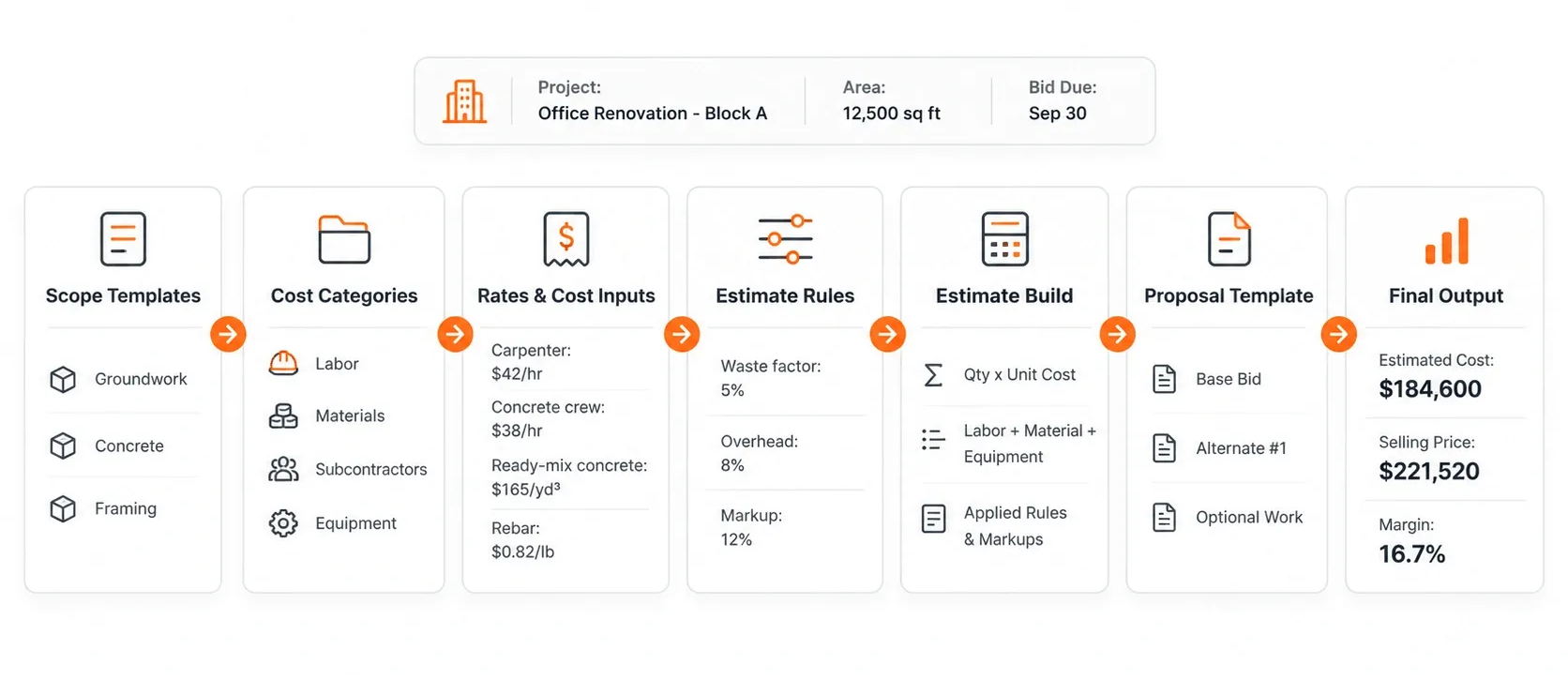
Configure Estimates Around the Way Your Construction Team Prices Work
Construction companies do not all build estimates the same way. Sunbase Construction Estimating & Proposal Software can be configured around the cost structure, scope categories, markup rules and proposal process your team already uses.
Configure the Estimating Structure
Scope Templates | Cost Categories | Labor Rates | Material Costs | Subcontractor Costs | Equipment Costs | Allowances | Markup | Margin | Proposal Templates
Construction Estimating Pricing
Pricing That Fits the Estimating Workflow Your Team Needs
Sunbase Construction Estimating & Proposal Software can be configured around the number of users, estimating requirements, proposal workflows, integrations and implementation needs of your construction team.
Pricing Can Depend On
Number of Users | Estimating Capabilities | Proposal Requirements | Workflow Configuration | Integrations | Automation | Implementation
Construction Estimating Setup
Set Up Sunbase Around Your Existing Estimating Process
Sunbase Construction Estimating & Proposal Software can be configured around the way your team currently builds estimates, reviews pricing, prepares proposals and moves approved work into the project workflow.
1. Review Your Current Estimating Workflow
Map how project information reaches estimating, how scope and quantities are built, how costs are calculated and how proposals are reviewed and approved.
2. Configure Estimates & Pricing
Set up:
Scope Structure | Cost Categories | Labor Rates | Material Costs | Subcontractor Costs | Equipment | Markup | Margin | Optional Work
3. Build Proposal &
Approval Workflows
Configure proposal templates, pricing presentation, alternates, revision steps, approval requirements and estimate-to-proposal handoff.
4. Connect Systems & Launch
Connect supported CRM, project, document, accounting or other systems, import required estimating data and launch the configured workflow with your team.
Construction Estimating FAQs
Questions Contractors Ask Before Choosing Construction Estimating Software
What should construction estimating software include?
Construction estimating software should help teams manage project scope, quantities, labor, materials, subcontractor costs, equipment, allowances, markup, selling price, proposal creation and approval within the same estimating workflow.
How is construction estimating software different from a basic quote tool?
A basic quote tool usually focuses on line items and final price. Construction estimating software builds pricing from the scope, quantities and cost components behind the work before the final selling price is prepared.
Can construction estimating software separate material and labor costs?
Yes. Construction estimating software can structure estimates around separate material, labor, subcontractor, equipment and other cost categories so estimators can see how each part contributes to total project cost.
Can construction estimating software calculate markup and margin?
Yes. Estimating software can help teams review estimated cost, markup, selling price, gross profit and margin before pricing is finalized.
Can I create reusable construction estimate templates?
Yes. Reusable estimate structures can help standardize common scope items, cost categories, pricing rules and proposal content while still allowing each estimate to be adjusted for the actual project.
Can construction estimating software handle alternates and optional work?
Yes. Construction estimates can include base scope, alternates, upgrades, deduct options and optional work so customers can compare different project configurations before approval.
Can estimates be turned into customer proposals?
Yes. Once pricing is approved internally, the scope, project details and selling price can be carried into a customer-facing proposal without rebuilding the estimate in a separate document.
Can construction proposals be revised before approval?
Yes. Scope, quantities, materials, options and pricing may change during customer review. Construction estimating software can help teams manage revisions while keeping the latest proposal aligned with the updated estimate.
Can approved estimates move into the project workflow?
Yes. The approved scope, quantities, selected options, pricing and supporting documents can move forward into the construction project workflow so project teams do not have to recreate the commercial information after award.
Can construction estimating software support commercial and residential work?
Yes. The estimating structure can support different project types including general contracting, commercial construction, residential construction, remodeling and specialty contracting, depending on how the workflow is configured.
Can construction estimating software connect with CRM, accounting or project systems?
Potentially, yes. Construction companies may continue using specialist CRM, accounting, document or project systems. The important question is whether the required information can move between them through supported integrations, APIs, webhooks or configured workflows.
When has a construction company outgrown spreadsheets for estimating?
Common signs include inconsistent pricing, duplicated calculations, outdated estimate versions, unclear markup, manual proposal creation and repeated data entry between sales, estimating and project teams.
What should I ask during a construction estimating software demo?
Ask the vendor to show one complete estimate moving through the system:
Project Requirements → Scope → Quantities → Cost → Markup → Selling Price → Proposal → Revision → Approval → Project Handoff
Also ask to see:
Templates | Cost Categories | Labor & Material Pricing | Subcontractor Costs | Alternates | Margin | Proposal Versions | Approval | Integrations
A useful demo should show how the estimate is actually built and carried into the approved project, not only a finished proposal or pricing dashboard.
What is the difference between construction estimating software and construction bidding software?
Construction estimating software is used to build the scope, quantities, costs, markup and selling price behind a project. Construction bidding software focuses more on preparing, submitting and tracking the bid presented for project award. Some platforms, including integrated estimating and proposal workflows, can support both parts of the process.
Ready to Build Construction Estimates
From Scope to Proposal?
Turn project scope, quantities, labor, materials and costs into structured estimates, review markup and pricing, and carry approved work into the construction project workflow.
Plans start at $59/user/month · No long-term contracts required · Cancel any time