
Roofing Project Management Software for Managing Jobs From Sale to Completion
*Contact us for a quote based on your team size
Roofing Project Management
WHAT IS ROOFING PROJECT MANAGEMENT SOFTWARE?
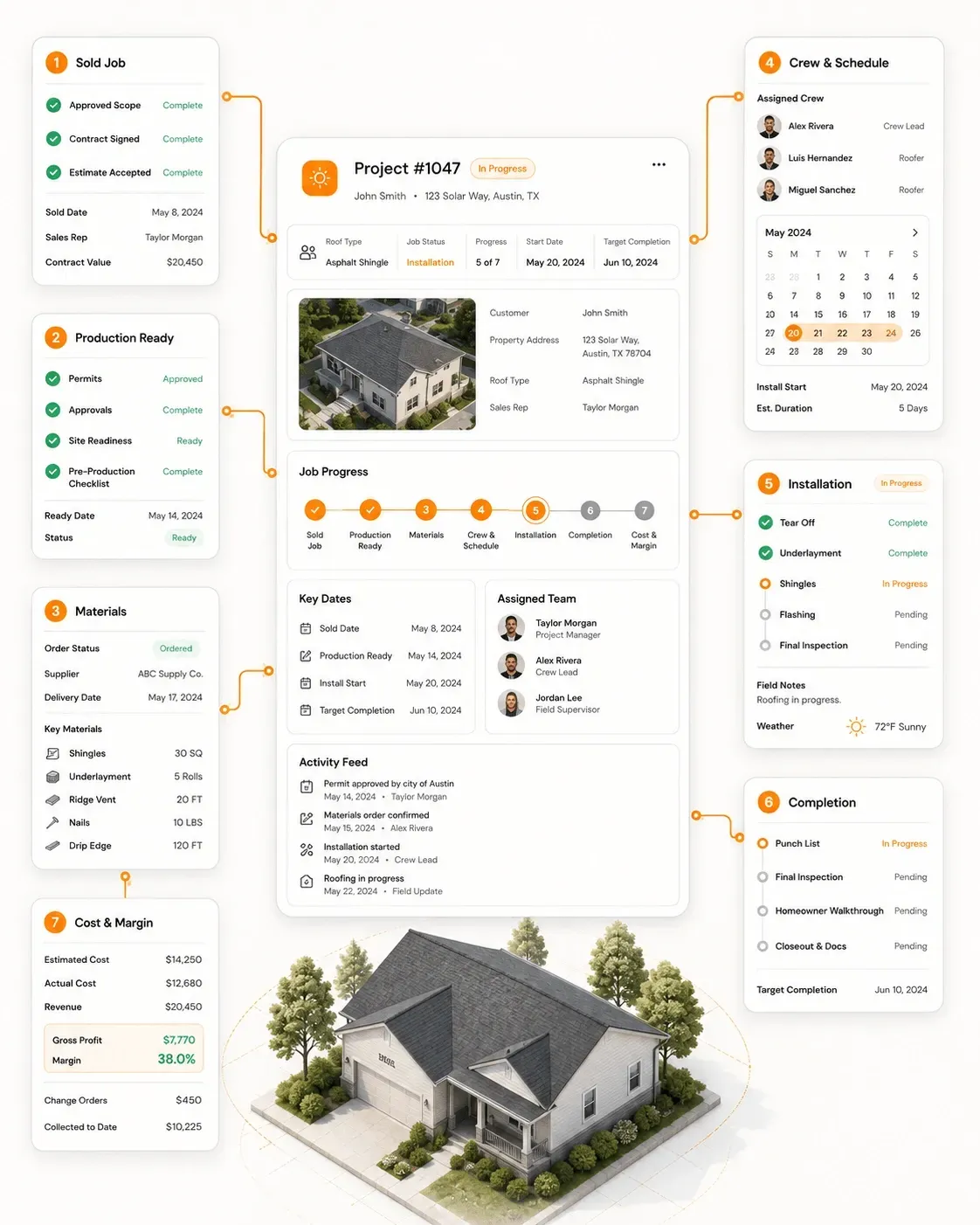
Roofing project management software helps roofing contractors plan, coordinate and track sold jobs through production readiness, material ordering, crew scheduling, field execution, project closeout and job costing.
Unlike general project management software built around generic tasks and boards, roofing project management software keeps the work tied to the
property, approved roofing scope, materials, installation schedule and field activity behind the project.
ROOFING Project WORKFLOW
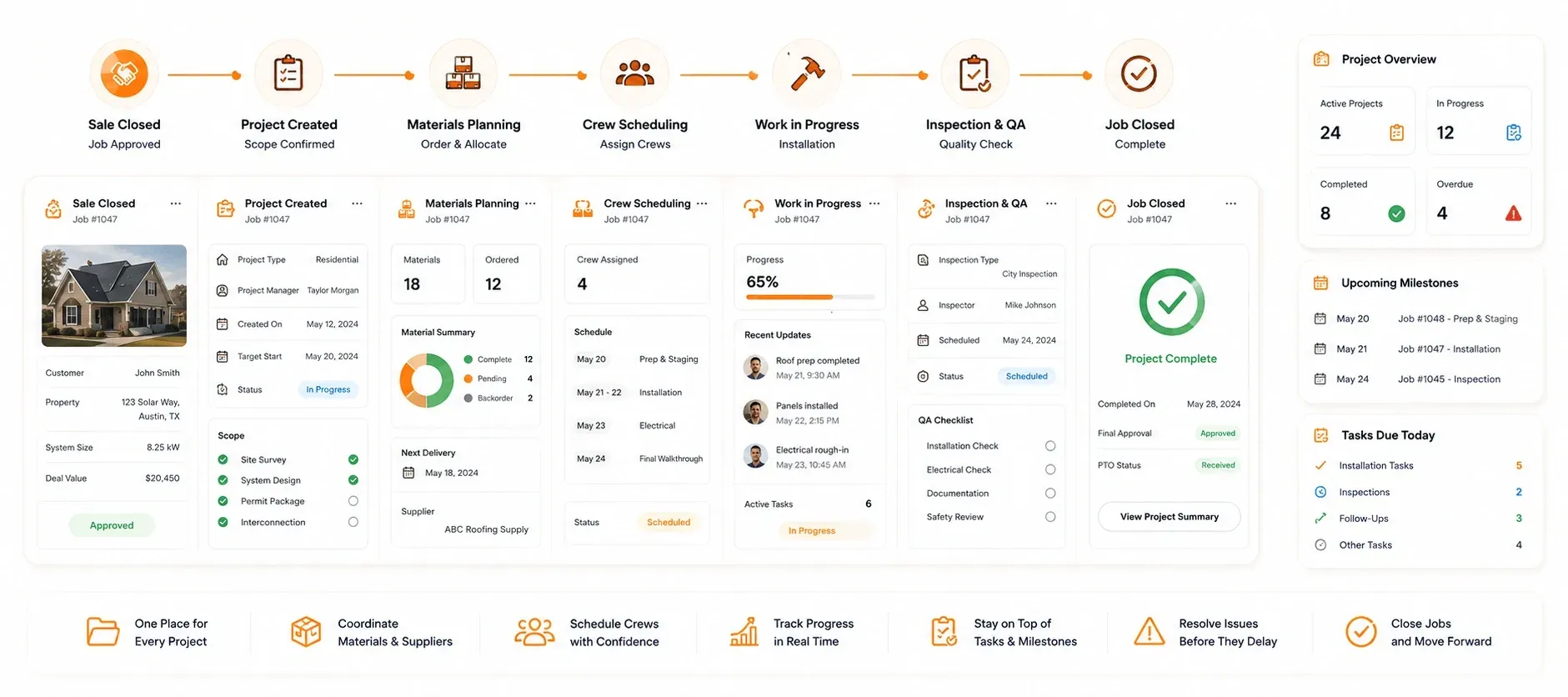
Manage the Roofing Project From Sale to Closeout
Sunbase Roofing Project Management Software gives production teams one place to see:
Project Stage | Scope | Materials | Crew | Schedule | Tasks | Milestones | Issues | Completion Status
Sold Job Handoff
Move the Approved Roofing Job Into Production Without Rebuilding It
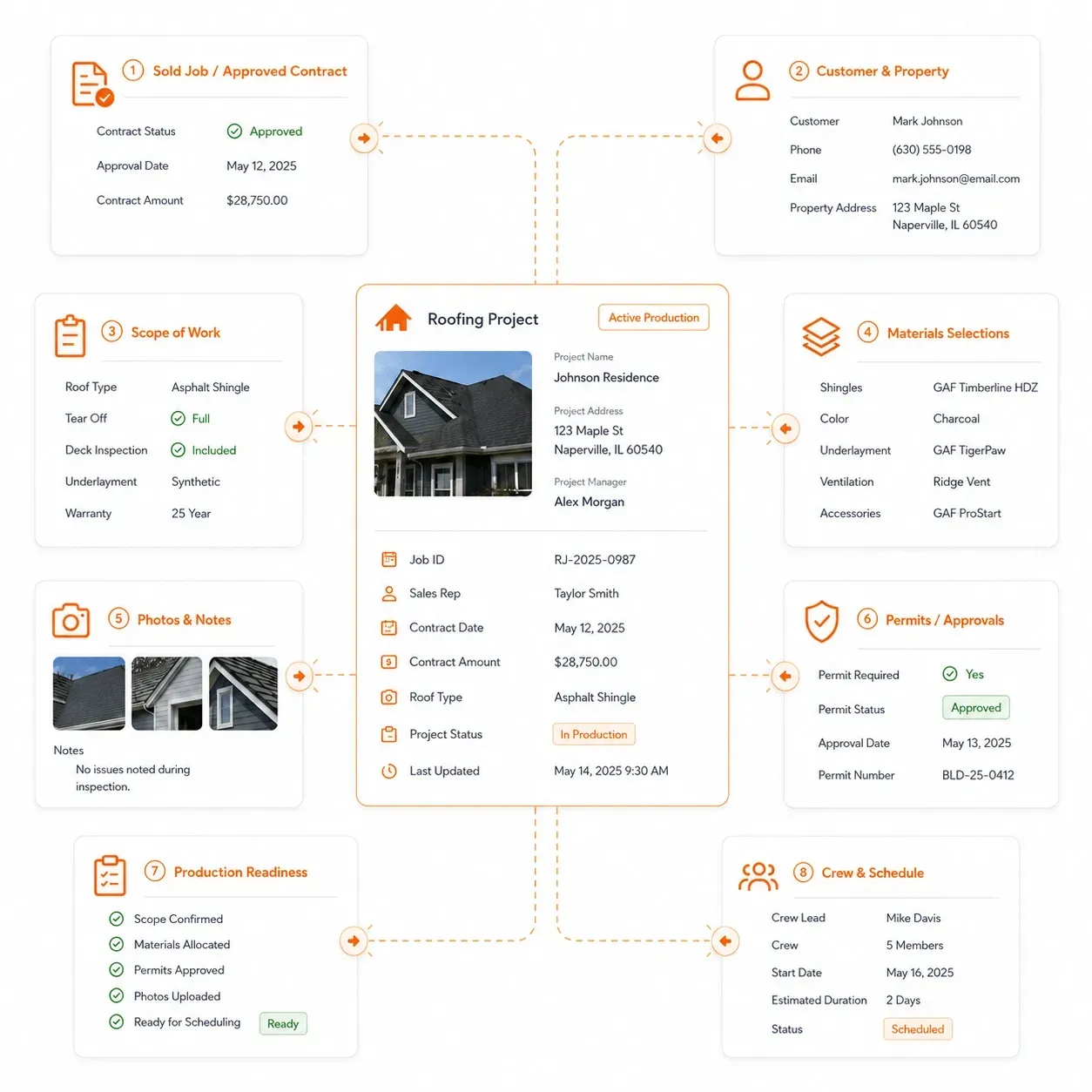
Once the customer approves the work, production needs the final scope, property details, material selections and job requirements required to deliver the project.
Sunbase Roofing Project Management Software keeps that approved information available as the job moves from sales into production.
Carry the Right Information Into the Project
- Customer and property details
- Approved roofing scope
- Material selections and specifications
- Estimate and contract information
- Inspection photos and notes
- Required permits or approvals
- Customer commitments and installation requirements
- Internal production notes
From Sold Job to Active Project
Contract Approved → Production Handoff → Work Order → Requirements Reviewed → Production Ready
The production team can start from the same approved roofing job information instead of recreating the scope from emails, proposals or separate documents.
Production Readiness
Know When a Sold Roofing Job Is Actually Ready for Production
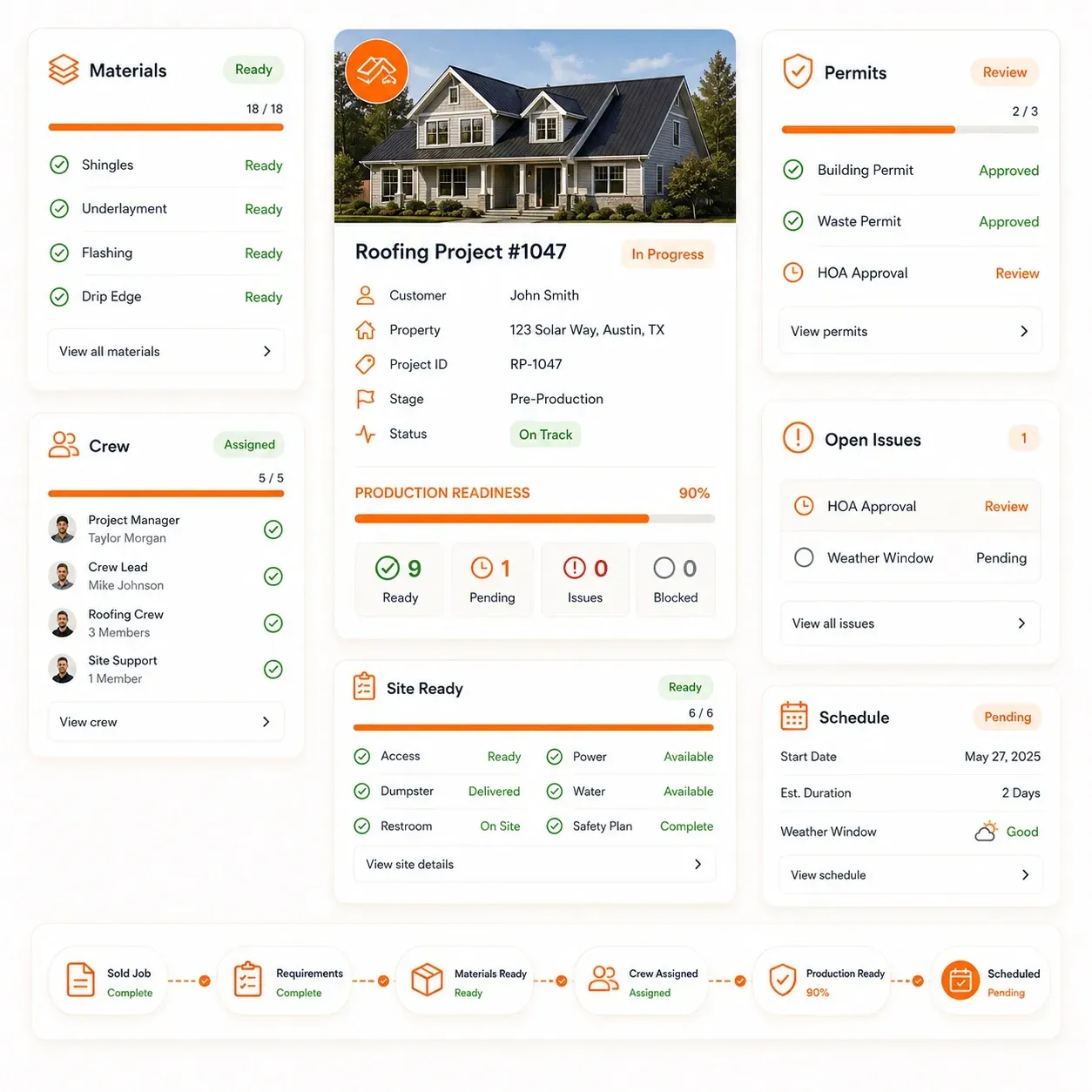
A signed contract does not always mean the roofing project is ready to schedule. Materials, approvals, crew availability, site conditions and other project requirements may still need to be confirmed before installation can begin.
Sunbase Roofing Project Management Software gives production teams a clear view of what is complete, what is still missing and what is blocking the project.
Confirm the Project Before Scheduling
- Final roofing scope approved
- Contract and required documents complete
- Material selections confirmed
- Permits or required approvals complete
- Materials ordered or available
- Delivery timing confirmed
- Crew or subcontractor assigned
- Customer installation date confirmed
- Equipment and site requirements ready
- Outstanding issues resolved
From Sold Job to Production-Ready
Sold Job → Requirements Reviewed → Materials Ready → Approvals Complete → Crew Ready → Production Ready → Scheduled
This helps production managers answer the question that matters before committing the job to the calendar:
“Is this roofing project actually ready to install?”
Roofing Project Scheduling
Build the Production Schedule Around the Work That Is Actually Ready
Once the project is production-ready, the next step is coordinating installation dates, crews, materials and project dependencies without overloading the production calendar.
Sunbase Roofing Project Management Software helps production teams plan roofing work around the resources and requirements needed to complete each job. Use the production job board, calendar or project schedule to see which roofing jobs are ready, scheduled, in progress, delayed or waiting on another requirement.
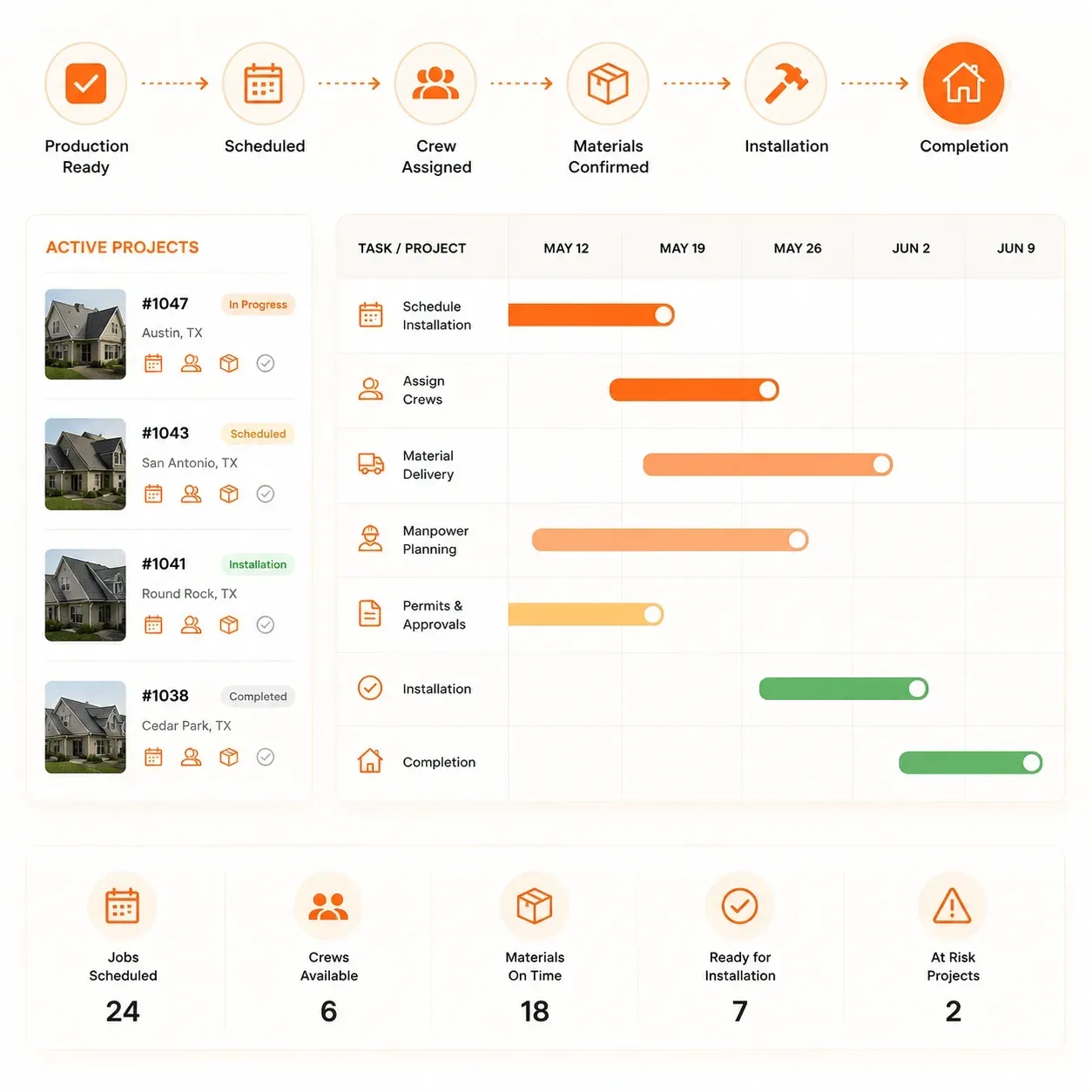
Plan the Work Across Active Roofing Projects
- Installation dates
- Crew and subcontractor availability
- Material delivery timing
- Required manpower
- Equipment and site requirements
- Project milestones
- Permit or approval dependencies
- Customer availability
- Weather or delay adjustments
- Rescheduled and overdue work
See What Is Coming Next
Production Ready → Scheduled → Crew Assigned → Materials Confirmed → Installation → Completion
Production managers can use the schedule to understand which jobs are ready, which resources are committed and where delays may affect upcoming work.
Materials & Purchasing
Keep Roofing Materials Aligned With the Project Schedule
Material delays can push an otherwise ready roofing project off schedule.
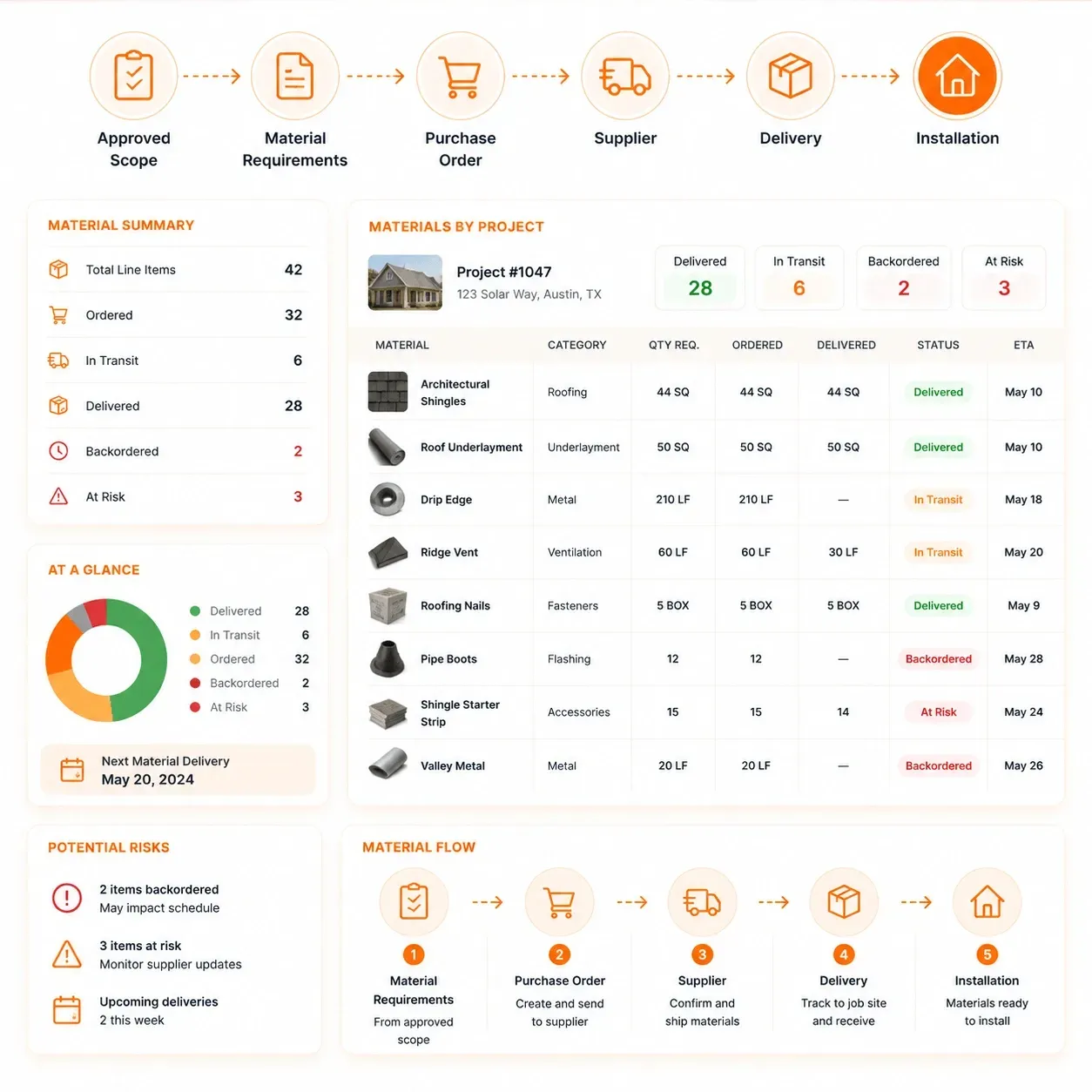
Sunbase Roofing Project Management Software helps production teams keep required materials, supplier activity and delivery timing connected to the project plan.
Coordinate Materials Before Installation
- Material requirements from the approved scope
- Product selections and specifications
- Required and ordered quantities
- Supplier and purchase order details
- Delivery dates and job-site delivery status
- Outstanding or backordered items
- Material substitutions or scope changes
- Readiness status before installation
From Material Requirement to Job Site
Approved Scope → Material Requirements → Purchase Order → Supplier → Delivery → Installation
Production teams can see whether the materials required for the job are ordered, available, delivered or still blocking the schedule.
Crew & Subcontractor Management
Assign the Right Crew or Subcontractor to the Roofing Project
Once materials and timing are confirmed, production teams need clear ownership of who is responsible for completing the work.
Sunbase Roofing Project Management Software helps coordinate roofing crews and subcontractors around the project requirements, schedule and installation scope.
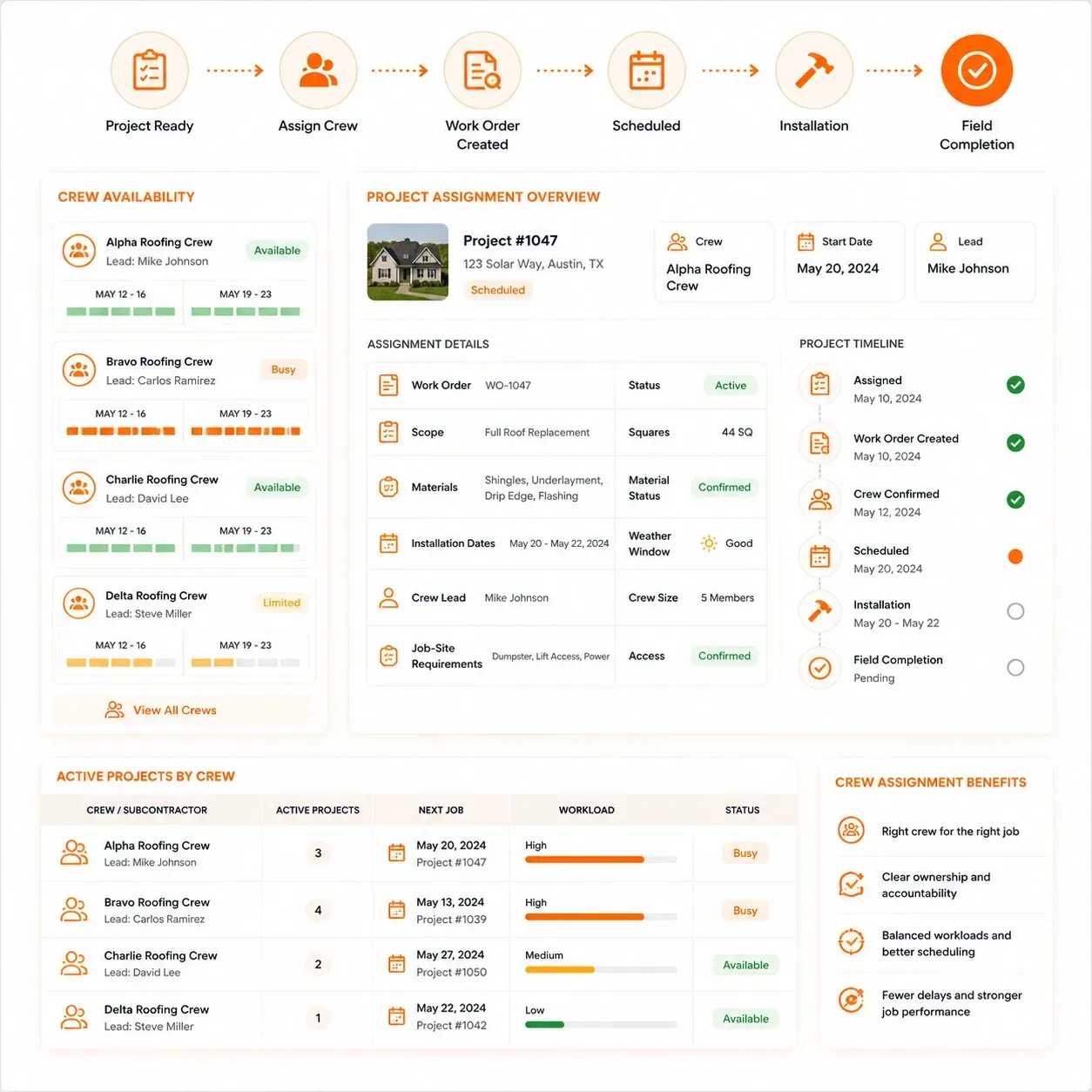
Keep Crew Responsibility Clear
- Assign roofing crews or subcontractors to each project
- Create and assign work orders to crews or subcontractors
- Track crew availability and upcoming commitments
- Match manpower to project size and scope
- Share installation dates and job-site requirements
- Keep approved scope and material information available
- Assign crew leads and responsible team members
- Track work status across active projects
- Reassign crews when schedules or priorities change
From Assignment to Installation
Project Ready → Work Order → Crew / Subcontractor Assigned → Schedule Confirmed → Installation
Production managers can see who owns the project, when the crew is expected on site and which jobs are competing for the same resources.
Field Execution
Keep Roofing Field Work Connected to the Project
Once the crew is on site, production teams need visibility into what has started, what has been completed and whether anything is affecting the project plan.
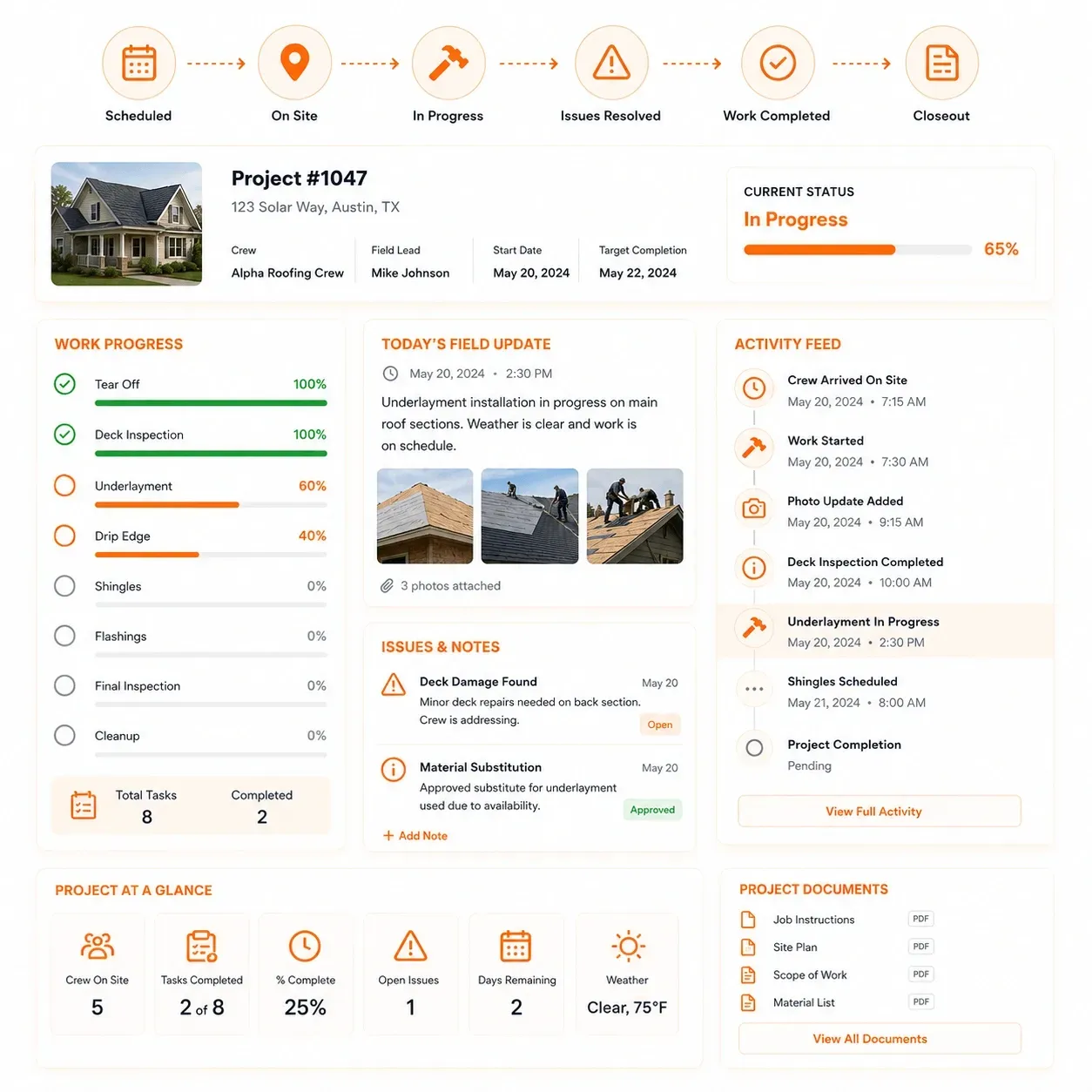
Sunbase Roofing Project Management Software keeps field activity tied to the roofing project. Field crews can access the approved scope, work orders, materials, schedule, tasks and project documents while updating progress, photos and issues from the job site.
Track Work as It Happens
- Start, in-progress and completion status
- Assigned crew and responsible field lead
- Approved scope and job instructions
- Field photos and progress updates
- Completed tasks and remaining work
- Site issues or unexpected conditions
- Material shortages or substitutions
- Corrective work and follow-up actions
- Customer or site notes
- Completion documentation
From Scheduled Work to Completed Installation
Scheduled → On Site → In Progress → Issues Resolved → Work Completed → Closeout
Production managers can see what is happening on the roof, what still needs attention and whether the project is staying on track.
Tasks & Milestones
Keep Every Roofing Project Moving Toward the Next Milestone
Roofing projects often depend on multiple actions being completed in the right order.
Sunbase Roofing Project Management Software helps teams track the tasks, approvals and milestones that keep each job moving forward.
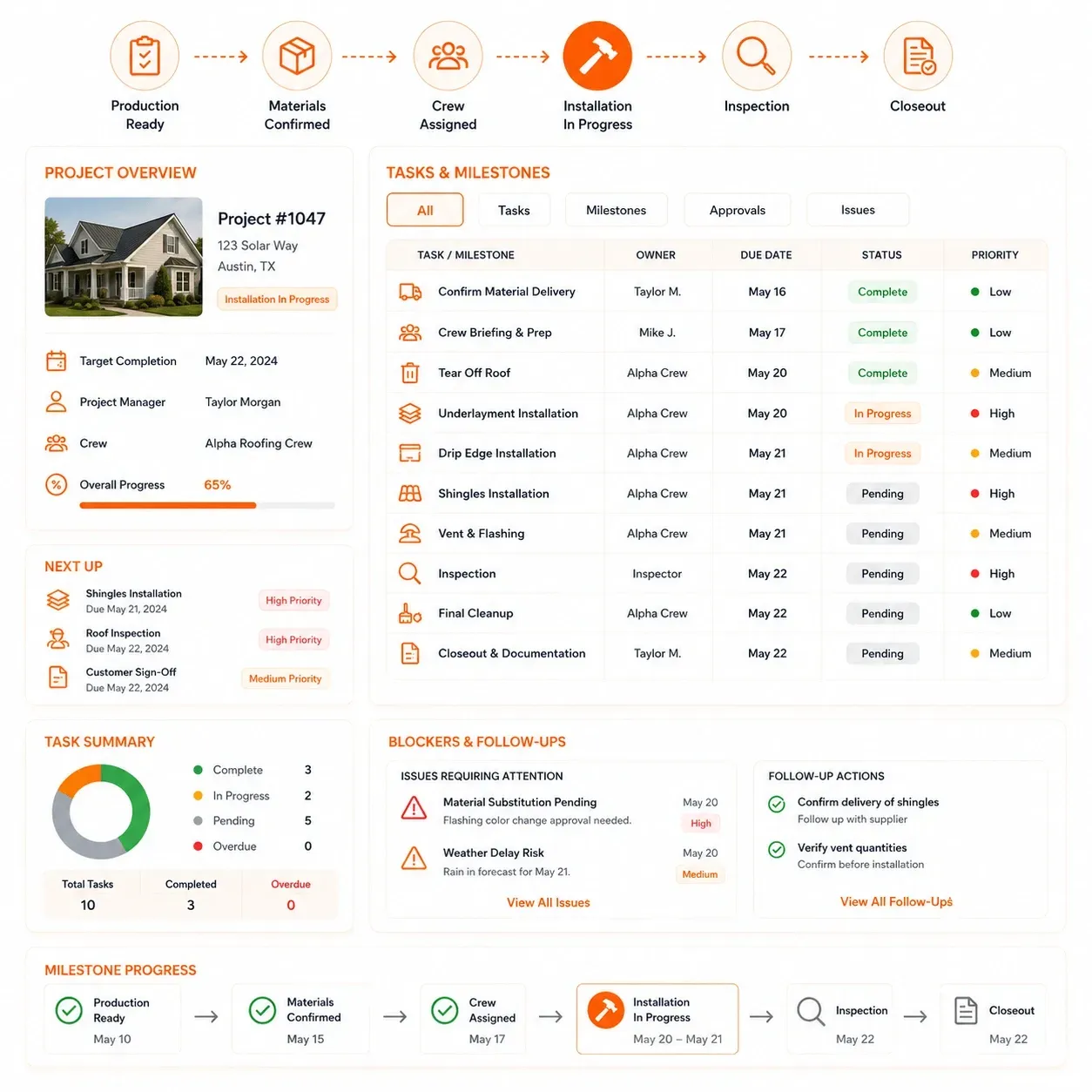
Track What Needs to Happen Next
- Project tasks and responsible owners
- Due dates and completion status
- Production milestones
- Permit and approval checkpoints
- Material and delivery dependencies
- Crew-related actions
- Customer requirements
- Inspection and closeout tasks
- Overdue or blocked work
- Follow-up actions after field issues
Manage the Project by Milestone
Production Ready → Materials Confirmed → Crew Assigned → Installation → Inspection → Closeout
Teams can see what has been completed, what is due next and which unfinished action is holding up the project.
Project Changes & Issues
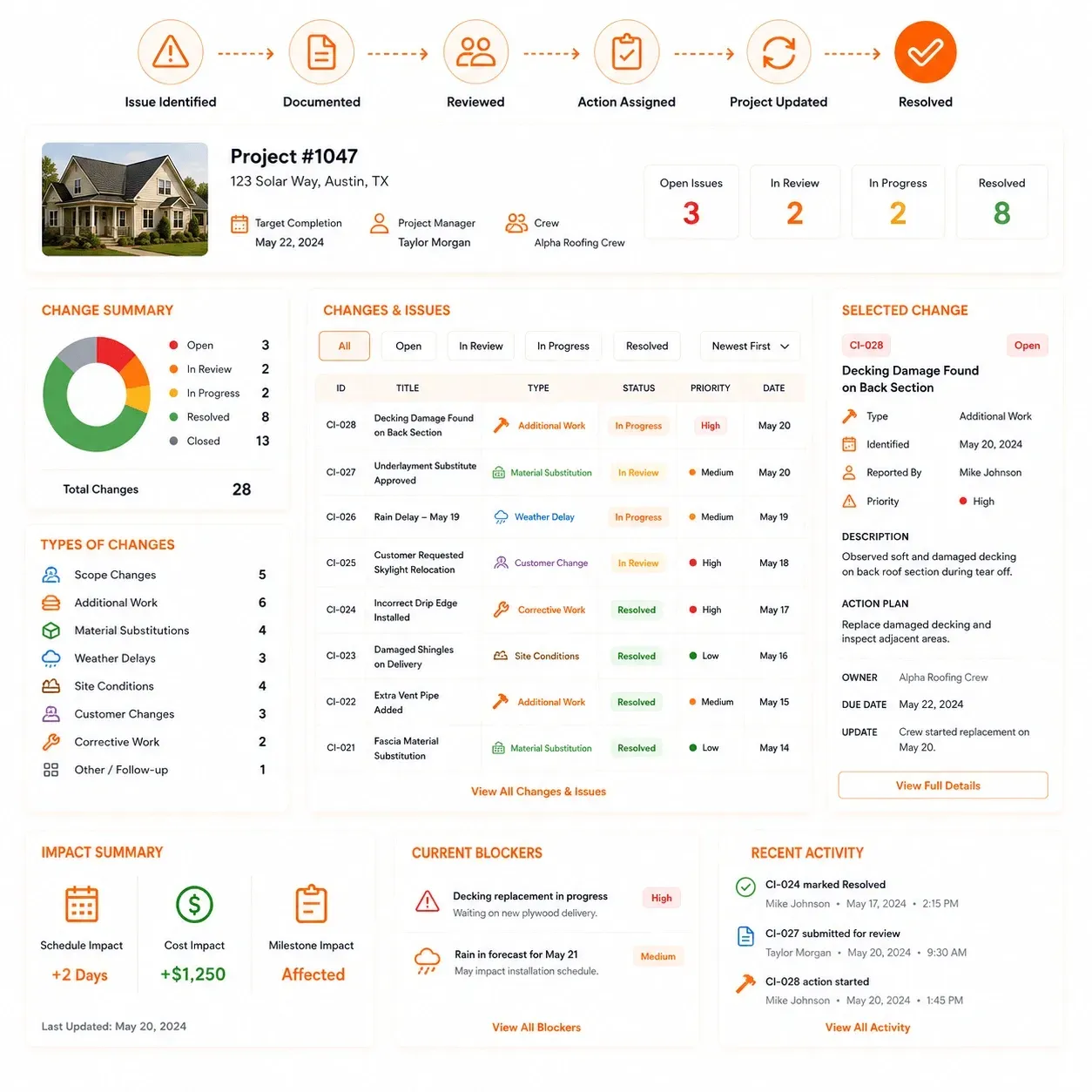
Keep Changes and Job-Site Issues From Derailing the Roofing Project
Roofing projects do not always go exactly to plan. Additional damage, scope changes, material substitutions, weather delays or site conditions can affect the schedule, cost and work required.
Sunbase Roofing Project Management Software helps teams document those changes against the project so everyone can see what happened, what was decided and what needs to be done next.
Track Changes as They Happen
- Scope changes
- Additional work
- Material substitutions
- Unexpected roof or site conditions
- Weather-related delays
- Customer-requested changes
- Corrective work
- New tasks or follow-up actions
- Revised dates or milestones
- Internal notes and approvals
From Issue to Resolution
Issue Identified → Documented → Reviewed → Action Assigned → Project Updated → Resolved
Keeping changes tied to the project helps production teams avoid losing critical decisions in calls, texts or separate notes.
Completion & Closeout
Close the Roofing Project With the Work and Documentation Complete
Finishing the installation is not the same as closing the project. Production teams still need to confirm that required work is complete, outstanding issues are resolved and the final project records are in place.
Sunbase Roofing Project Management Software helps teams move the job from completed field work into a clear closeout process.
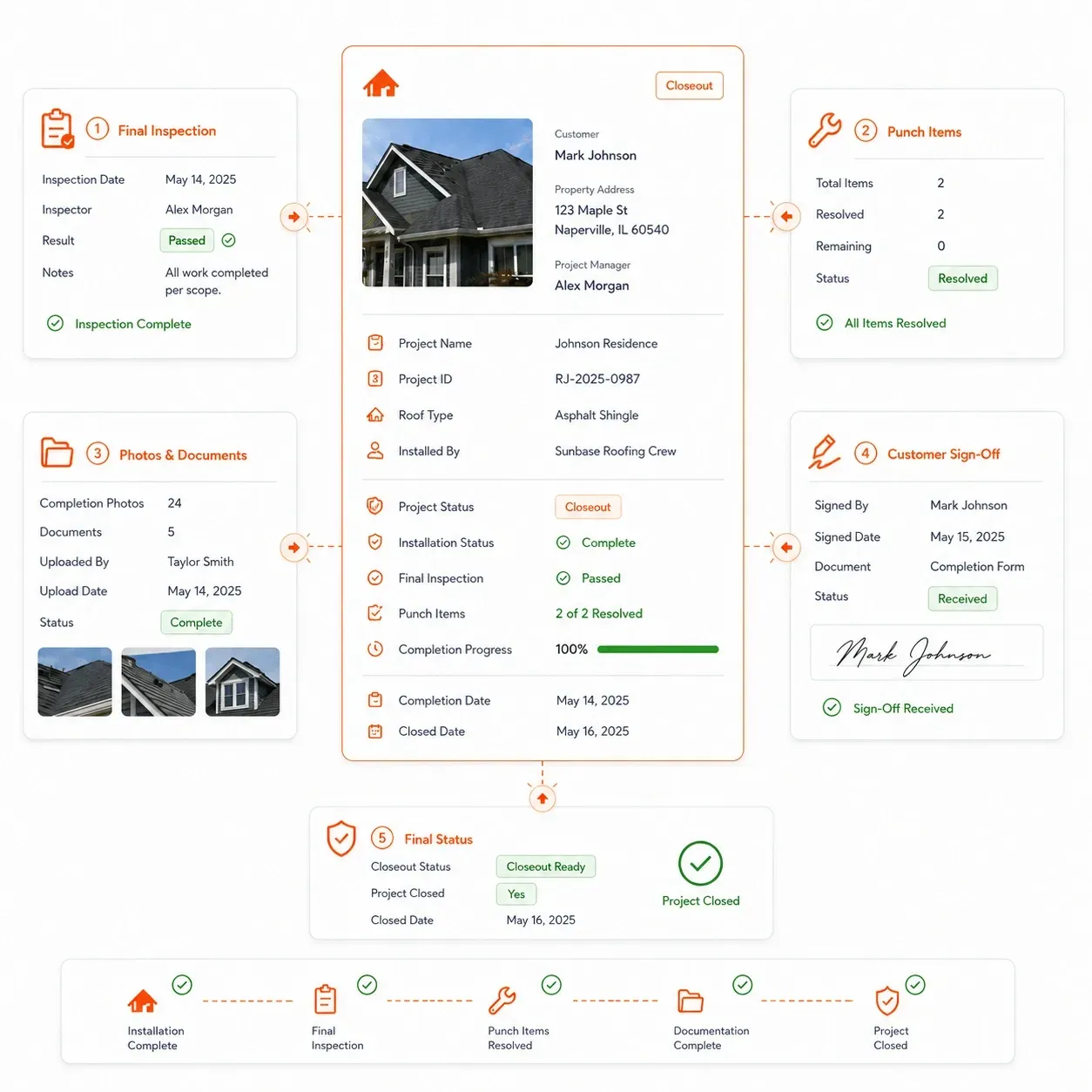
Confirm the Project Before Closing It
- Installation and approved scope completed
- Final field photos uploaded
- Outstanding tasks resolved
- Corrective work completed
- Required inspections recorded
- Customer sign-off or completion confirmation
- Remaining materials or site items addressed
- Final documents attached to the project
- Completion date and final status updated
- Handoff to invoicing, warranty or service where required
From Installation to Project Closeout
Installation Complete → Final Inspection → Outstanding Items Resolved → Documentation Complete → Project Closed
A clear closeout process helps ensure the roofing project is not marked complete while tasks, documentation or follow-up work are still outstanding.
Job Costing & Profitability
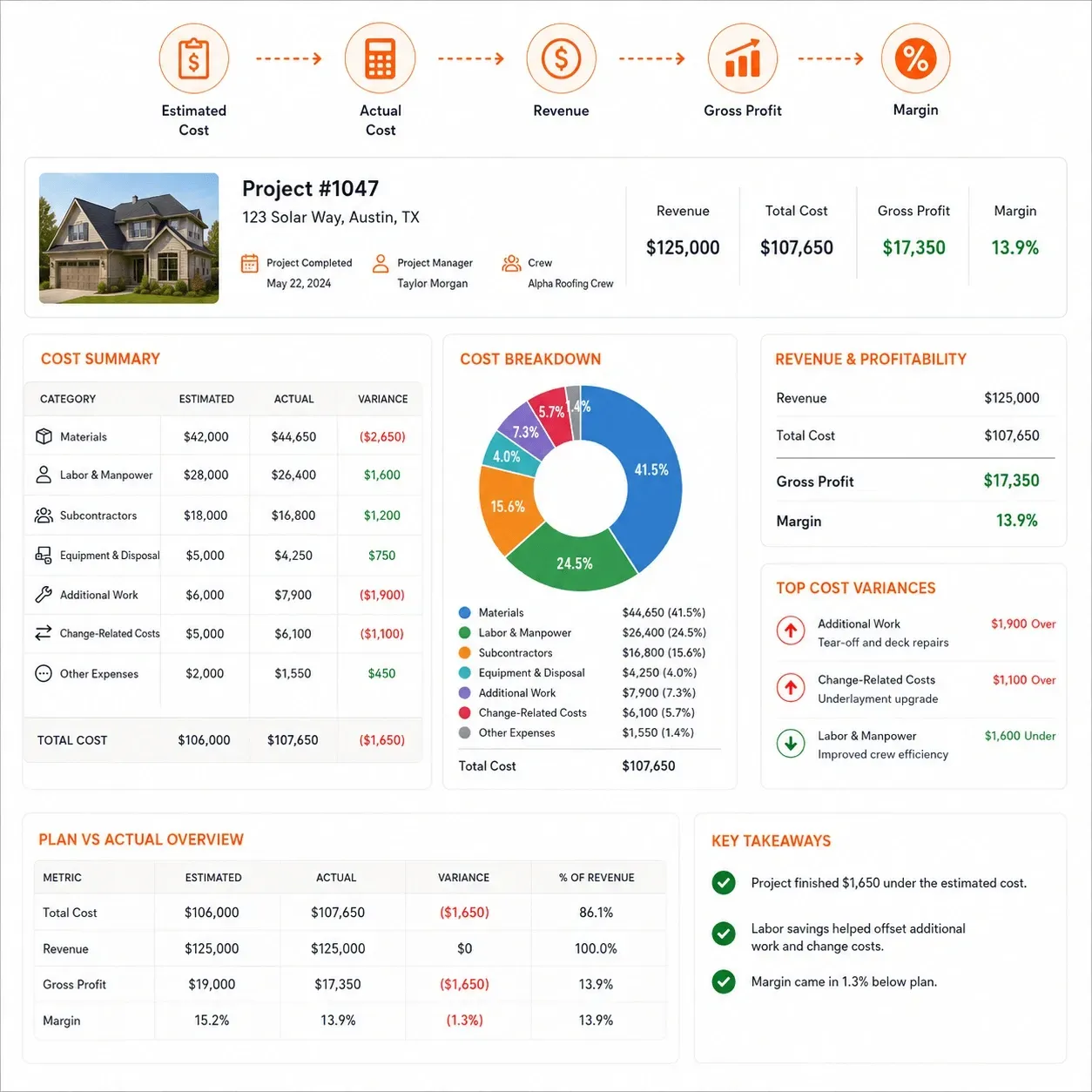
Compare the Project Plan With What the Roofing Job Actually Cost
A roofing project can stay on schedule and still finish below the expected margin. Material changes, additional labor, subcontractor costs and unplanned work can all affect the final financial result.
Sunbase Roofing Project Management Software helps keep project costs tied to the job so production and management teams can compare what was planned with what was actually spent.
Track the Costs Behind the Project
- Estimated material cost
- Actual material cost
- Labor and manpower
- Subcontractor expenses
- Equipment and disposal costs
- Additional or corrective work
- Change-related costs
- Other project expenses
- Project revenue
- Gross profit and final margin
From Planned Cost to Final Result
Estimated Cost → Actual Cost → Invoice → Payment → Revenue → Gross Profit → Margin
This helps roofing companies identify where project costs changed, which jobs remained within plan and which projects finished below the expected margin.
Roofing Project Workflows
Support Different Roofing Project Workflows
Roofing projects do not all follow the same production path. A residential replacement, commercial project, repair job or storm-restoration project may require different schedules, milestones, approvals and field activity.
Sunbase Roofing Project Management Software can be configured around those differences while keeping the project structure and production visibility consistent.
Residential Roof Replacement
Manage a standard replacement project from production handoff through installation and closeout.
Sold Job → Materials → Crew → Schedule → Installation → Closeout
Storm Restoration
Manage projects that require additional documentation, approvals and changing production requirements.
Approved Scope → Documentation → Materials → Scheduling → Installation → Completion
Commercial Roofing
Coordinate longer projects with procurement, multiple milestones and larger field teams.
Project Handoff → Procurement → Milestones → Crew Planning → Field Execution → Closeout
Roof Repair & Service
Move smaller jobs quickly from approved work to field completion.
Approved Work → Schedule → Crew → Repair → Completion
Preventive Maintenance
Track recurring work against the property and roof service history.
Inspection → Required Work → Schedule → Maintenance → Updated Service History
Multi-Site Roofing Projects
Coordinate roofing work across multiple properties, locations or phases.
Properties → Priorities → Project Schedule → Crews → Milestones → Closeout
Project Team Visibility
Give Every Roofing Project Team the Information It Needs
Roofing projects move through production managers, purchasing teams, crews, subcontractors, field supervisors and management.
Sunbase Roofing Project Management Software gives each team visibility into the part of the project it is responsible for.
01
Production Managers
See what is ready, scheduled, delayed or blocked across active roofing projects.
Project Stage | Readiness | Schedule | Crew | Milestones | Issues
02
Purchasing
Track the material activity required to keep installation on schedule.
Material Requirements | Purchase Orders | Suppliers | Deliveries | Outstanding Items
03
Crew Leads & Subcontractors
Access the information needed to complete assigned roofing work.
Property | Approved Scope | Materials | Schedule | Tasks | Site Instructions
04
Field Supervisors
Follow installation progress and respond to issues from the job site.
Progress | Photos | Open Tasks | Issues | Corrective Work | Completion
05
Project Coordinators
Keep deadlines, approvals and dependencies moving.
Tasks | Due Dates | Milestones | Documents | Project Notes | Activity History | Approvals
06
Owners & Management
See project performance across the roofing operation.
Active Projects | Upcoming Installs | Delays | Cost Variance | Gross Profit | Margin
Roofing PM vs General Project Management
Why General Project Management Tools Fall Short for Roofing Operations
General project management software can organize tasks, deadlines and team assignments, but roofing production depends on more than a generic project board.
Sunbase Roofing Project Management Software keeps the project tied to the
property, approved scope, materials, crews, installation schedule and field activity behind the roofing job.
General Project Management Software
Generic Projects & Tasks
Work organized around boards, lists and deadlines.
Manual Job Context
Property, scope and roofing details often need to be added separately.
Limited Production Readiness
No built-in view of whether materials, approvals, crews or site requirements are ready.
Separate Field Workflow
Job-site photos, issues and completion records may live in other tools.
Limited Roofing Cost Context
Project progress and actual roofing job costs may remain disconnected.
Property-Based Project Record
Keep the roofing project tied to the customer, property and approved scope.
Production Readiness
Track what must be complete before the job reaches the installation schedule.
Materials, Crews & Scheduling
Coordinate purchasing, deliveries, manpower and project timing.
Field Execution
Track progress, photos, issues, corrective work and completion from the job site.
Project Cost Visibility
Compare estimated and actual costs alongside project progress.
Built Around the Roofing Production Lifecycle
Sold Job → Production Ready → Materials → Crew → Schedule → Installation → Closeout
Roofing Project
Management Integrations
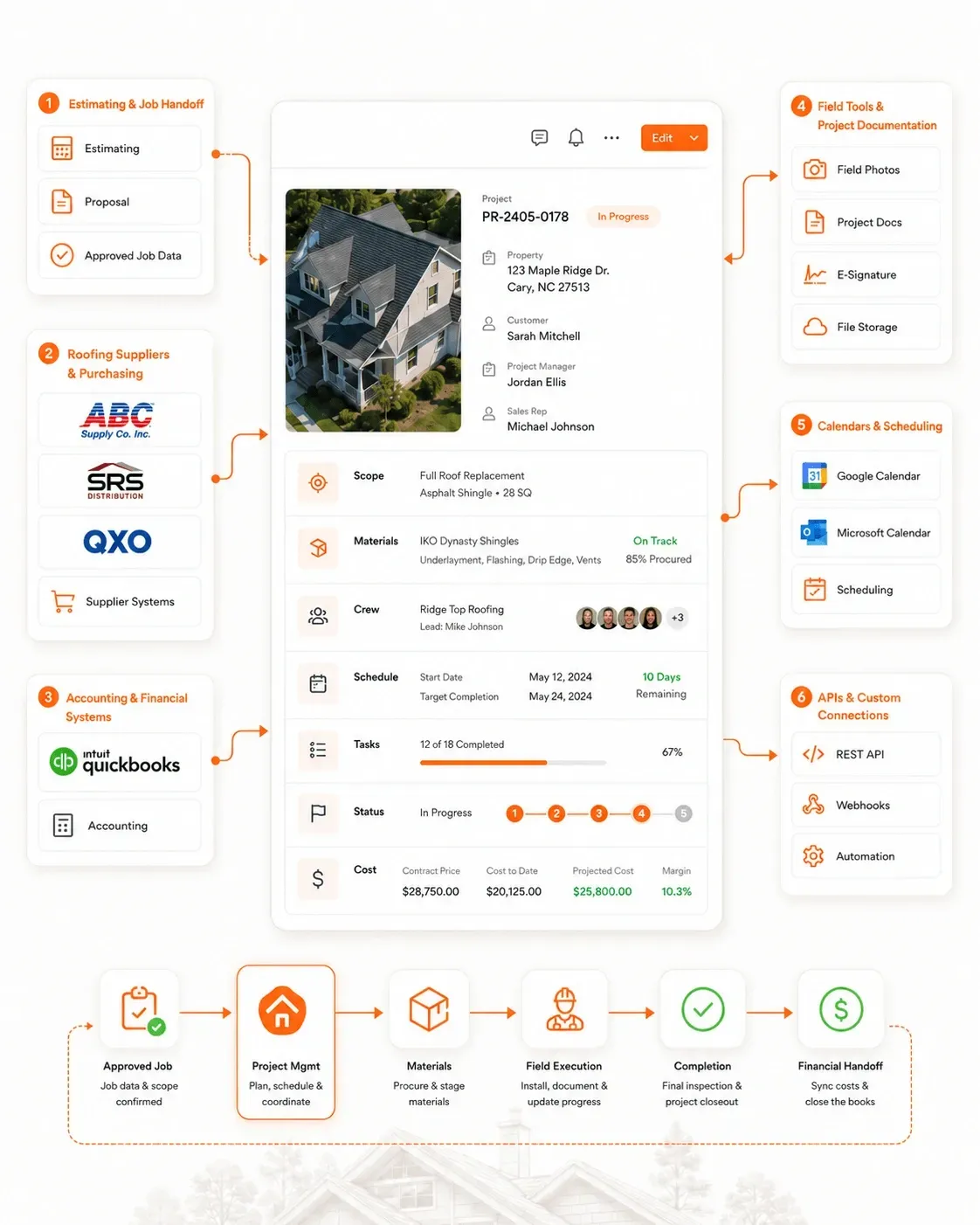
Connect Project Management With the Systems Your Roofing Team Already Uses
Roofing project management often depends on information coming from estimating, suppliers, accounting, field tools and communication systems.
Sunbase Roofing Project Management Software can connect those systems to the wider project workflow through supported integrations, APIs, webhooks and configurable connections.
Estimating & Job Handoff
Carry approved scope, pricing and project requirements into production without rebuilding the roofing job.
Estimating Systems | Proposal Tools | Approved Job Data
Roofing Suppliers & Purchasing
Connect material requirements, purchasing activity and delivery information with supplier workflows where supported.
ABC Supply | SRS Distribution | QXO | Other Supplier Systems
Accounting & Financial Systems
Keep project, cost and invoice information aligned with downstream accounting workflows.
QuickBooks | Supported Accounting Platforms
Field Tools & Project Documentation
Keep job-site communication, photos, documents and approvals accessible from the project.
Field Photos | Project Documents | E-Signature | File Storage | Supported Field Tools
Calendars & Scheduling
Coordinate project dates, crew availability and installation schedules with supported calendar systems.
Google Calendar | Microsoft Calendar | Scheduling Tools
APIs & Custom Connections
Extend the project workflow through:
REST API | Webhooks | Automation | Custom Integrations
Configurable Roofing Project Workflows
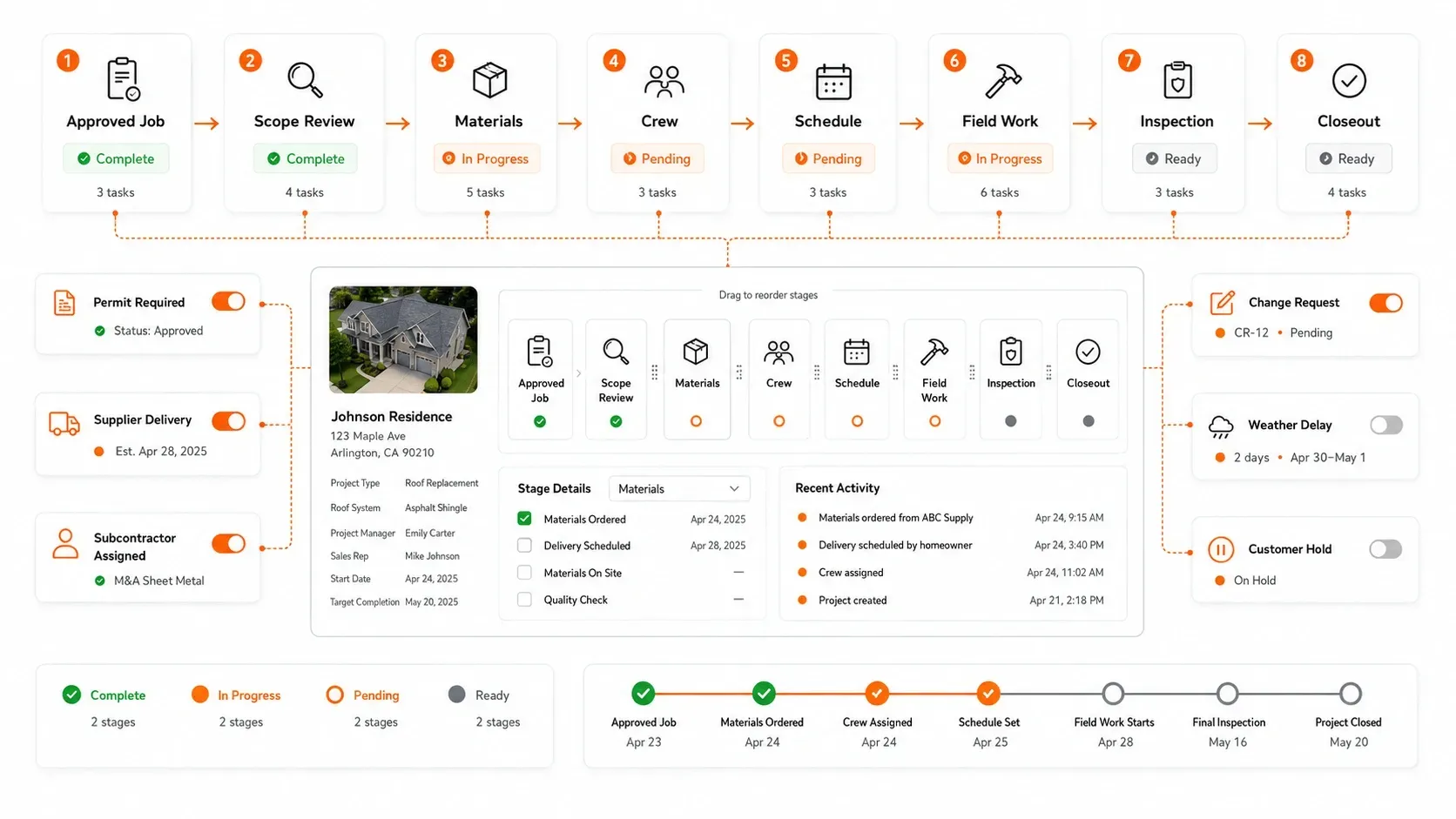
Configure Project Management Around the Way Your Roofing Team Works
Roofing companies differ in how they prepare projects, order materials, assign crews, manage milestones and close jobs. Sunbase Roofing Project Management Software can be configured around those operational requirements instead of forcing every project through the same fixed process.
Roofing Project Management Pricing
Pricing That Fits the Project Workflow Your Team Needs
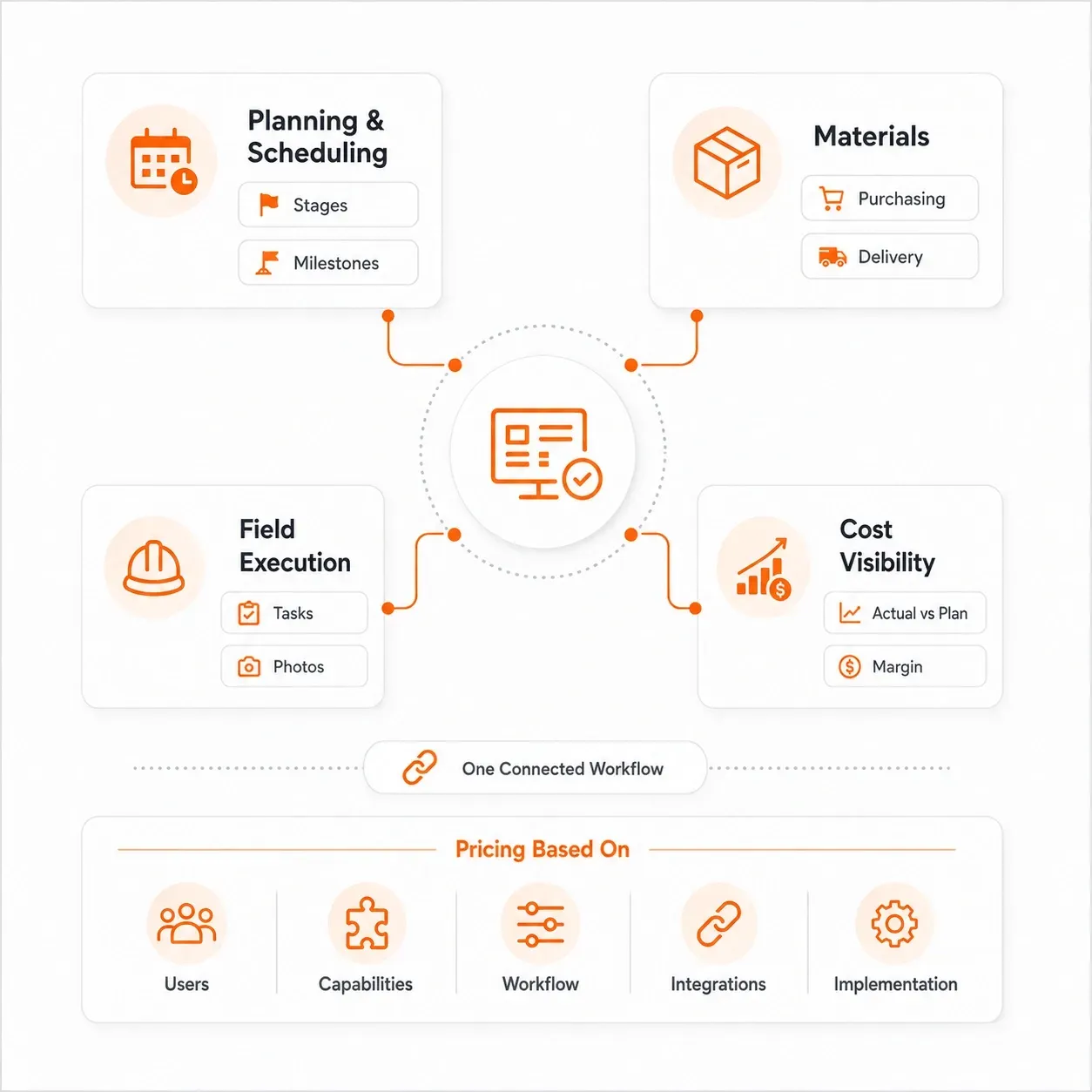
Roofing companies vary in project volume, team size and operational complexity. Sunbase Roofing Project Management Software can be configured around the users, workflows and project-management capabilities your team actually needs.
Pricing Can Be Based On
Number of Users | Required Capabilities | Workflow Configuration | Integrations | Implementation Requirements
Build Around the Areas You Need
Project Planning & Scheduling
Production readiness, project stages, milestones, timelines and installation schedules.
Materials & Resources
Material requirements, purchasing, supplier activity, crews and subcontractors.
Field & Project Execution
Tasks, progress updates, photos, issues, corrective work and closeout.
Cost & Performance Visibility
Estimated vs actual costs, project performance, gross profit and margin.
Roofing Project Management Setup
Set Up Sunbase Around Your Existing Roofing Project Workflow
Moving to a new project management system should not mean rebuilding the way your production team works.
Sunbase Roofing Project Management Software can be configured around your current stages, responsibilities, project data and operational requirements.
1. Review Your Current Project Workflow
Map how roofing jobs currently move from sold job through production, installation and closeout.
Project Stages | Approvals | Materials | Crews | Milestones | Closeout
2. Configure the Project Structure
Set up the workflows your production team needs.
Stages | Custom Fields | Responsibilities | Required Actions | Dependencies | Statuses
3. Connect Existing Project Systems
Configure the integrations and data connections required for the project workflow.
Estimating | Suppliers | Accounting | Calendars | Documents | APIs
4. Import Project Data & Launch
Set up users, permissions and workflows for:
Customers | Properties | Active Projects | Project Documents
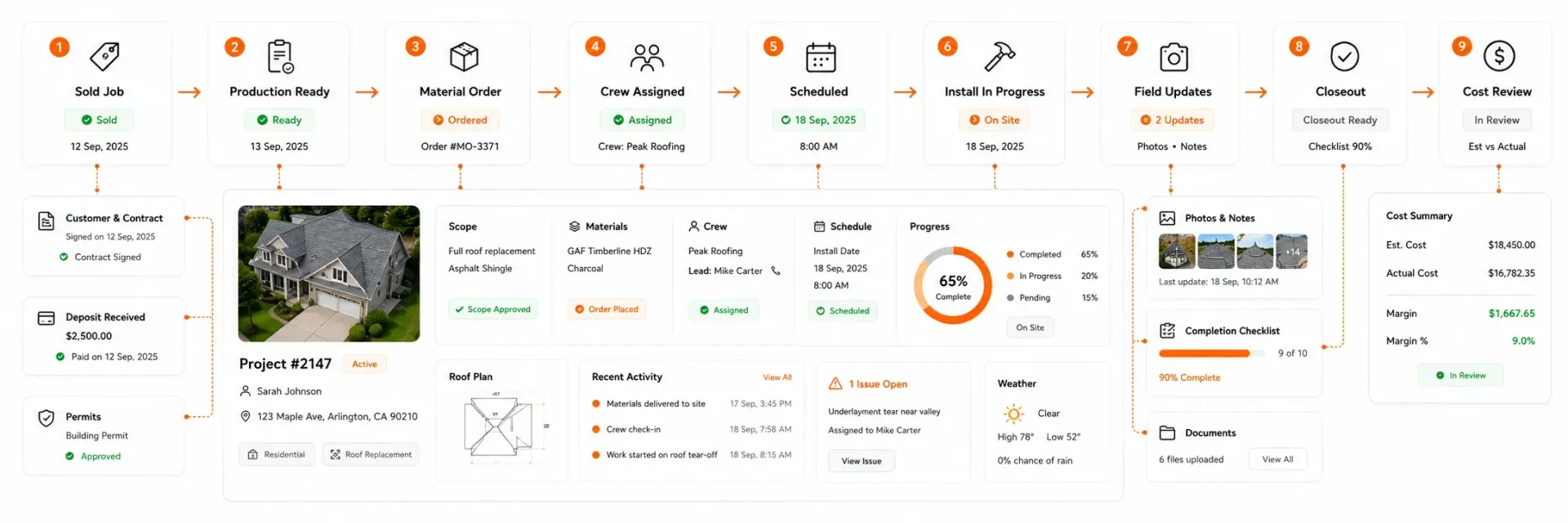
Real Roofing Project
See One Roofing Project Move Through Sunbase
Sold Job → Production Readiness → Material Order → Crew Assignment → Scheduled Installation → Field Updates → Closeout → Estimated vs Actual Cost
Roofing Project Management FAQs
Questions Roofing Contractors Ask Before Choosing Project Management Software
What should roofing project management software track?
Roofing project management software should track the work required after a job is sold, including production readiness, materials, suppliers, crews, schedules, milestones, field progress, open issues, completion status and project costs.
The most useful systems show not only where the project is, but also what is blocking it and what needs to happen next.
How is roofing project management software different from a general project management tool?
General project management tools are usually built around tasks, boards and deadlines. Roofing project management software also needs to account for properties, approved roofing scope, material requirements, crew assignments, installation schedules, field activity and closeout.
The project is therefore organized around the actual roofing job, not just a generic task list.
When should a sold roofing job be considered production-ready?
A sold job is production-ready when the requirements needed to install the roof have been confirmed.
This may include:
Final Scope | Contract | Permit / Approval | Materials | Delivery | Crew | Customer Confirmation | Site Requirements
A signed contract alone does not necessarily mean the project is ready to reach the installation calendar.
Can roofing project management software help manage materials and supplier deliveries?
Yes. A roofing project workflow can track material requirements, ordered quantities, suppliers, purchase orders, delivery dates, outstanding items and material readiness.
This helps production teams identify material issues before they affect the installation schedule.
How should roofing companies schedule crews across multiple projects?
Crew scheduling should consider more than the installation date. Production teams may need to account for crew availability, manpower, project size, material readiness, job dependencies, customer timing and other active projects.
A shared production schedule helps show where crews are committed and where capacity is still available.
Can field crews update roofing projects from the job site?
Field teams can update project information such as work status, photos, completed tasks, site issues, material shortages, corrective work and completion records, depending on the configured workflow and permissions.
This gives office teams visibility into field progress without relying only on phone calls or text messages.
How can roofing companies track project delays and blockers?
Project management software should make incomplete requirements and overdue actions visible.
Common roofing project blockers include:
Permit Delays | Material Shortages | Supplier Delays | Crew Availability | Customer Changes | Site Conditions | Open Tasks | Corrective Work
Tracking the blocker against the project makes it easier to understand why a job is not moving forward.
Can roofing project management software support commercial roofing projects?
Yes. Commercial roofing projects often require longer schedules, procurement, multiple milestones, larger crews, inspections and phased work.
A configurable project-management system can support those additional stages while keeping the property, scope, schedule, tasks and field activity organized around the project.
Can roofing project management software track job profitability?
Where job-costing capabilities are configured, roofing companies can compare estimated and actual materials, labor, subcontractor costs, additional work and other project expenses against revenue.
This helps management understand cost variance, gross profit and final margin after the job is completed.
Can I keep my existing estimating, accounting or supplier systems?
Potentially, yes. Roofing companies often continue using specialist estimating, accounting, measurement or supplier systems alongside project-management software.
What should I ask during a roofing project management software demo?
Ask the vendor to show one roofing project moving from an approved sale through completion.
Specifically ask to see:
How a sold job enters production
How production readiness is tracked
How materials and deliveries are managed
How crews are assigned and scheduled
How tasks and milestones are monitored
What field teams can see and update
How project issues and changes are handled
How closeout is completed
How estimated and actual costs are compared
Which integrations are native and which require configuration
A useful demo should show how the roofing project actually moves from sale to completed job, not only dashboards and task boards.
Ready to Manage Roofing Projects From Sale to Closeout?
Coordinate materials, crews, subcontractors, schedules, field work and project costs from one roofing project workflow.
Plans start at $59/user/month. Final pricing depends on users, configuration and required capabilities.