
Roofing CRM Software for Managing Leads, Customers and Sales
*Contact us for a quote based on your team size
roofing crm
WHAT IS ROOFING CRM SOFTWARE?
Roofing CRM software helps roofing companies manage leads, customer and property information, appointments, sales activity and follow-ups as each opportunity moves from the first enquiry toward an approved roofing job.
Unlike a general CRM that mainly stores contacts and deals, a roofing CRM keeps the sales process tied to the
property, roof inspection, estimate and next action behind the opportunity.
ROOFING SALES WORKFLOW
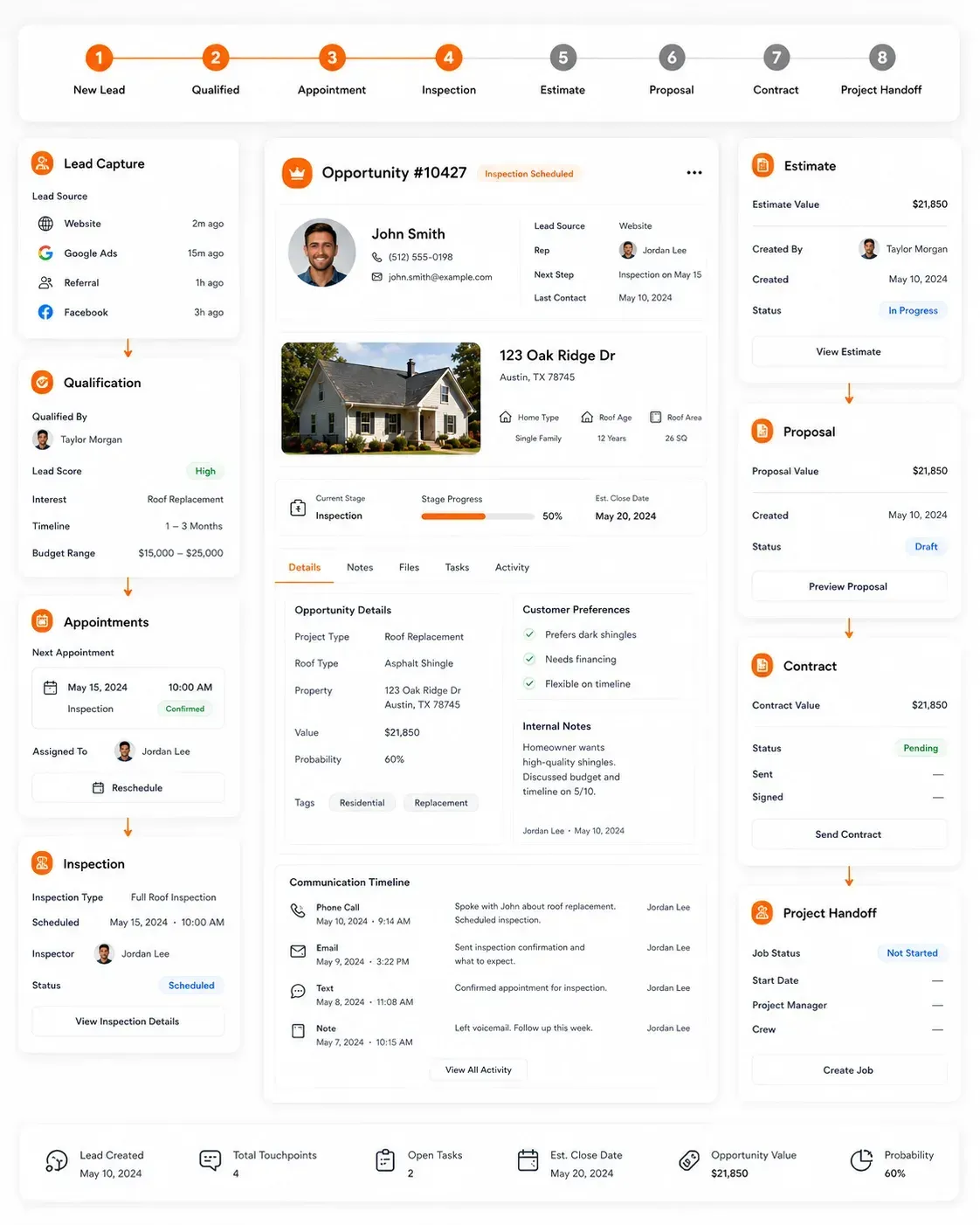
Keep the Roofing Sales Process Connected
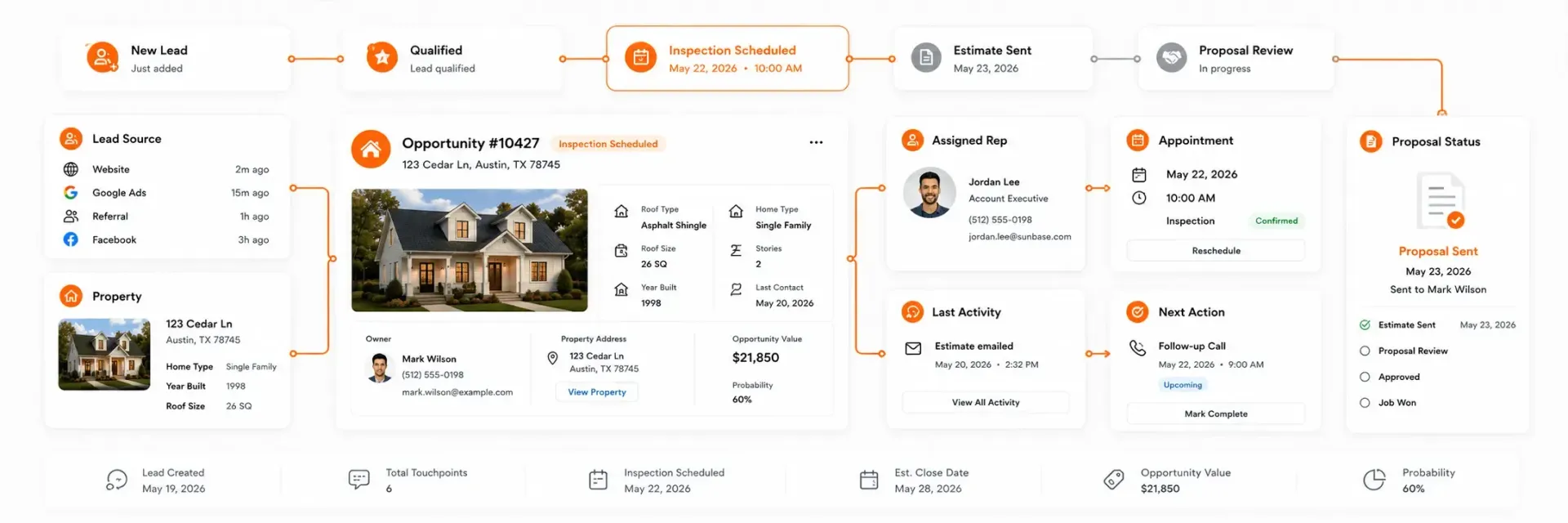
Sunbase Roofing CRM Software gives sales teams one place to see
Lead Source | Property | Sales Stage | Assigned Rep | Appointment | Last Activity | Next Action | Proposal Status
Roofing Lead Capture
Capture Roofing Leads From the Channels That Generate New Business
Roofing leads can come from website forms, paid ads, referrals, inbound calls, canvassing and partner sources. Sunbase Roofing CRM Software keeps those opportunities in one sales workflow so reps can respond, qualify and move them forward without losing the source or property context.
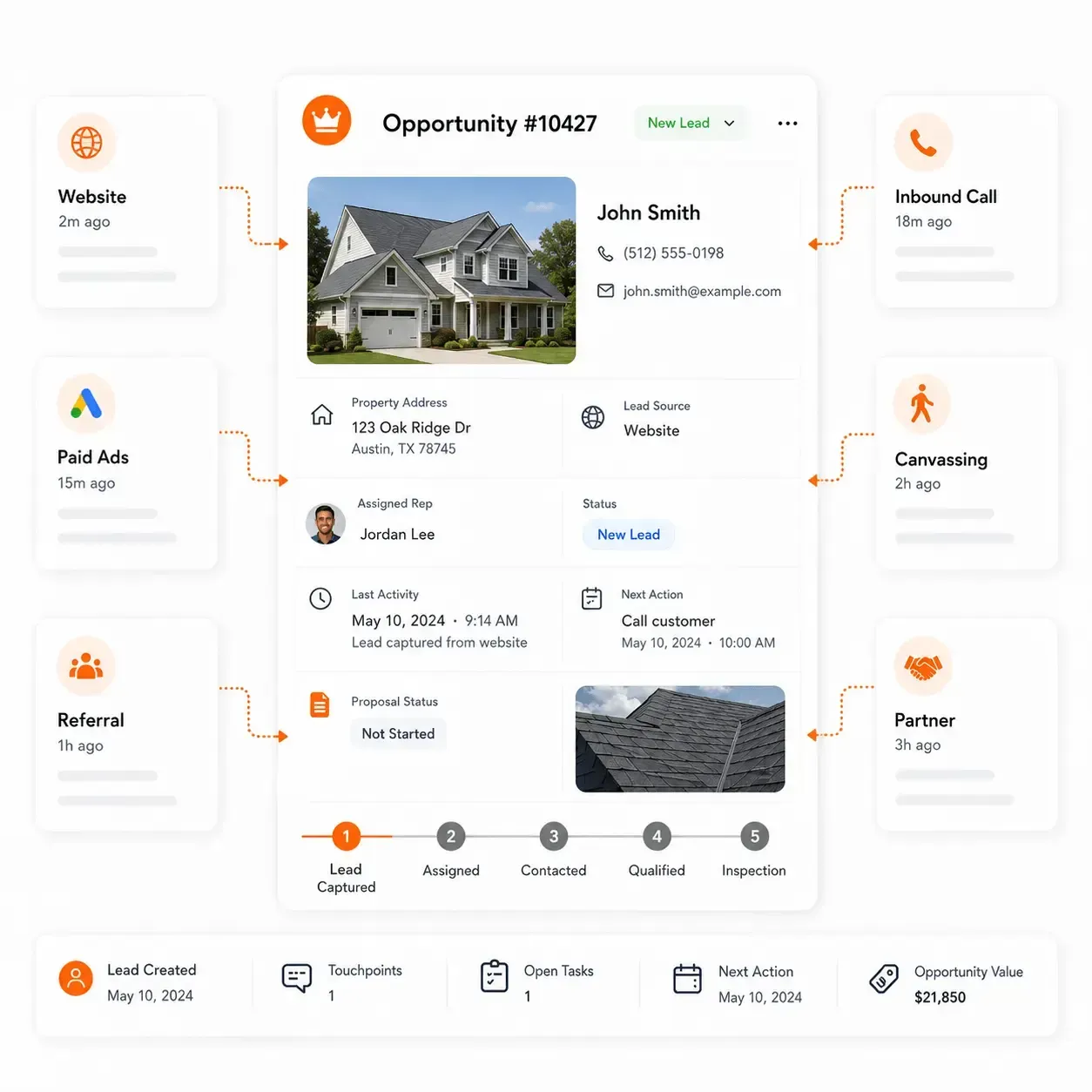
Bring New Opportunities Into the CRM
- Website enquiries and quote requests
- Google Ads and Meta lead campaigns
- Inbound phone leads
- Referrals and repeat customers
- Door-to-door and canvassing leads
- Partner and dealer opportunities
- Imported or manually added prospects
Keep the Source With the Opportunity
Track: Lead Source | Campaign | Property | Assigned Rep | Contact Status | Qualification | Next Action
From New Lead to Sales Opportunity
Lead Captured → Assigned → Contacted → Qualified → Appointment / Inspection
This gives roofing sales teams a clear view of where leads are coming from, who owns them and which opportunities still need follow-up.
Customer & Property Record
Keep the Customer and Property at the Center of the Sale
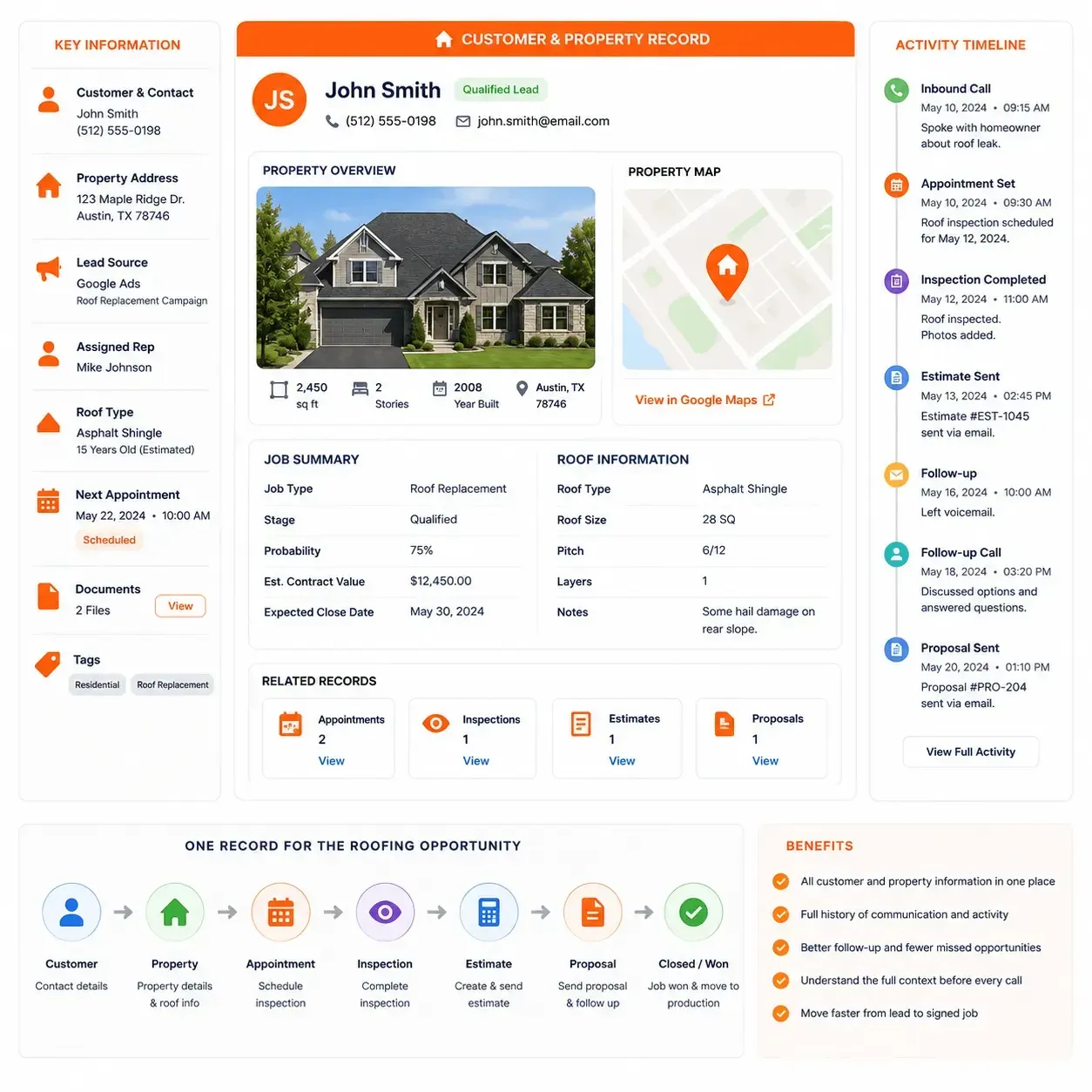
In roofing, the opportunity is tied to a property, not just a contact. Sunbase Roofing CRM Software keeps customer details, property information and sales activity together so reps can understand the full context before the next call, inspection or estimate.
Keep the Sales Record Complete
- Customer and contact details
- Property address and job location
- Lead source and campaign
- Assigned sales representative
- Roof type and basic property information
- Appointment and inspection history
- Notes, photos and documents
- Previous estimates, proposals and activity history
- Next action and follow-up date
One Record for the Roofing Opportunity
Customer → Property → Appointment → Inspection → Estimate → Proposal
Sales reps can see the customer, property, sales history and next action from the same opportunity record.
Roofing Sales Pipeline
See Where Every Roofing Opportunity Stands
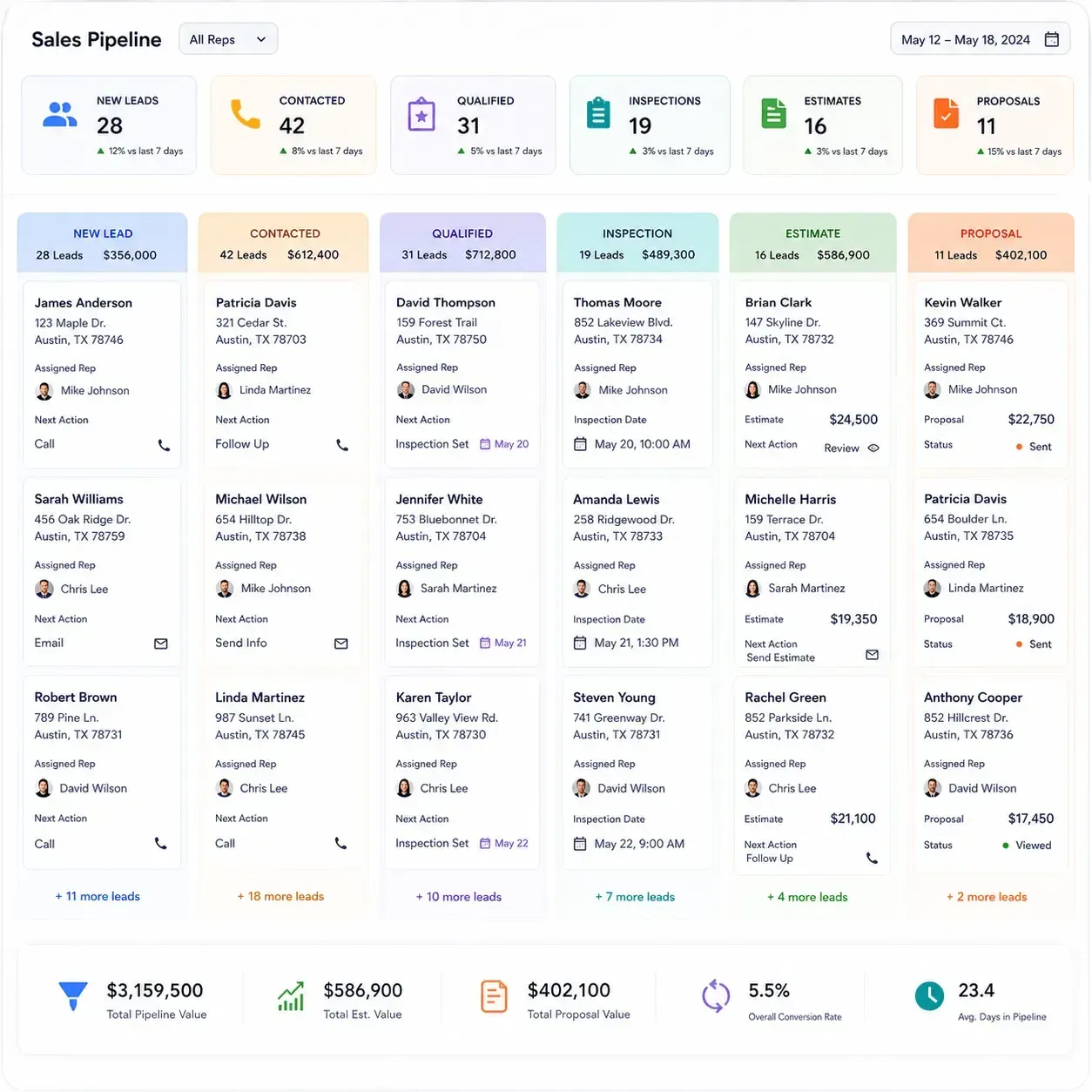
Roofing sales teams need more than a contact list. They need to know which opportunities are new, which customers have been contacted, which inspections are scheduled and which jobs are waiting on an estimate, proposal or decision.
Build the Pipeline Around Your Roofing Sales Process
New Lead → Contacted → Qualified → Appointment → Inspection → Estimate → Proposal → Contract
Track key information such as:
- Assigned sales representative
- Customer and property
- Lead source
- Current sales stage
- Appointment or inspection date
- Estimate and proposal status
- Deal value
- Last activity
- Next action
- Overdue follow-ups
Know What Needs Attention Next
New Leads Not Contacted | Inspections Pending | Estimates Outstanding | Proposals Awaiting Decision | Follow-Ups Overdue
This gives sales managers a clearer view of which opportunities are progressing, where deals are slowing down and what the team needs to act on next.
Appointments & Follow-Ups
Keep Every Roofing Appointment and Follow-Up on Track
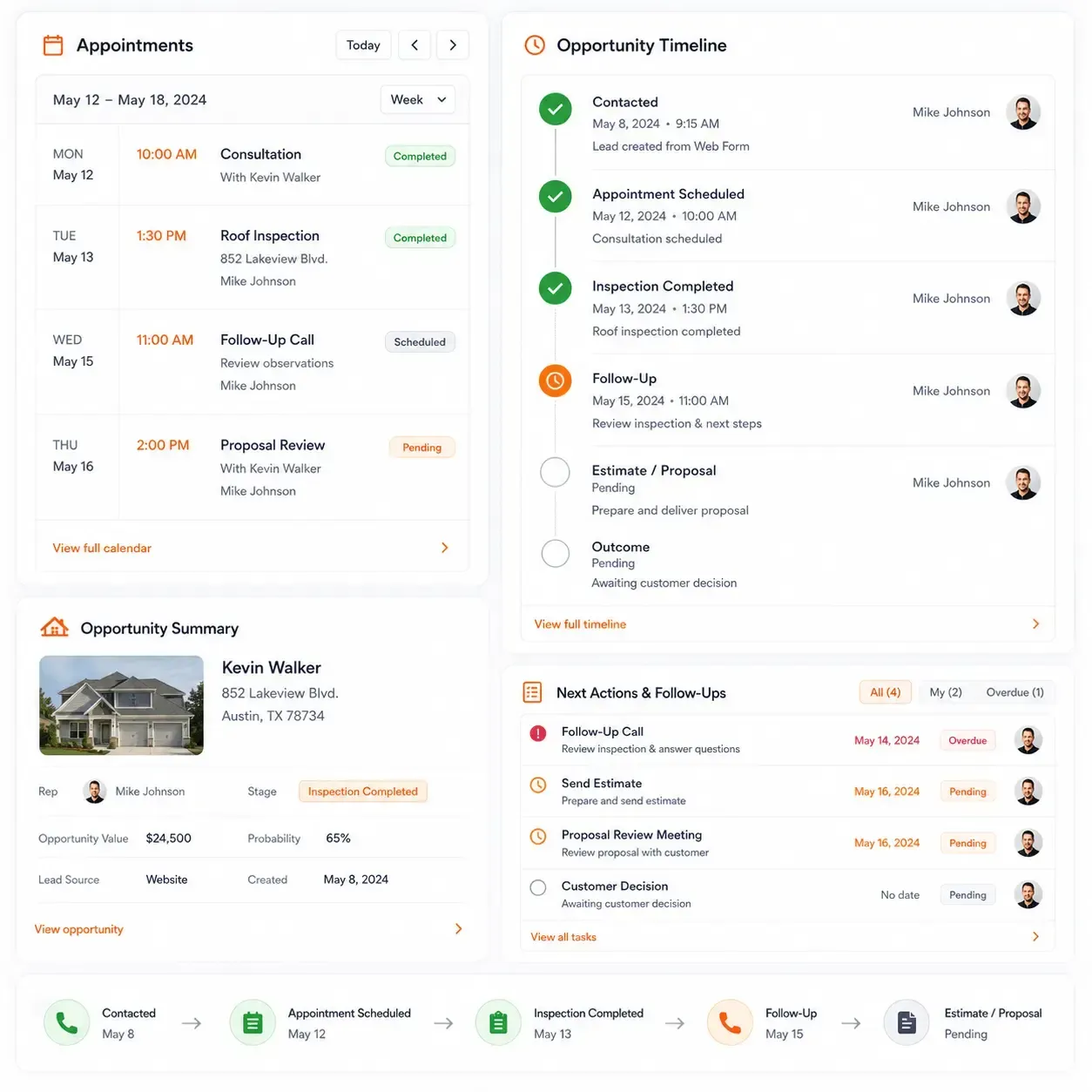
Roofing sales often depends on what happens between the first conversation and the signed contract. Missed inspections, delayed callbacks and forgotten follow-ups can slow down otherwise qualified opportunities.
Sunbase Roofing CRM Software keeps appointments, tasks and next actions connected to the customer and property so reps know what needs to happen next.
Manage the Activities That Move the Sale Forward
- Schedule appointments and roof inspections
- Assign activities to the right sales rep
- Track upcoming and overdue follow-ups
- Record call, meeting and inspection outcomes
- Set next actions and follow-up dates
- See which opportunities have gone inactive
From Contact to Next Action
Contacted → Appointment Scheduled → Inspection Completed → Follow-Up → Estimate / Proposal
Every completed activity updates the customer timeline, giving sales reps and managers a clear view of what has already happened and what still needs attention.
Estimating & Job Handoff
Move Qualified Roofing Opportunities Into Estimating With the Right Context
Once the inspection is complete and the opportunity is ready to price, the estimator needs more than a customer name. Property details, inspection findings, photos, notes and customer requirements should move with the opportunity.
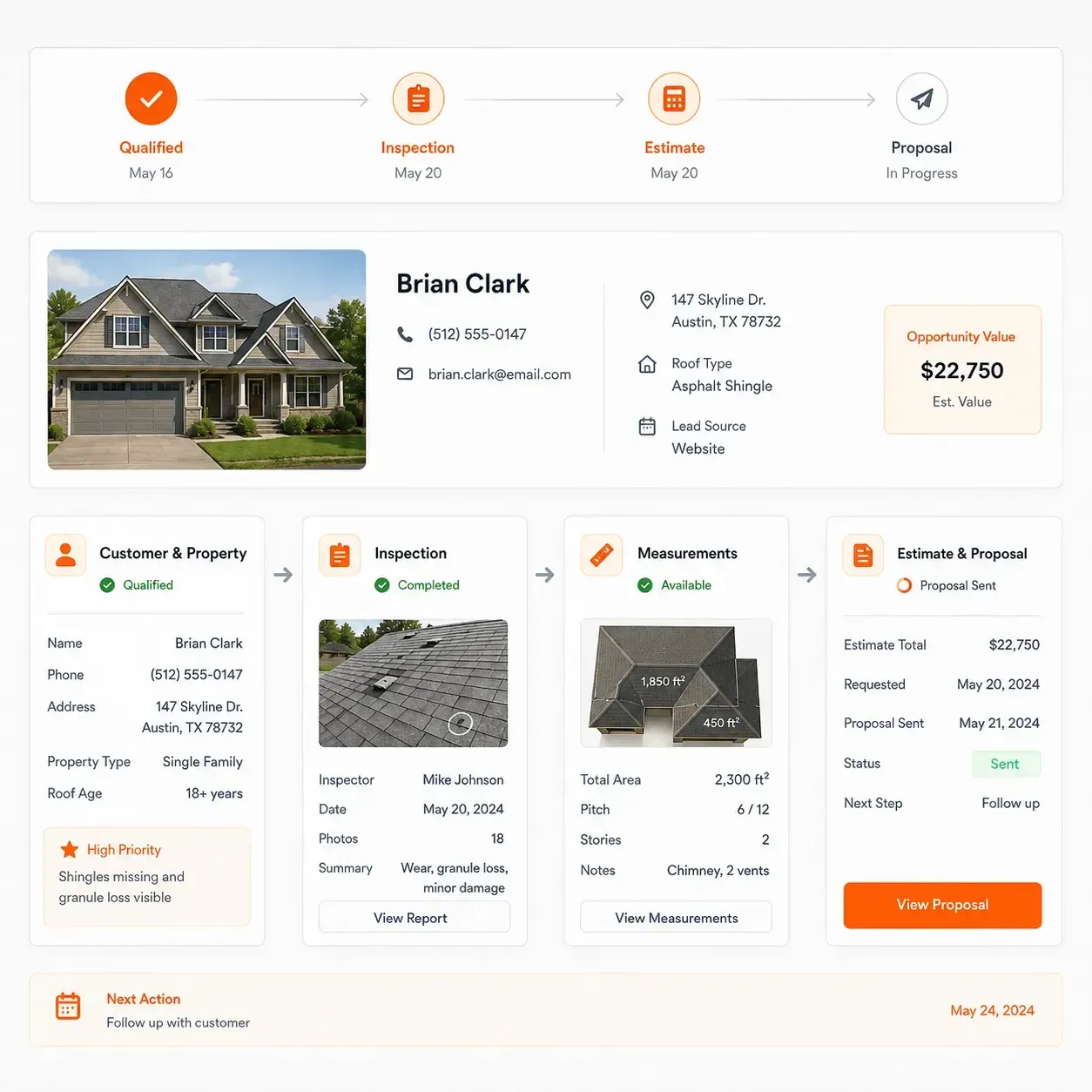
Sunbase Roofing CRM Software keeps the sales record connected as the job moves into estimating and proposal preparation.
Give Estimators the Information They Need
- Customer and property details
- Roof inspection information
- Measurements and photos
- Damage and required work
- Customer preferences and notes
- Assigned sales representative
- Estimate status
- Proposal status and revisions
- Follow-up after proposal delivery
From Qualified Lead to Customer Decision
Qualified → Inspection → Estimate Requested → Estimate Prepared → Proposal Sent → Follow-Up → Approved / Lost
Sales teams can continue tracking the opportunity while estimating progresses, without creating a separate disconnected customer record.
Communication & Activity History
Keep Every Customer Interaction Connected to the Roofing Opportunity
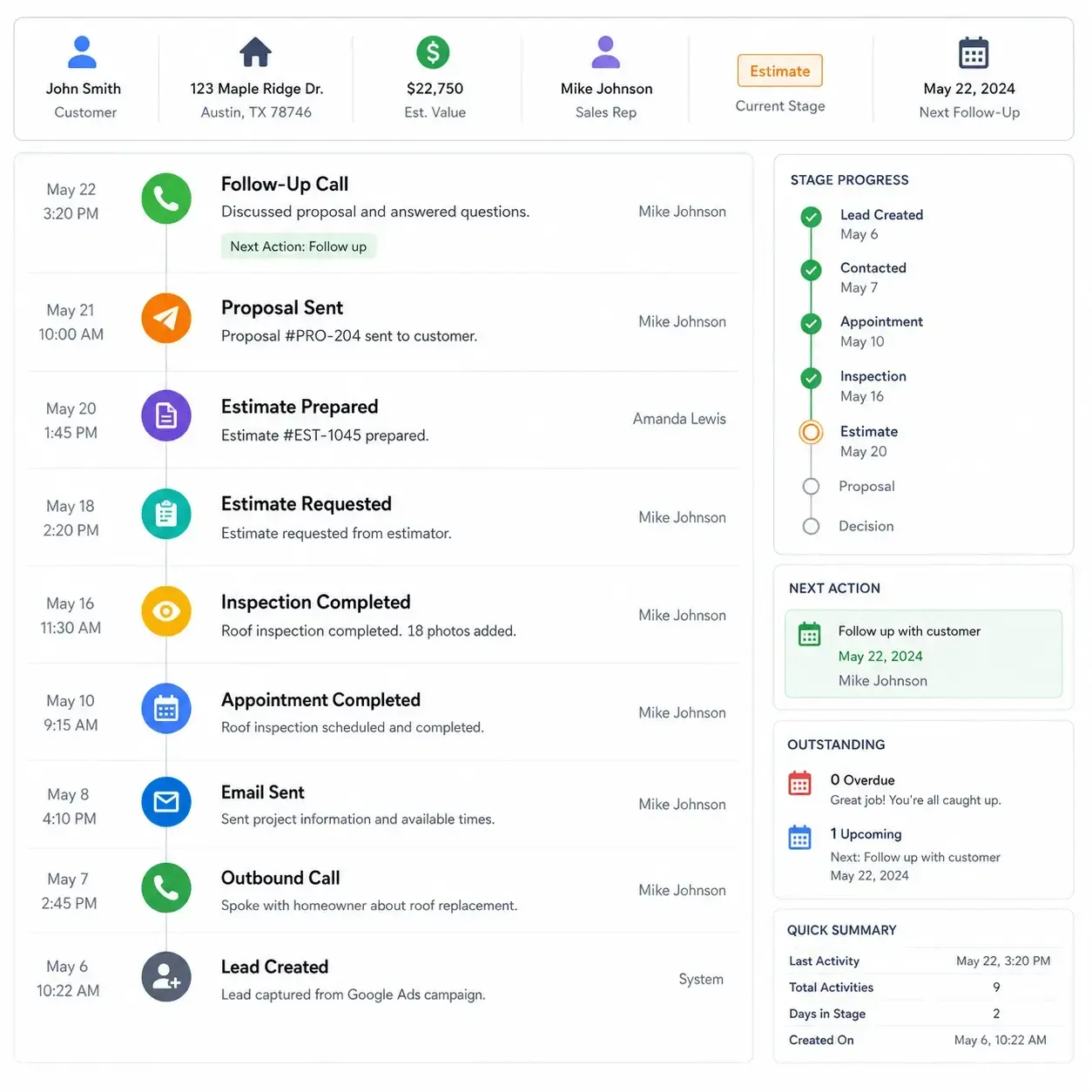
Roofing sales can involve multiple calls, appointments, inspection notes, proposal revisions and follow-ups before the customer makes a decision.
Sunbase Roofing CRM Software keeps that activity visible on the customer and property record so the next conversation starts with the right context.
Maintain a Clear Sales Timeline
- Calls and customer conversations
- Emails and messages
- Appointments and inspection outcomes
- Sales notes and internal comments
- Estimate and proposal activity
- Documents and customer files
- Follow-up tasks and reminders
- Stage changes and opportunity history
See What Happened Before the Next Follow-Up
Calls | Emails | SMS | Appointments | Notes | Documents | Proposal Activity | Tasks | Stage Changes
Before the next call or follow-up, reps can see the customer's previous interactions, current sales stage and outstanding actions from the activity timeline.
Door-to-Door & Field Leads
Turn Canvassing Activity Into Trackable Roofing Opportunities
Door-to-door prospecting can generate valuable roofing opportunities, but those leads are easy to lose if field activity stays separate from the CRM.
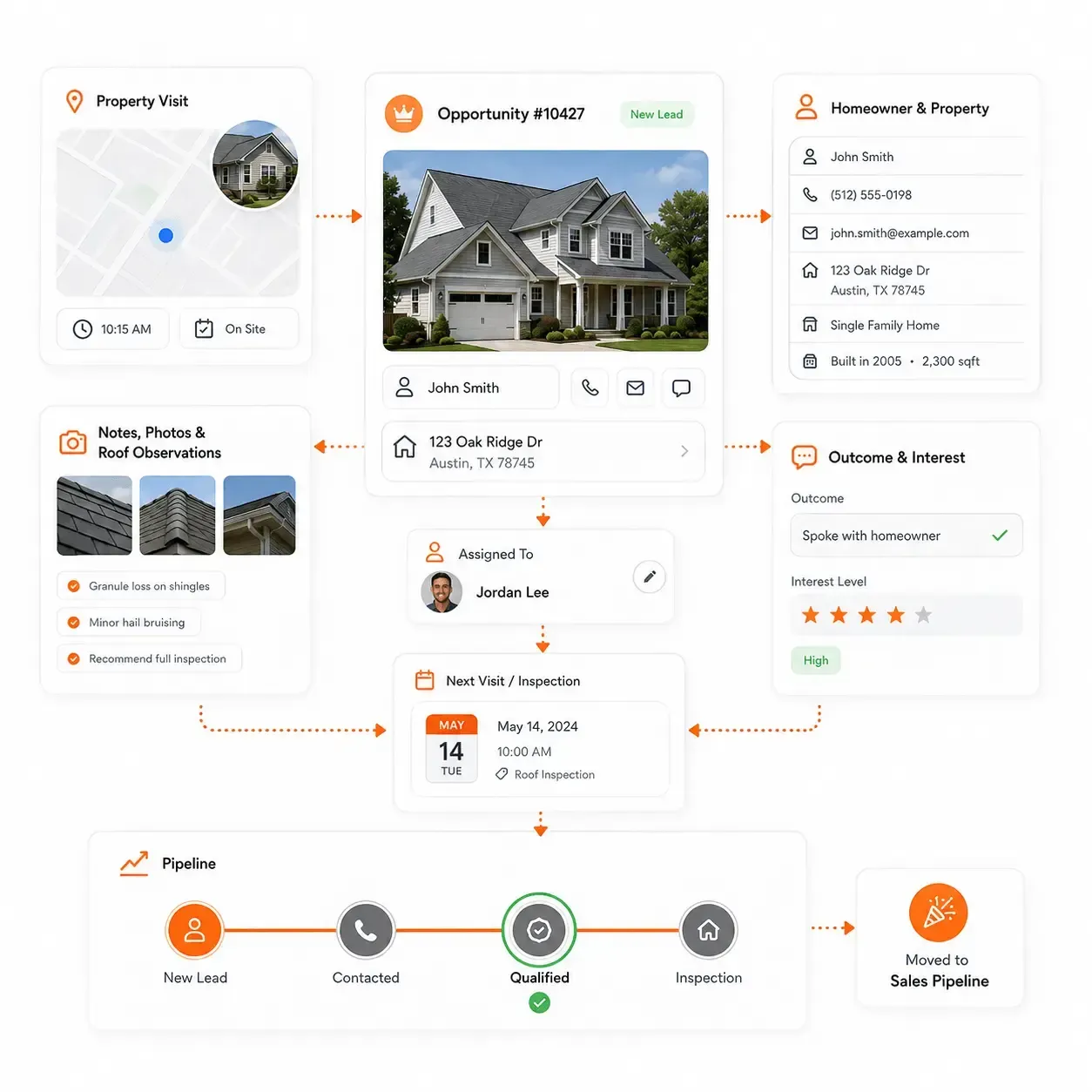
Sunbase Roofing CRM Software can bring field-generated prospects into the same sales workflow so canvassing activity, property information and follow-up remain connected.
Capture Leads From the Field
- Add prospects directly from the property
- Record homeowner and property details
- Assign the lead to the responsible rep
- Capture notes, photos and initial roof observations
- Record contact outcome and interest level
- Schedule the next visit, call or inspection
- Move qualified prospects into the roofing sales pipeline
From Door Knock to Roofing Opportunity
Territory | Rep | Property | Contact Outcome | Notes | Photos | Follow-Up
Field reps can create the opportunity while they are at the property, while office and sales teams can immediately see who was contacted, what happened and what needs to happen next.
Lead Source Tracking
Know Which Channels Are Generating Roofing Opportunities
Lead volume alone does not show which channels are creating roofing sales.
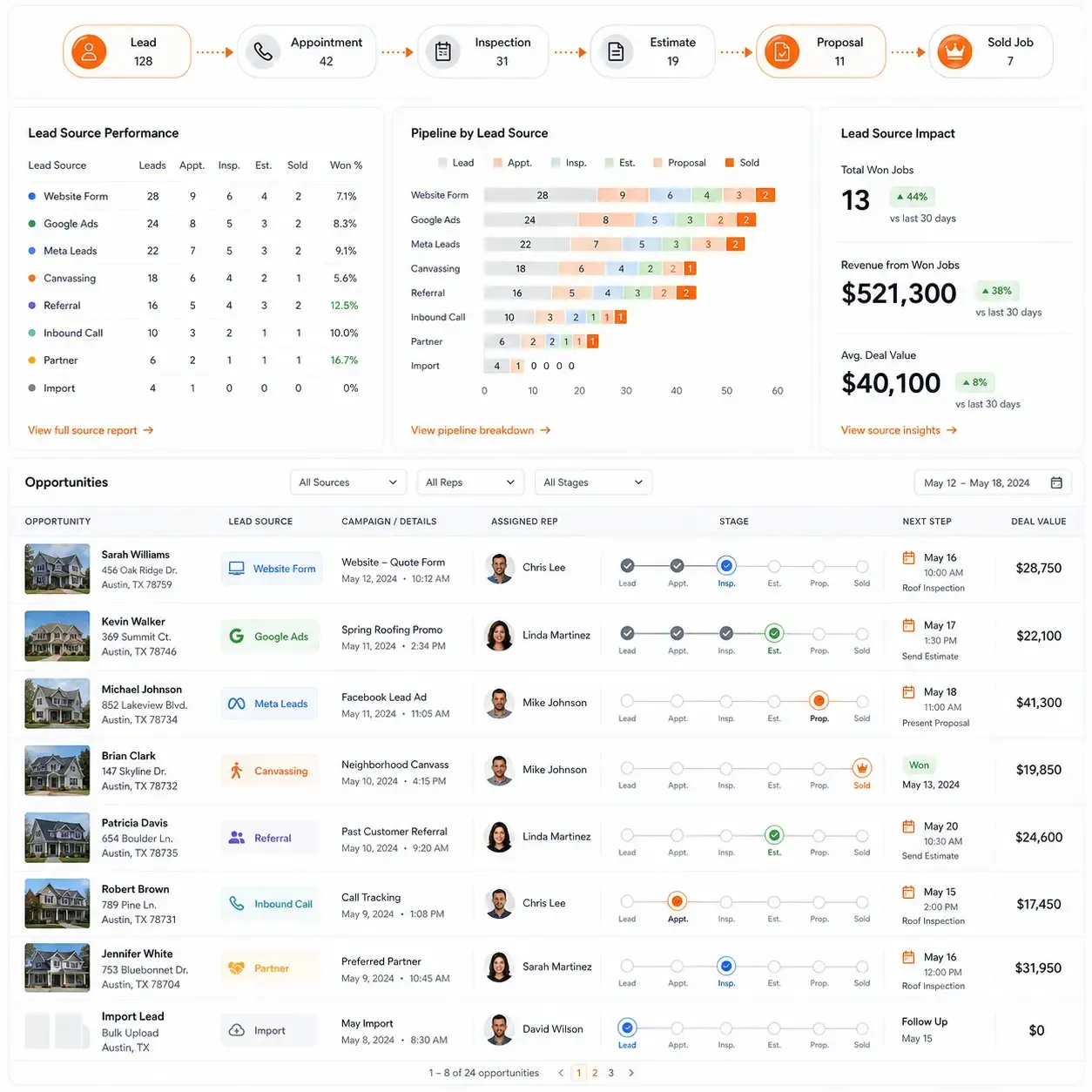
Sunbase Roofing CRM Software keeps the lead source connected to the opportunity so sales and marketing teams can see which channels are creating appointments, estimates and sold jobs.
Track Where the Opportunity Came From
- Website forms and quote requests
- Google Ads
- Meta lead campaigns
- Door-to-door canvassing
- Referrals and repeat customers
- Inbound calls
- Partners and dealer sources
- Imported or manually added leads
Follow the Lead Beyond the First Conversion
Track the source alongside:
Lead → Appointment → Inspection → Estimate → Proposal → Sold Job
This helps teams move beyond counting raw leads and understand which sources are producing qualified opportunities and roofing sales.
Give Sales and Marketing the Same View
Lead Source | Campaign | Assigned Rep | Sales Stage | Deal Value | Won / Lost
Marketing can see where opportunities originate, while sales can see the full history behind each lead as it moves through the pipeline.
Sales Team Visibility
Give Sales Managers a Clear View of the Roofing Pipeline
Roofing sales managers need to know more than how many leads are in the CRM. They need visibility into which opportunities are moving, which reps are following up and where deals are getting stuck.
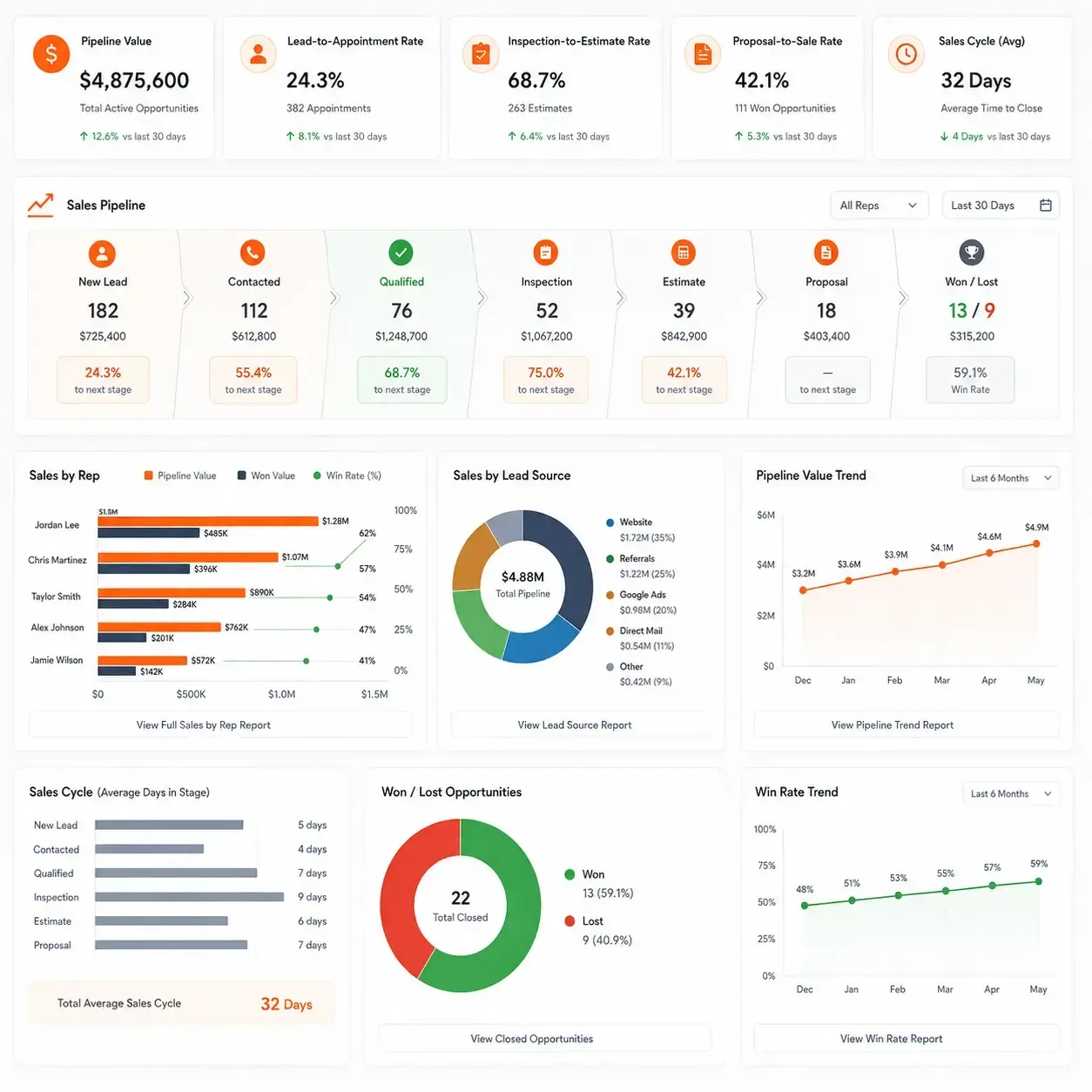
Pipeline Value
Total value of active roofing opportunities.
Lead-to-Appointment Rate
How many new leads reach a scheduled appointment or inspection.
Inspection-to-Estimate Rate
How often completed inspections progress to pricing.
Proposal-to-Sale Rate
How many proposals become approved jobs.
Sales by Rep
Opportunity value, wins and conversion by representative.
Sales by Lead Source
Which sources produce qualified opportunities and sold jobs.
Sales Cycle
How long opportunities remain in the pipeline before a decision.
Won / Lost Opportunities
Understand where and why roofing opportunities are being closed or lost.
Roofing Sales Workflows
Support Different Roofing Sales Workflows
Not every roofing opportunity moves through the same sales process. A retail replacement, storm restoration lead, commercial bid or door-to-door prospect may require different stages, follow-ups and approvals.
Sunbase Roofing CRM Software can be configured around those differences while keeping the customer, property and sales activity organized in the same CRM.
Residential Roof Replacement
Manage homeowner opportunities from first enquiry through inspection, estimate and contract.
Lead → Qualification → Inspection → Estimate → Proposal → Contract
Storm Restoration
Track damage-related opportunities with the additional documentation and follow-up they require.
Property → Damage Inspection → Documentation → Estimate → Approval
Commercial Roofing Sales
Manage longer sales cycles involving site visits, bids, decision-makers and follow-up.
Opportunity → Site Visit → Scope / Bid → Follow-Up → Contract
Roof Repair & Service
Move service opportunities quickly from request to approved work.
Request → Inspection → Estimate → Approval
Door-to-Door Canvassing
Turn field prospecting into trackable CRM opportunities.
Property → Contact Outcome → Qualified Lead → Inspection → Estimate
Multi-Location Sales Teams
Manage lead ownership and sales activity across territories, branches or multiple roofing teams.
Lead → Territory / Rep Assignment → Follow-Up → Opportunity → Sale
Cross-Team Visibility
Give Every Revenue Team the Information It Needs
Roofing sales involves more than the salesperson. Canvassers, inspectors, estimators, managers and marketing teams all contribute information that helps move an opportunity toward a signed job.
Sunbase Roofing CRM Software gives each team access to the sales information relevant to its role while keeping the opportunity organized around the customer and property.
01
Sales Reps
See the information needed to move opportunities forward.
Leads | Properties | Appointments | Proposals | Follow-Ups | Next Actions
02
Canvassers
Turn field activity into trackable roofing opportunities.
Properties | Contact Outcomes | Notes | Photos | Follow-Ups | Lead Status
03
Inspectors
Prepare for appointments and return inspection information to the sales process.
Customer | Property | Appointment | Roof Details | Photos | Inspection Status
04
Estimators
See the context behind the opportunity before preparing pricing.
Customer Requirements | Property | Inspection | Measurements | Estimate Request | Proposal Status
05
Sales Managers
Understand what is happening across reps and the pipeline.
Pipeline | Rep Activity | Deal Value | Conversion | Overdue Actions | Won / Lost
06
Marketing
Connect lead generation activity with downstream sales outcomes.
Lead Source | Campaign | Qualified Leads | Appointments | Sold Jobs | Sales Value
CONNECTED ROOFING SALES
One Roofing Sales Record Instead of Separate Sales Tools
Roofing sales often spans multiple systems for lead capture, scheduling, inspection notes, estimating and proposals. When those tools are disconnected, reps spend more time transferring information and managers lose visibility into the full opportunity.
Sunbase Roofing CRM Software keeps the sales process organized around one customer and property record from the first lead through the approved job.
When Sales Is Split Across Separate Tools
Lead Source
Website, ads, calls or canvassing
→
CRM / Spreadsheet
Customer and opportunity details
→
Calendar
Appointments and inspections
→
Inspection Notes
Photos, measurements and findings
→
Estimating Tool
Scope and pricing
→
Proposal / Contract
Customer decision
Result: Sales information is spread across different systems and may need to be re-entered, synchronized or manually checked.
With Sunbase Roofing CRM Software
Lead Source
↓
Customer & Property
↓
Appointment / Inspection
↓
Estimate Status
↓
Proposal
↓
Contract
↓
Approved Job Handoff
Result: Reps can see the history of the opportunity while managers can track ownership, stage, activity, next action and deal status from one roofing sales record.
Roofing CRM Integrations
Connect Your Roofing CRM With the Tools Already in Your Sales Process
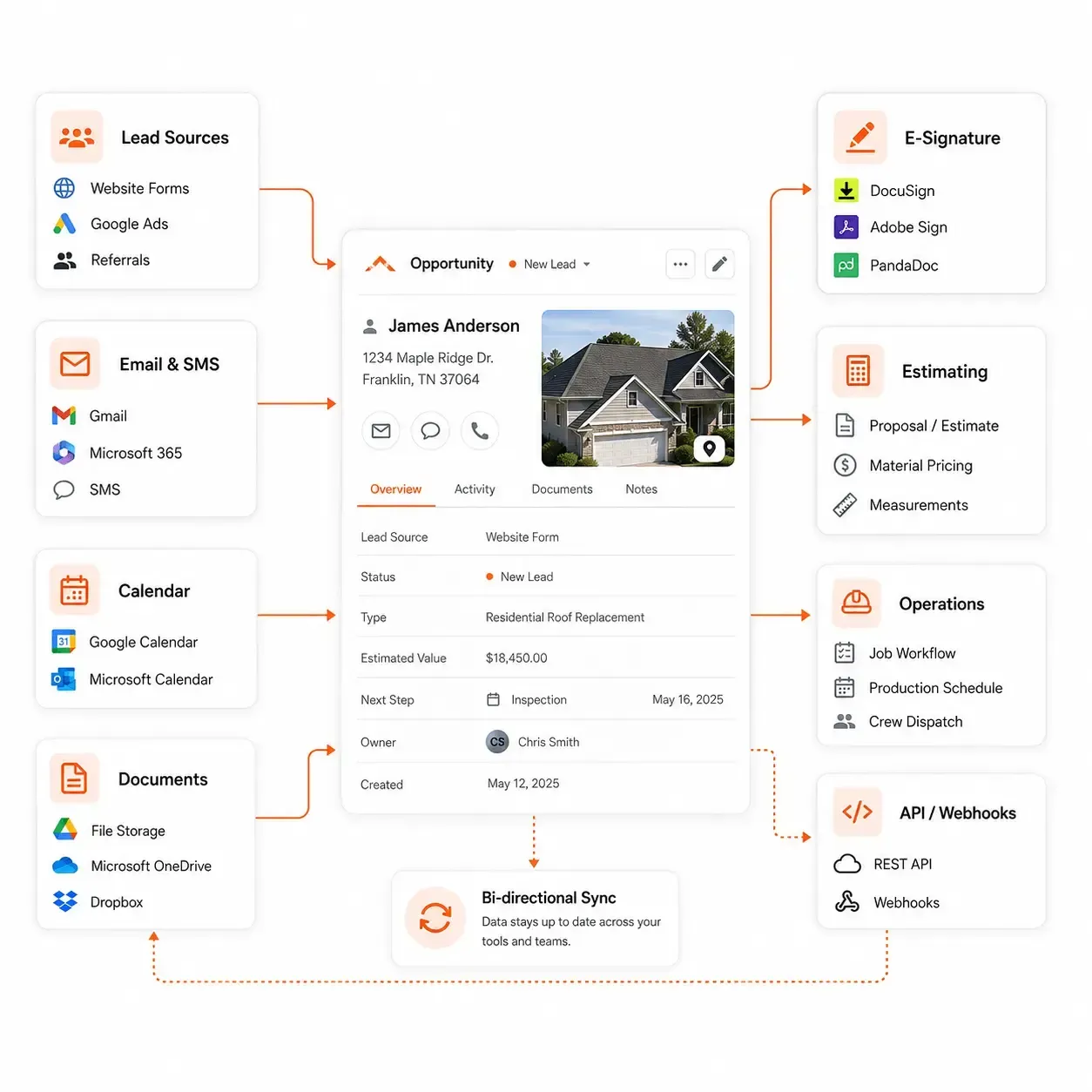
Sunbase Roofing CRM Software can connect lead sources, communication tools, calendars, documents and downstream systems so sales activity does not stop inside the CRM.
Lead Sources
Bring new roofing opportunities into the CRM from:
Website Forms | Meta Lead Ads | Google Ads | Referral Sources |
Partner Leads
Email & Communication
Keep customer conversations associated with the opportunity.
Gmail | Microsoft 365 | SMS | Supported Communication Tools
Calendars & Scheduling
Connect appointments, inspections and rep availability with the sales workflow.
Google Calendar | Microsoft Calendar | Supported Scheduling Tools
Documents & E-Signature
Keep proposals, contracts and customer documents accessible from the opportunity.
Document Storage | E-Signature | File Sharing
Estimating & Job Handoff
Pass approved opportunities into estimating, production or other roofing workflows without recreating the customer and property record.
APIs & Custom Connections
Extend the CRM through:
REST API | Webhooks | Automation | Custom Integrations
Configurable Roofing CRM
Configure the CRM Around Your Roofing Sales Process
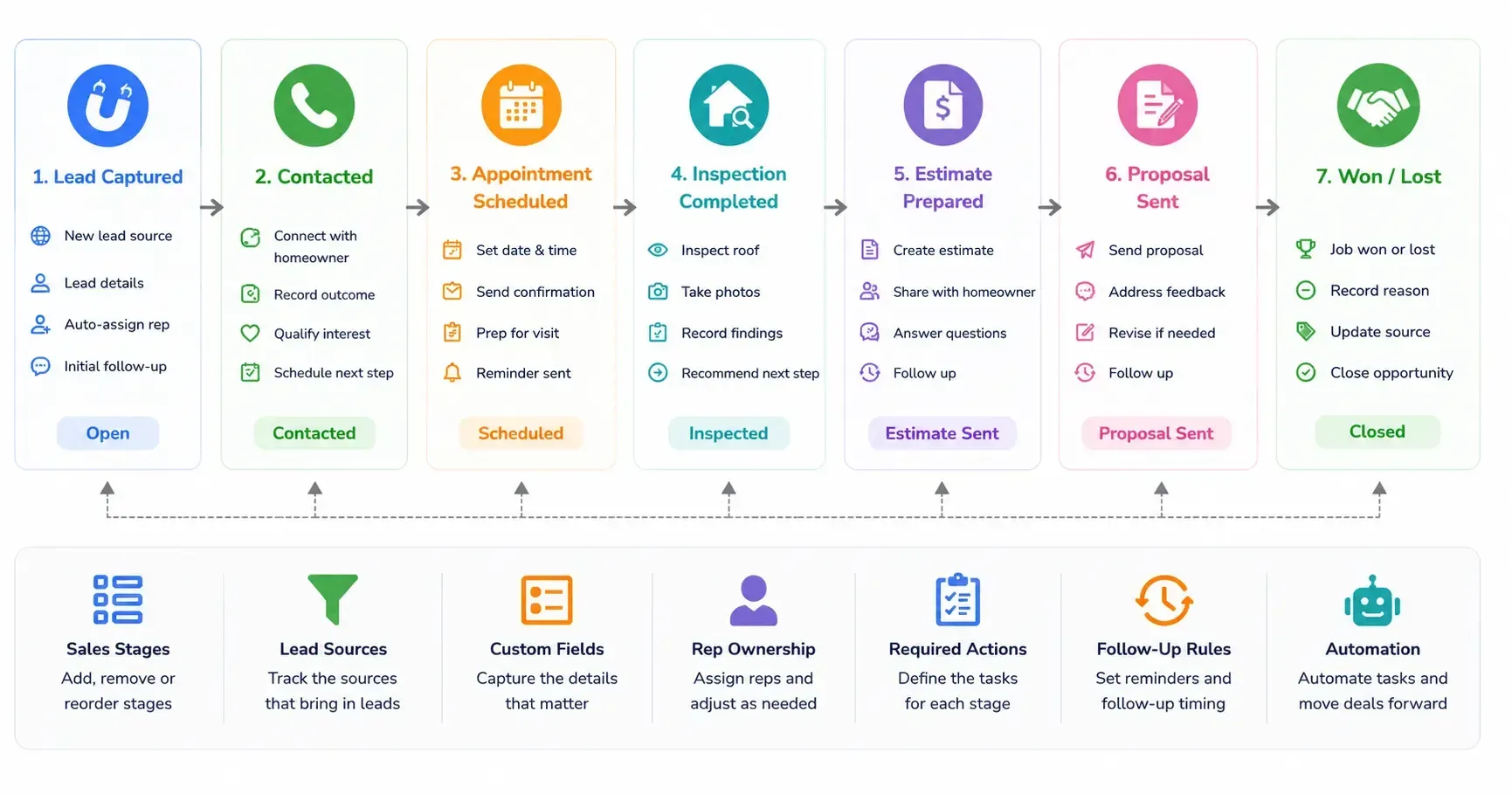
Roofing companies do not all qualify leads, schedule inspections, follow up with homeowners or close jobs the same way. Sunbase Roofing CRM Software can be configured around the stages, responsibilities and actions your sales team already uses.
Sales Stages | Lead Sources | Custom Fields | Rep Ownership | Required Actions | Follow-Up Rules | Automation
Roofing CRM Pricing
Pricing That Fits the Sales Workflow Your Team Needs
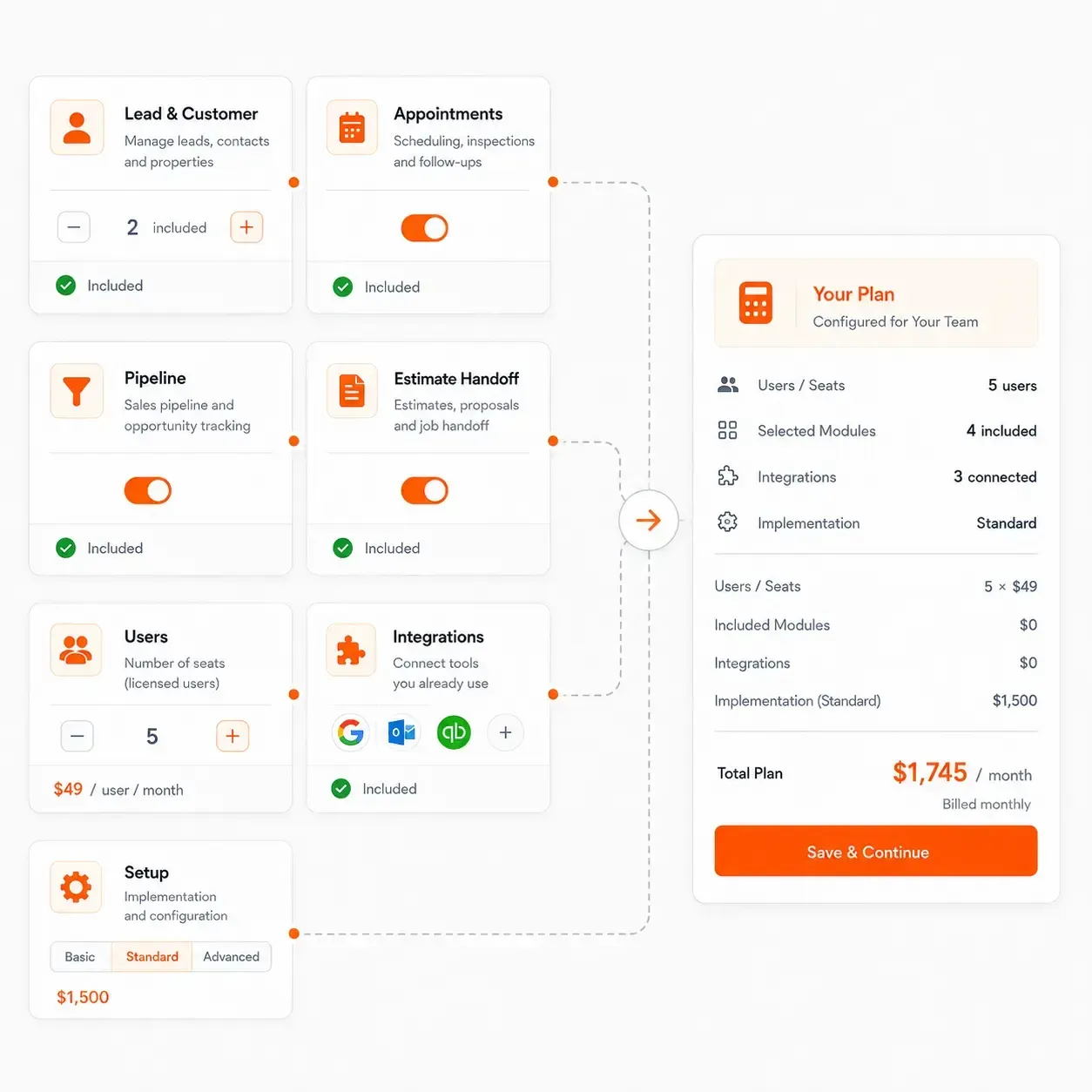
Roofing sales teams vary in size, process and the tools they use around the CRM. Sunbase Roofing CRM Software can be configured around the users, sales workflows and capabilities required by your team.
Build Around the Areas You Need
Lead & Customer Management
Leads, contacts, properties, lead sources and sales activity.
Appointments & Follow-Ups
Scheduling, inspections, tasks, reminders and next actions.
Pipeline & Sales Management
Sales stages, opportunity value, rep ownership and conversion tracking.
Estimates & Proposal Handoff
Move qualified roofing opportunities into estimating, proposal and job workflows.
Scale With Your Sales Team
Pricing can be based on factors such as:
Number of Users | Required CRM Capabilities | Workflow Configuration | Integrations | Implementation Requirements
Roofing CRM Setup
Set Up Sunbase Roofing CRM Around Your Existing Sales Process
Moving to a new CRM should not mean rebuilding your entire roofing sales operation from scratch. Sunbase Roofing CRM Software can be configured around your current pipeline, team structure and follow-up process.
1. Review Your Current Sales Workflow
Map how leads currently move from first enquiry through appointment, inspection, estimate, proposal and contract.
2. Configure the roofing CRM workflow
Set up:
Pipeline Stages | Lead Sources | Custom Fields | Rep Ownership | Required Actions | Follow-Ups
3. Connect Your Existing Sales Systems
Configure the integrations and data connections your sales team needs to keep using.
Lead Sources | Email | Calendar | Documents | Estimating | APIs
4. Import Data & Launch
Bring in the customer, property and opportunity data required for the new CRM, then set up users, permissions and workflows for the team.
Roofing CRM FAQs
Questions Roofing Contractors Ask Before Choosing a CRM
What should a roofing CRM track beyond leads and contacts?
A roofing CRM should track the information that determines whether an opportunity is actually moving forward, including property address, lead source, assigned rep, appointment status, inspection status, estimate status, proposal status, last activity, next action and deal value.
For roofing companies, the property and next step are often just as important as the contact record.
How is roofing CRM software different from a general CRM?
A general CRM is usually built around contacts, companies and deals. Roofing CRM software also needs to account for the property, inspection, estimate and roofing-specific sales stages behind the opportunity.
This allows reps to see not only who the prospect is, but also which property is involved, what has happened so far and what needs to happen next.
Can a roofing CRM help prevent missed follow-ups?
Yes. A roofing CRM can surface upcoming appointments, next actions, overdue tasks, inactive opportunities and proposals waiting on a decision.
This helps sales reps focus on opportunities that have stopped moving instead of relying on personal reminders or spreadsheets.
How should roofing leads be assigned to sales reps?
Lead assignment can be based on factors such as territory, location, lead source, sales team, rep availability or canvassing area.
The important part is that ownership is clear as soon as the lead enters the CRM and remains visible throughout the sales process.
Can a roofing CRM track door-to-door and canvassing leads?
Yes. Field-generated prospects can be added with information such as property, assigned rep, contact outcome, notes, photos and next follow-up.
Qualified canvassing leads can then continue through the same appointment, inspection, estimate and proposal workflow as other roofing opportunities.
How can roofing companies tell which lead sources are producing sales?
The CRM should keep the original lead source connected to the opportunity as it moves through the pipeline.
Instead of measuring only lead volume, roofing companies can compare:
Leads → Qualified Leads → Appointments → Inspections → Estimates → Proposals → Sold Jobs → Sales Value
This gives a clearer view of which channels are generating revenue, not just enquiries.
Should roofing estimates and proposals be managed inside the CRM?
They do not necessarily need to be created entirely inside the CRM, but their status should remain visible from the sales record.
A rep should be able to answer:
Has the estimate been prepared? Has the proposal been sent? Is the customer reviewing it? What is the next follow-up?
without searching across separate systems.
Can I keep my existing roofing software when switching CRM?
In many cases, yes. Roofing companies often continue using specialist systems for measurements, estimating, e-signature, accounting or other operational functions.
Before choosing a CRM, confirm which existing tools need to remain and whether the required data can move through supported integrations, APIs, webhooks or automation.
What roofing CRM reports should a sales manager track?
Useful roofing sales metrics include:
Lead Response Time | Qualification Rate | Appointment Rate | Inspection Rate | Estimate-to-Proposal Rate | Proposal-to-Sale Rate | Pipeline Value | Sales by Rep | Sales by Lead Source | Overdue Follow-Ups | Lost Opportunities
These reports help managers understand where opportunities are slowing down and where the sales process needs attention.
When has a roofing company outgrown spreadsheets or a basic CRM?
Common signs include missed leads, inconsistent follow-ups, separate property spreadsheets, unclear lead ownership, disconnected estimates and managers having to ask reps for pipeline updates.
If the team cannot quickly answer who owns the opportunity, what happened last and what happens next, the sales process usually needs a more structured roofing CRM.
What should I ask during a roofing CRM demo?
Ask the vendor to show one real roofing opportunity moving through the system.
Look for:
How a new lead enters the CRM
How the customer is connected to the property
How inspections and appointments are scheduled
How estimate and proposal status are tracked
How overdue follow-ups are surfaced
How lead sources and rep performance are reported
How an approved sale moves into the job workflow
Which integrations are native and which require configuration
How existing CRM data would be migrated
A useful roofing CRM demo should show how the sales team actually works from lead to signed job, not only dashboards and feature menus.
Ready to Build a Better Roofing Sales Process?
Capture leads, manage properties, keep follow-ups on track and give your sales team a clear path from first enquiry to approved roofing job.
Plans start at $59/user/month. Final pricing depends on users, configuration and required capabilities.