
Roofing Software
for Managing Jobs From Lead to Completion
*Contact us for a quote based on your team size
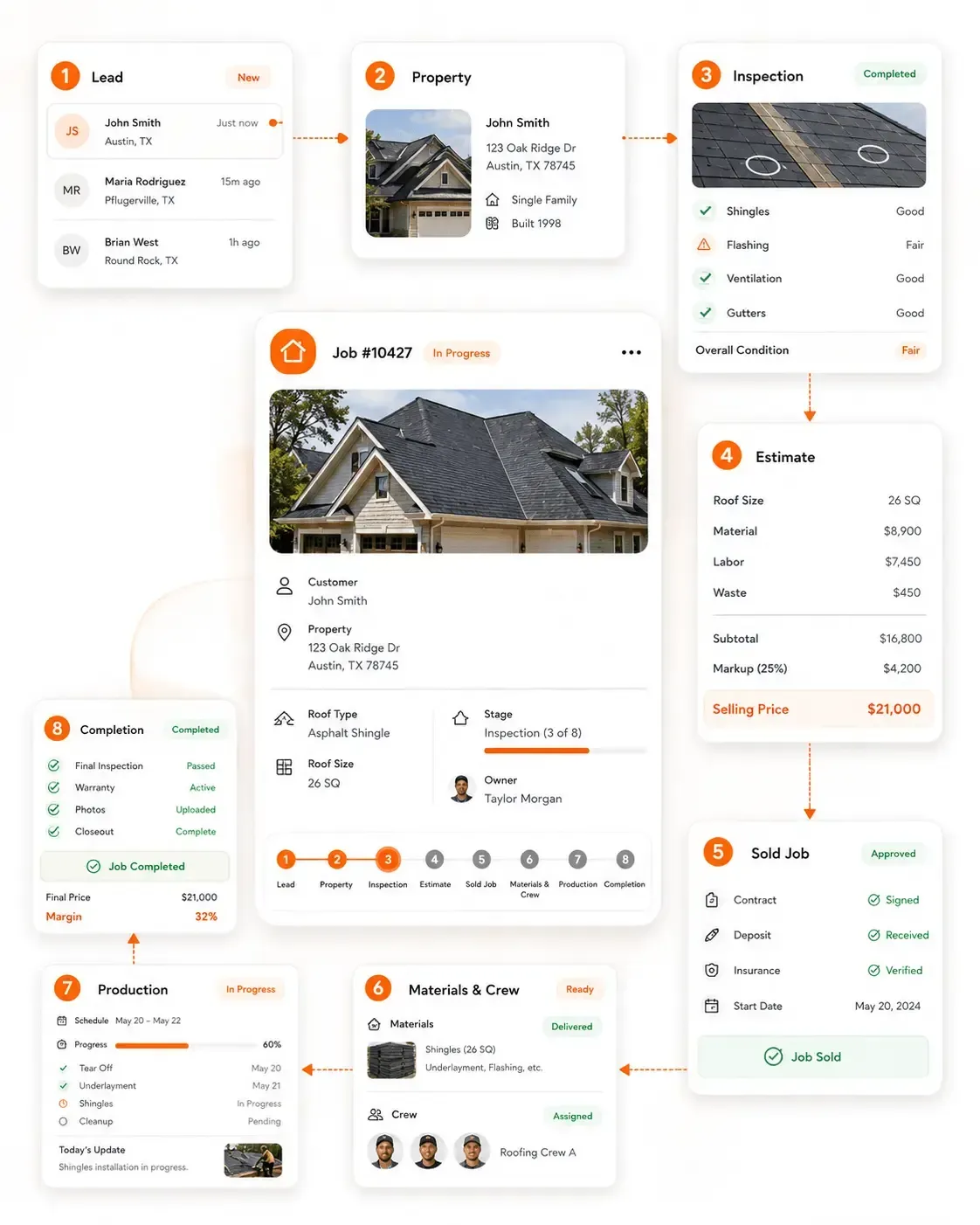
roofing software
WHAT IS ROOFING SOFTWARE?
Roofing software is a digital platform that helps roofing companies manage customer and property information, roof inspections, estimates, materials, crews and job progress from the first lead through project completion.
Unlike a general CRM or project-management tool, roofing software connects the information created during
inspection, estimating, sales and production around the same roofing job.
Customer & Property Record
Every Roofing Job Starts With the Property
Before a roofing company can inspect, estimate or schedule the work, it needs a clear record of the customer, property and roof conditions behind the job.
Sunbase Roofing Software keeps this information connected from the first enquiry so sales, inspection, estimating and production teams can work from the same roofing job record.
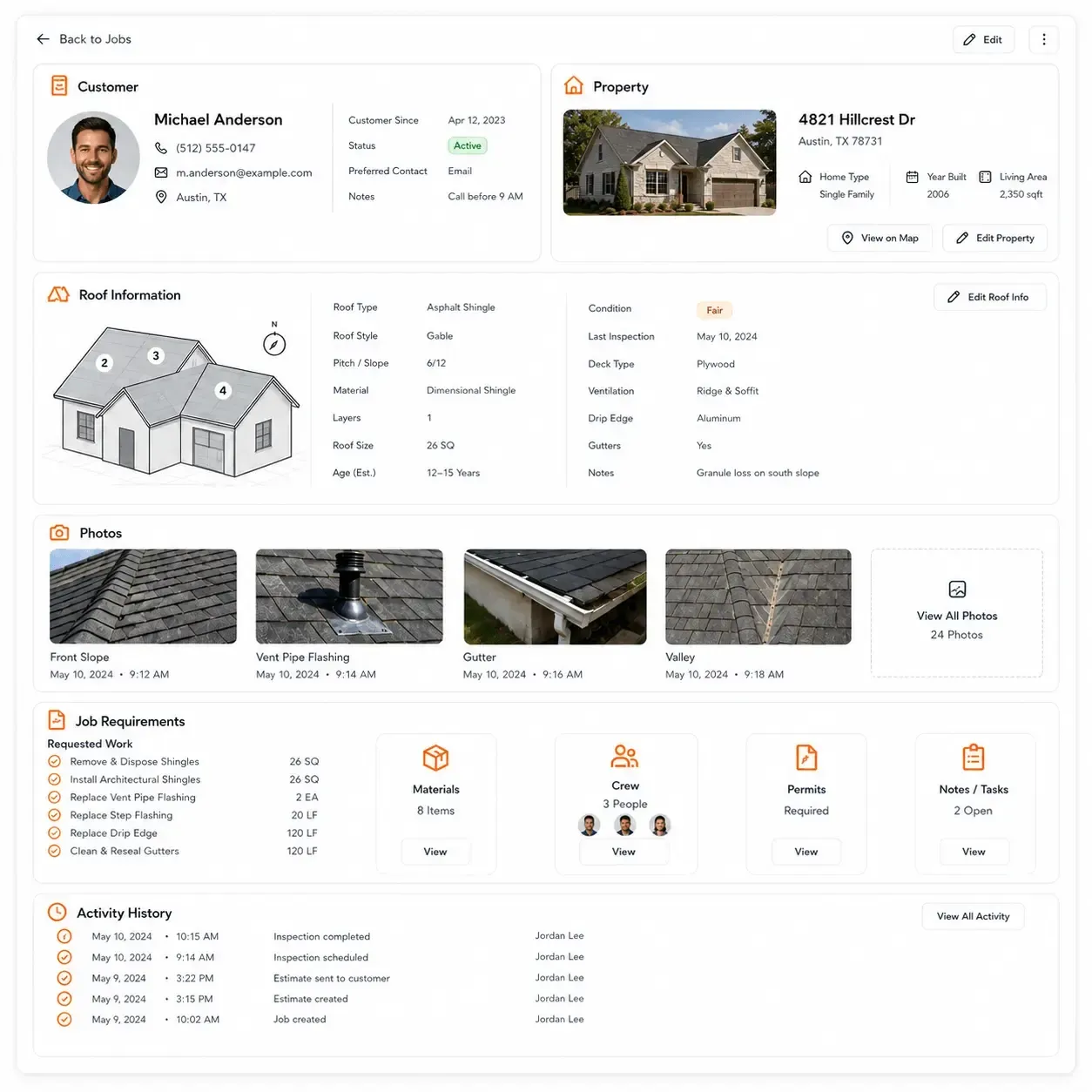
Keep the Customer and Property Information Together
- Customer and contact details
- Property address and job location
- Lead source and assigned representative
- Roof type and existing roofing system
- Roof condition and known damage
- Property photos and documents
- Customer requirements and requested work
- Previous inspections, estimates and job history
- Calls, messages, notes and job activity history
Build the Roofing Job Around the Property
As more information is collected, the same property record can connect:
Customer | Property | Roof Information | Documents | Activity Feed | Job History
The property record becomes the starting point for the inspection, roofing scope, estimate and work that follows.
Roof Inspection & Job Assessment
Turn Roof Inspection Findings Into the Scope of Work
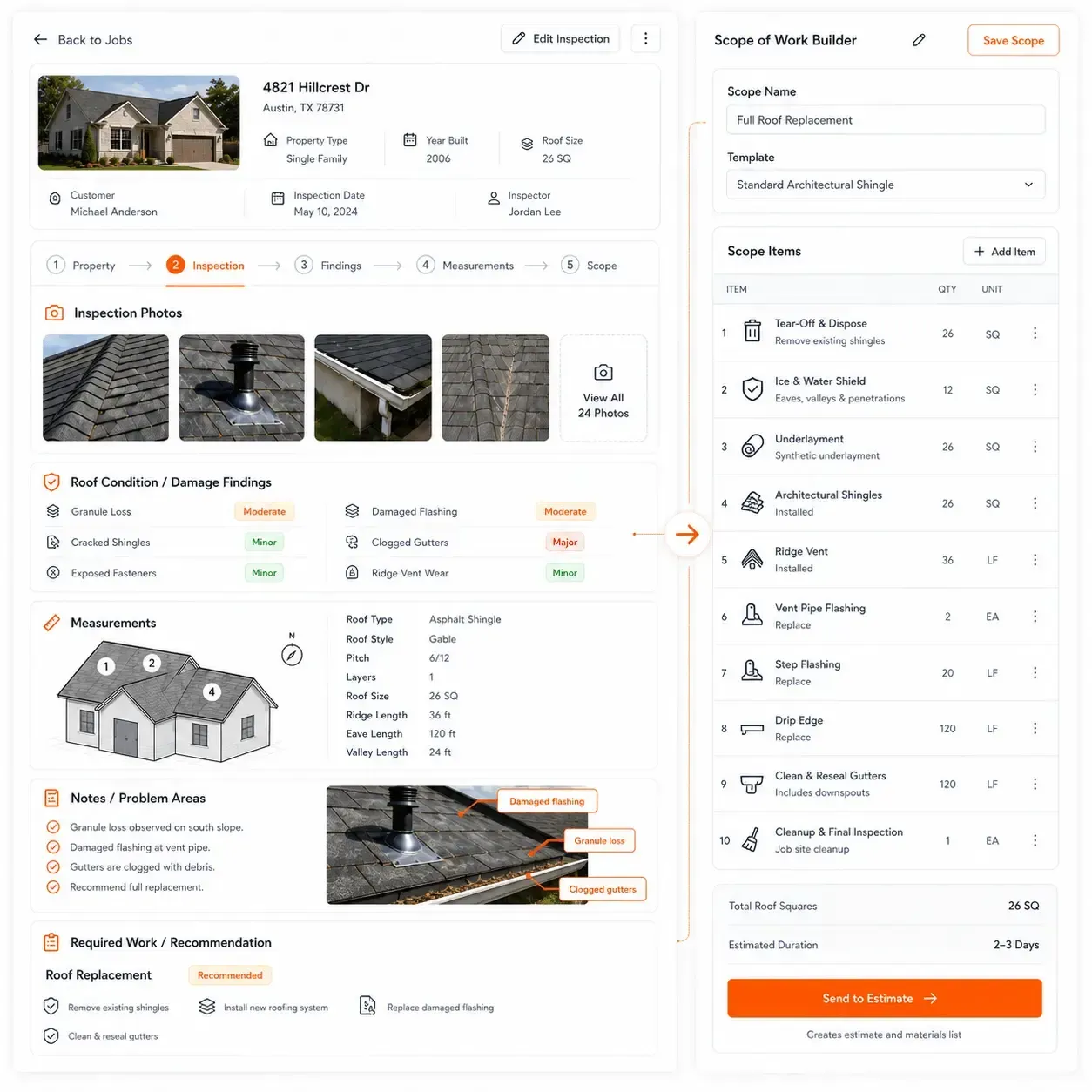
A roof inspection should do more than document the condition of the property. It should create the information needed to define the roofing scope, prepare the estimate and plan the work.
Sunbase Roofing Software keeps inspection findings connected to the same customer and property record so the next team does not have to rebuild the job from separate photos, notes or measurement files.
Capture the Information That Affects the Roofing Job
- Roof condition and existing roofing system
- Damage, wear and problem areas
- Roof measurements, pitch and dimensions
- Ridges, hips, valleys, eaves and rakes
- Skylights, vents, chimneys and penetrations
- Photos and inspection notes
- Access, safety and site conditions
- Recommended repair or replacement work
Move From Inspection to Scope
Property → Roof Inspection → Findings → Measurements → Scope of Work
The inspection becomes the starting point for deciding what work is required, what materials will be needed and what should be included in the roofing estimate.
Roofing Measurements & Estimating
Turn Roof Measurements Into a Workable Roofing Estimate
Once the inspection is complete, the next step is turning roof measurements and required work into a clear scope, material plan and price.
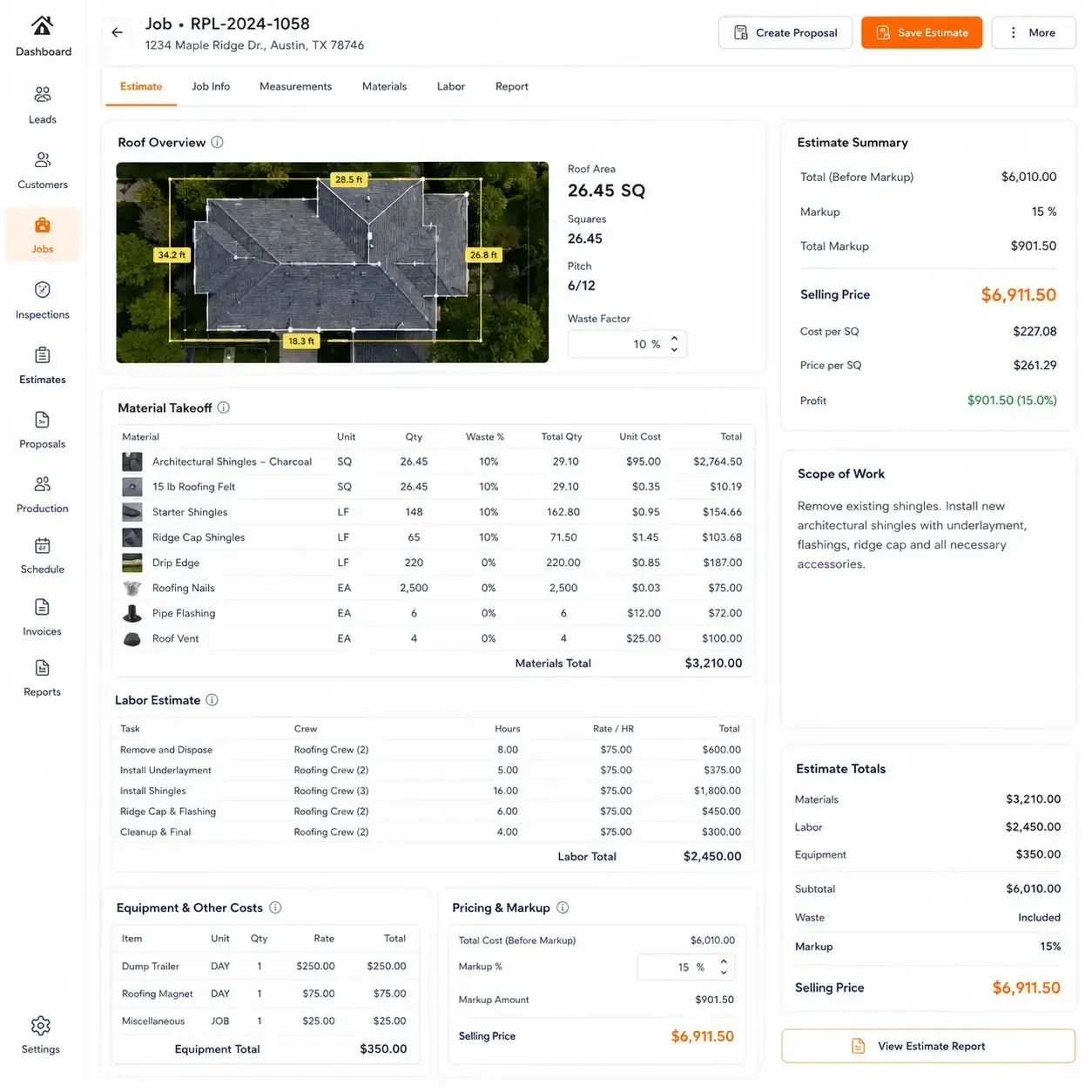
Sunbase Roofing Software keeps the measurement, inspection and cost information connected so estimators can build the job around what actually needs to be installed. Use roof measurements to develop the scope, material takeoff, labor requirements and selling price.
Build the Estimate From the Roofing Scope
- Roof area, squares, pitch and dimensions
- Ridges, hips, valleys, eaves and rakes
- Waste factors and required material quantities
- Shingles, underlayment, flashing, ridge caps and accessories
- Labor and subcontractor costs
- Equipment and other job expenses
- Markup, selling price and expected margin
- Additional or optional work
From Roof Data to Customer Pricing
Measurements → Scope of Work → Materials & Labor → Estimate → Selling Price
This creates a direct connection between what was found on the roof, what work is required and what the customer is being quoted for.
Roofing Estimate to Proposal
Turn the Approved Job Scope Into a Clear Customer Proposal
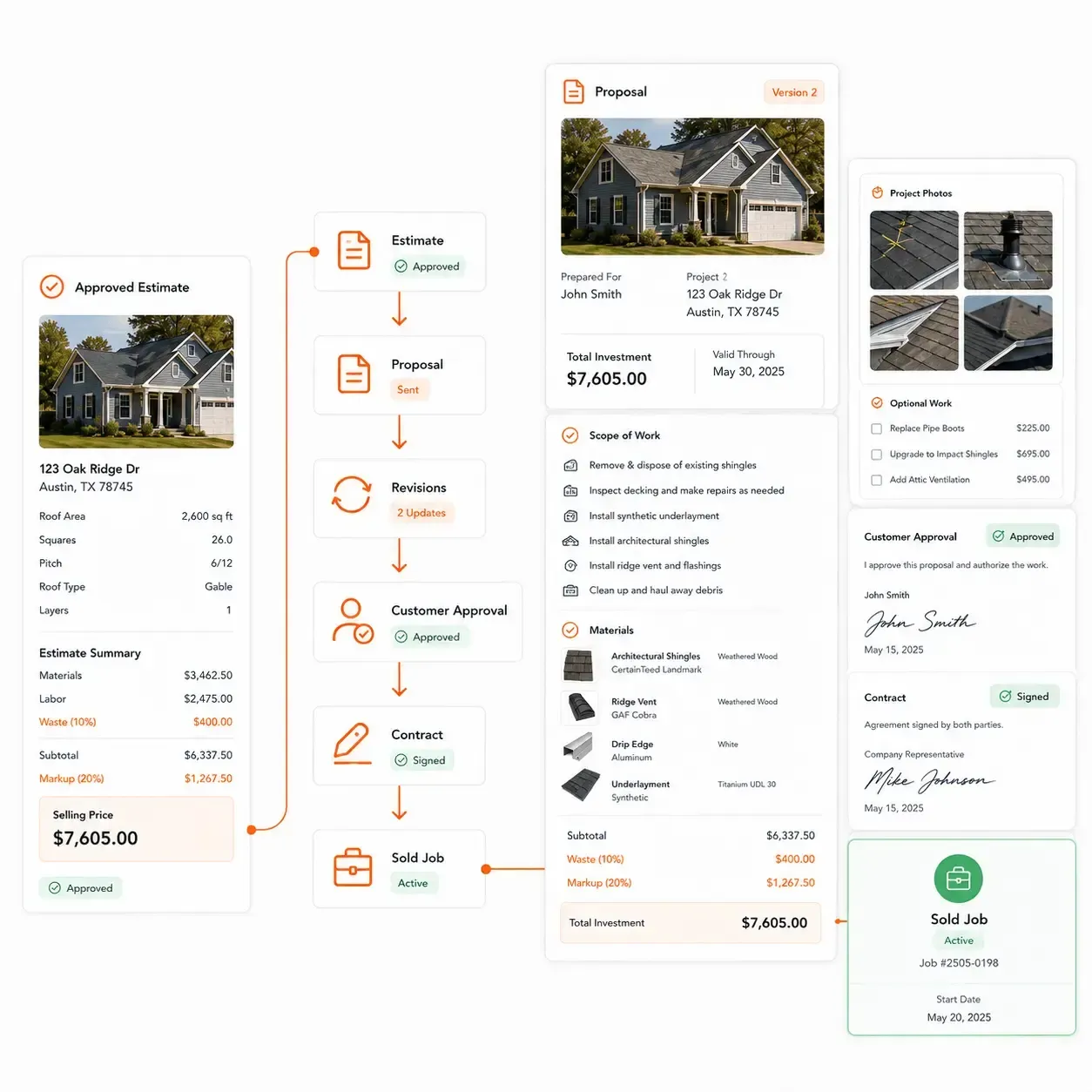
Once the scope, materials and pricing are defined, the estimate should move directly into the customer proposal without rebuilding the job in a separate document.
Sunbase Roofing Software keeps the approved roofing scope, pricing and project details connected as the opportunity moves from estimate to customer approval.
Present the Job Clearly to the Customer
- Approved roofing scope and recommended work
- Material selections and roofing system details
- Labor, Project pricing, financing and optional work
- Inspection photos and supporting notes
- Proposal revisions and updated pricing
- Customer approval and signed documents
- Accepted scope carried into the sold job
From Estimate to Sold Job
Estimate → Proposal → Revisions → Customer Approval → Contract → Sold Job
The production team can then work from the same approved scope, materials and customer commitments used during the sales process.
Production Readiness
A Sold Roofing Job Is Not Always Ready to Install
A signed contract does not always mean the roofing job is ready to install. Materials, approvals, crew availability and site requirements may still need to be confirmed before the job reaches the production calendar.
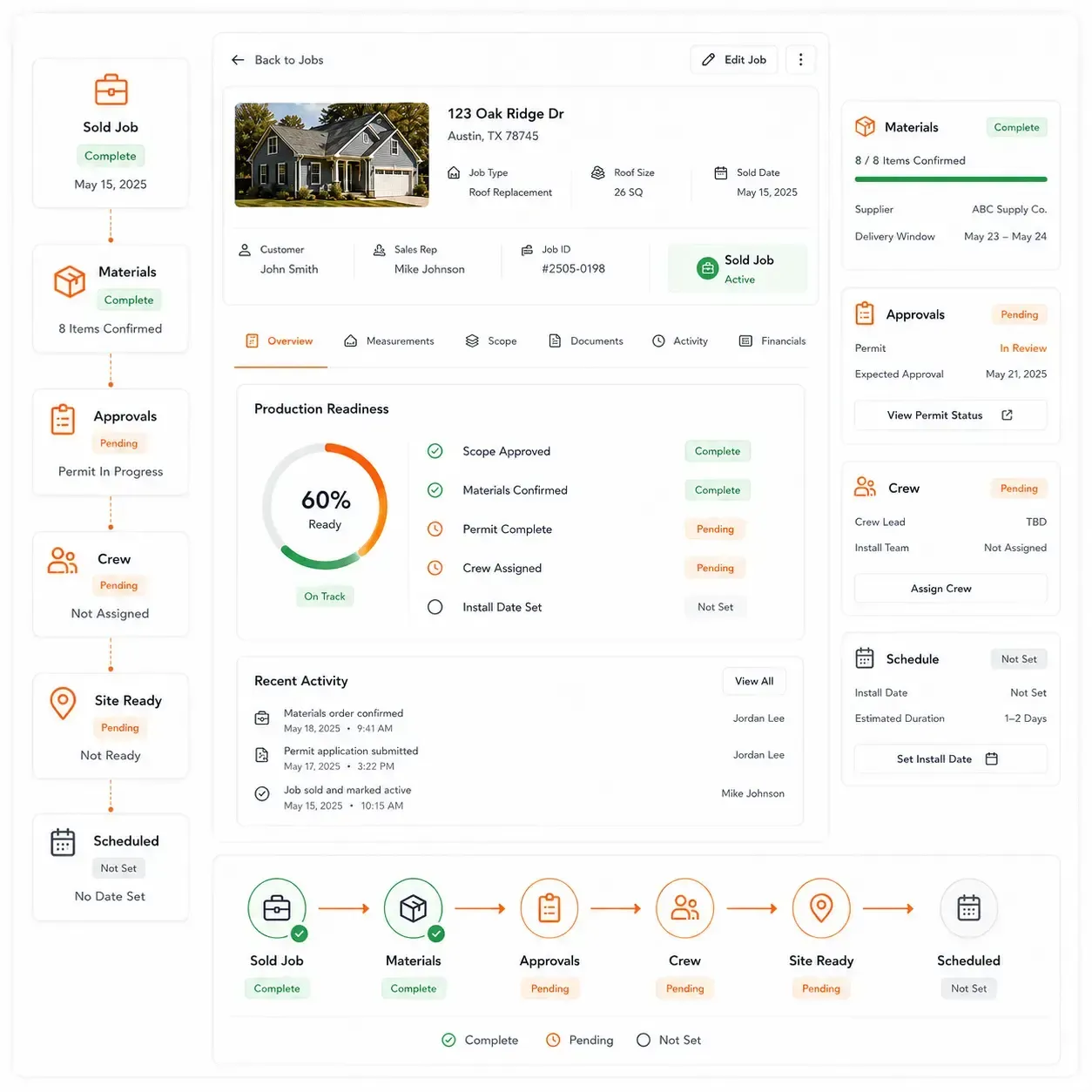
Sunbase Roofing Software helps production teams see what is complete, what is still missing and what is blocking the next stage.
Confirm the Job Before Scheduling Installation
- Final scope and contract approved
- Material selections confirmed
- Required permits or approvals completed
- Materials ordered and delivery scheduled
- Crew or subcontractor assigned
- Equipment and site requirements confirmed
- Customer installation date confirmed
- Outstanding changes or production issues resolved
From Sold Job to Production-Ready
Sold Job → Materials & Approvals → Crew Assigned → Site Ready → Production Ready → Scheduled
This gives the production team a clearer answer to the question:
“Can this roofing job actually be installed as planned?”
Complete Roofing Production Workflow
Move the Roofing Job From Production-Ready to Final Closeout
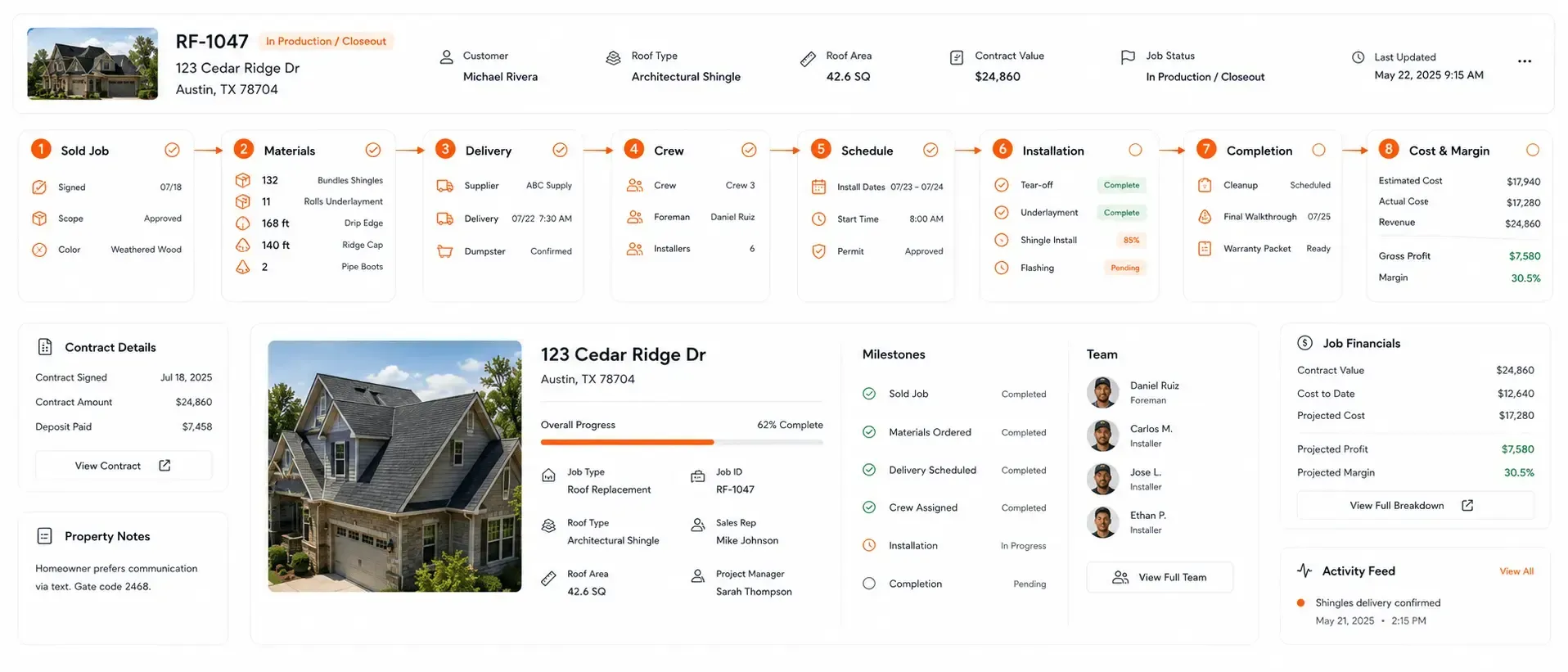
Once a roofing job is ready for production, the focus shifts from selling the work to delivering it. Sunbase Roofing Software keeps materials, crews, schedules, field activity and completion connected to the approved roofing job.
One Connected Production Record
Sold Job → Work Order → Materials → Delivery → Crew → Schedule → Installation → Completion → Cost & Margin
Information created during estimating and sales remains available throughout production, helping office and field teams work from the same approved roofing scope and job record.
Job Costing & Profitability
See What the Roofing Job Actually Cost
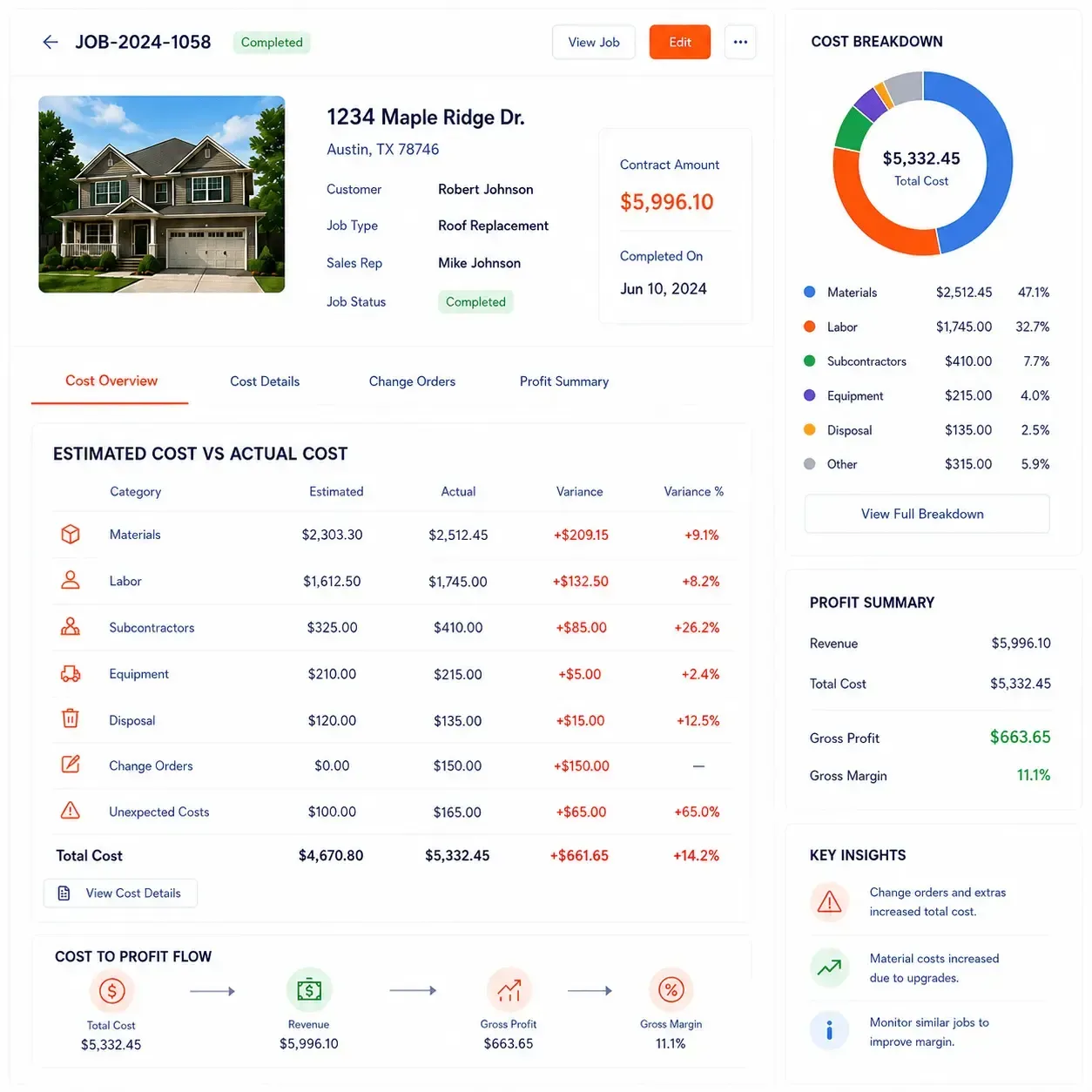
A roofing job can look profitable when it is sold but still lose margin during production. Material changes, additional labor, subcontractor costs and unexpected work can all affect the final result.
Sunbase Roofing Software keeps estimated and actual job costs connected so management can understand how the completed project performed financially.
Compare Planned Cost With Actual Cost
- Estimated material cost
- Actual material cost
- Labor and manpower
- Subcontractor expenses
- Equipment and disposal costs
- Change orders and additional work
- Unexpected production expenses
- Revenue, gross profit and final margin
From Estimate to Final Margin
Estimated Cost → Actual Cost → Invoice → Payment → Revenue → Gross Profit → Margin
This helps roofing companies see where costs changed, which jobs stayed within the original plan and which projects are falling below the expected margin.
Roofing Workflows
Support Different Types of Roofing Work
Different roofing jobs require different stages, approvals and field workflows. Sunbase Roofing Software can be configured around each type of work while keeping the customer, property and job history connected.
Residential Roof Replacement
Manage the complete homeowner replacement workflow.
Lead → Inspection → Estimate → Contract → Materials → Installation → Closeout
Storm & Insurance Restoration
Manage storm-related jobs with damage documentation, insurance claims, supplements and approval tracking.
Damage → Claim → Estimate → Supplement → Approval → Production
Commercial Roofing
Coordinate longer projects with procurement, milestones and multiple teams.
Site Assessment → Bid → Procurement → Milestones → Field Execution → Closeout
Roof Repair & Service
Move smaller service jobs quickly from inspection to completion.
Service Request → Inspection → Estimate → Schedule → Repair → Complete
Preventive Maintenance
Maintain ongoing roof condition, deficiencies and service history.
Roof Record → Inspection → Deficiency → Work Order → Maintenance → Service History
Multi-Site & Property Portfolio Roofing
Manage roofing work across multiple properties, locations or customer sites.
Properties → Inspections → Required Work → Priorities → Projects → Service History
Cross-Team Visibility
Give Every Roofing Team the Job Information They Need
Sales, estimating, purchasing, production and field teams work on different parts of the roofing job. Sunbase Roofing Software keeps the same job record connected while giving each team visibility into the information relevant to its work.
01
Sales Teams
Manage the customer relationship and move opportunities toward an approved job.
Leads | Customers | Appointments | Follow-Ups | Proposals | Financing | Sales Stage
02
Inspectors & Estimators
Work with the property and roof information needed to define scope and pricing.
Roof Details | Measurements | Photos | Damage | Scope | Pricing | Supplements | Estimate
03
Purchasing
See what materials are required and what still needs to reach the job.
Material Quantities | Suppliers | Purchase Orders | Deliveries | Outstanding Items
04
Production
Know which jobs are ready, what is blocking them and when work is scheduled.
Production Readiness | Work Orders | Crew | Subcontractors | Schedule | Milestones | Material Status | Blocker
05
Field Crews
Access the information needed to perform and document the roofing work.
Property | Approved Scope | Materials | Tasks | Photos | Progress | Issues
06
Owners & Management
See the wider roofing operation without opening every individual job.
Sales Pipeline | Active Jobs | Upcoming Installs | Invoices | Payments | Gross Profit | Margin
Connected Roofing Operations
One Roofing Job Record Instead of Multiple Disconnected Systems
Roofing companies may use separate systems for CRM, measurements, estimating, suppliers, production and accounting. The challenge is keeping the job consistent as work moves between them.
Sunbase Roofing Software keeps the
customer, property, approved scope and production information tied to the same roofing job throughout the workflow.
When Roofing Work Is Split Across Systems
- CRM
Lead, customer and sales activity
→ Measurement / Inspection Tool
Roof dimensions, property data and photos
→ Estimating / Proposal Software
Scope, materials, labor and customer pricing
→ Supplier / Purchasing System
Material orders and delivery information
→ Production Tool
Crew, schedule and field progress
→ Accounting System
Invoices, actual costs and profitability
Result: Job information may need to be exported, synchronized or entered again as the project moves forward.
With Sunbase Roofing Software
Customer & Property
↓
Inspection & Measurements
↓
Scope & Estimate
↓
Proposal & Sold Job
↓
Materials & Purchasing
↓
Crew & Production
↓
Completion & Job Costing
Result: One connected roofing job record from the first lead through production and final margin.
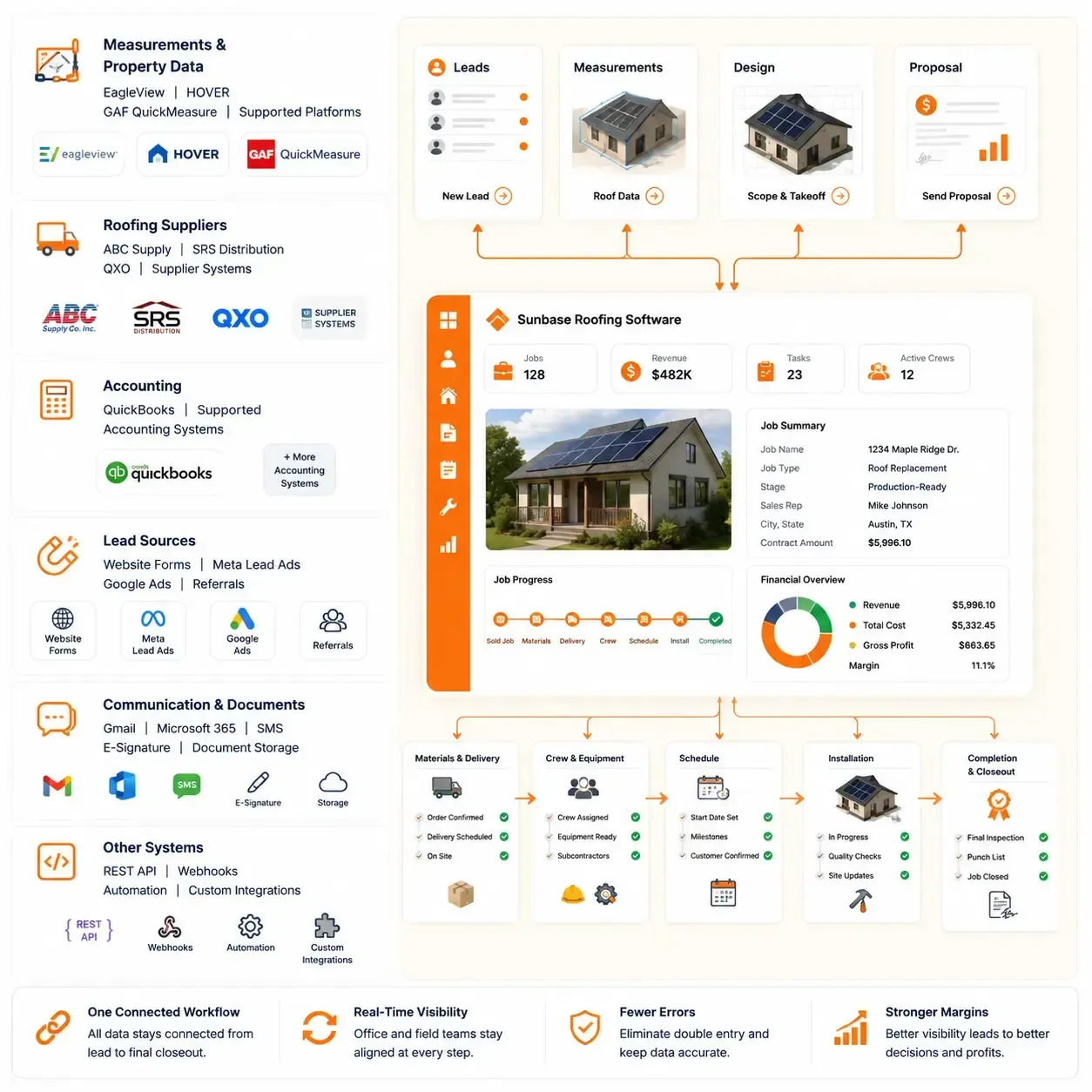
Roofing Software Integrations
Connect Sunbase Roofing Software With the Tools Your Team Already Uses
Sunbase Roofing Software can connect these systems to the wider customer and job workflow through supported integrations and configurable connections.
Measurements & Property Data
EagleView | HOVER | GAF QuickMeasure | Supported Platforms
Roofing Suppliers
ABC Supply | SRS Distribution | QXO | Supplier Systems
Accounting & Payments
QuickBooks | Supported Accounting Systems
Lead Sources
Website Forms | Meta Lead Ads | Google Ads | Referrals
Communication & Documents
Gmail | Microsoft 365 | SMS | E-Signature | Document Storage
Other Systems
REST API | Webhooks | Automation | Custom Integrations
Configurable Roofing Workflows
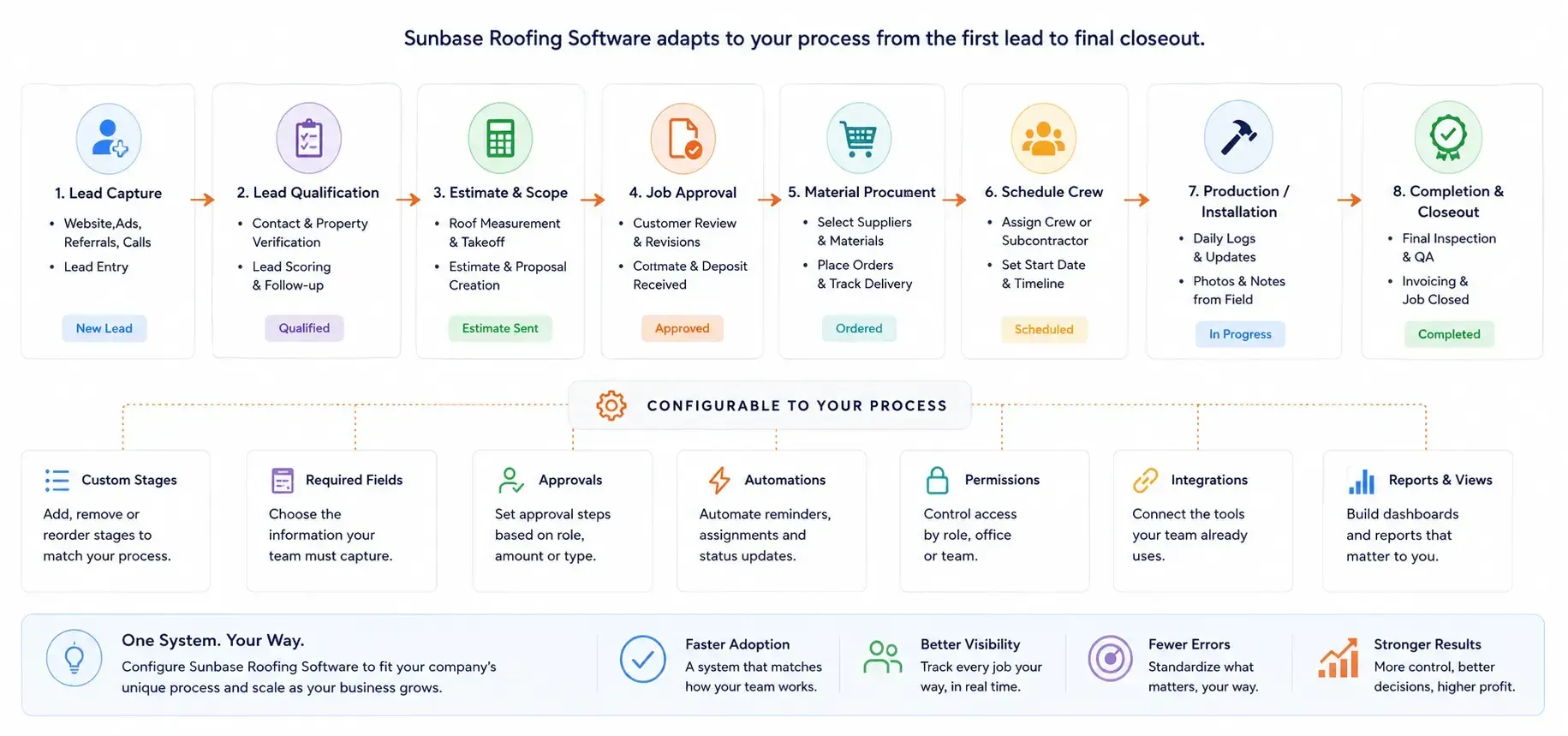
Configure Sunbase Roofing Software Around the Way Your Team Works
Roofing companies differ in how they qualify leads, approve jobs, purchase materials, schedule crews and close projects.
Sunbase Roofing Software can be configured around your existing process.
Job Sold → Create Work Order → Assign Production Manager → Notify Team
Roofing Software Pricing
Pricing That Fits the Roofing Workflow You Need
Sunbase Roofing Software can be configured around the users, workflows and capabilities your roofing company needs—from sales and estimating through production, field operations and financial management.
Plans start at $59/user/month.
Pricing can vary based on:
Number of Users | Required Modules | Workflow Configuration | Integrations | Automation | Implementation
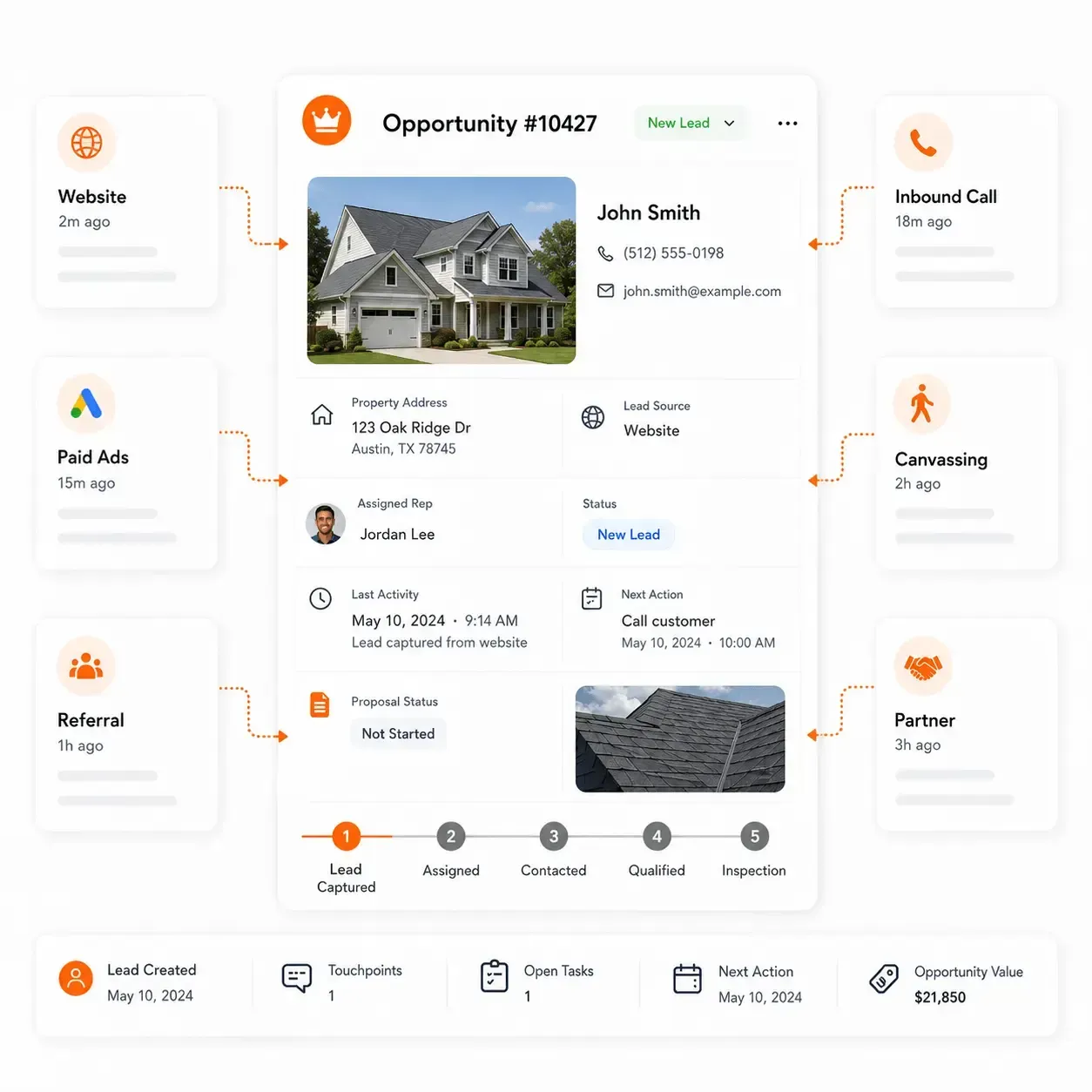
Roofing CRM Software
Manage the customer relationship from the first roofing enquiry through the sold job.
- Lead Capture
- Customer & Property Records
- Appointments & Follow-Ups
- Sales Pipeline
- Proposals & Approvals
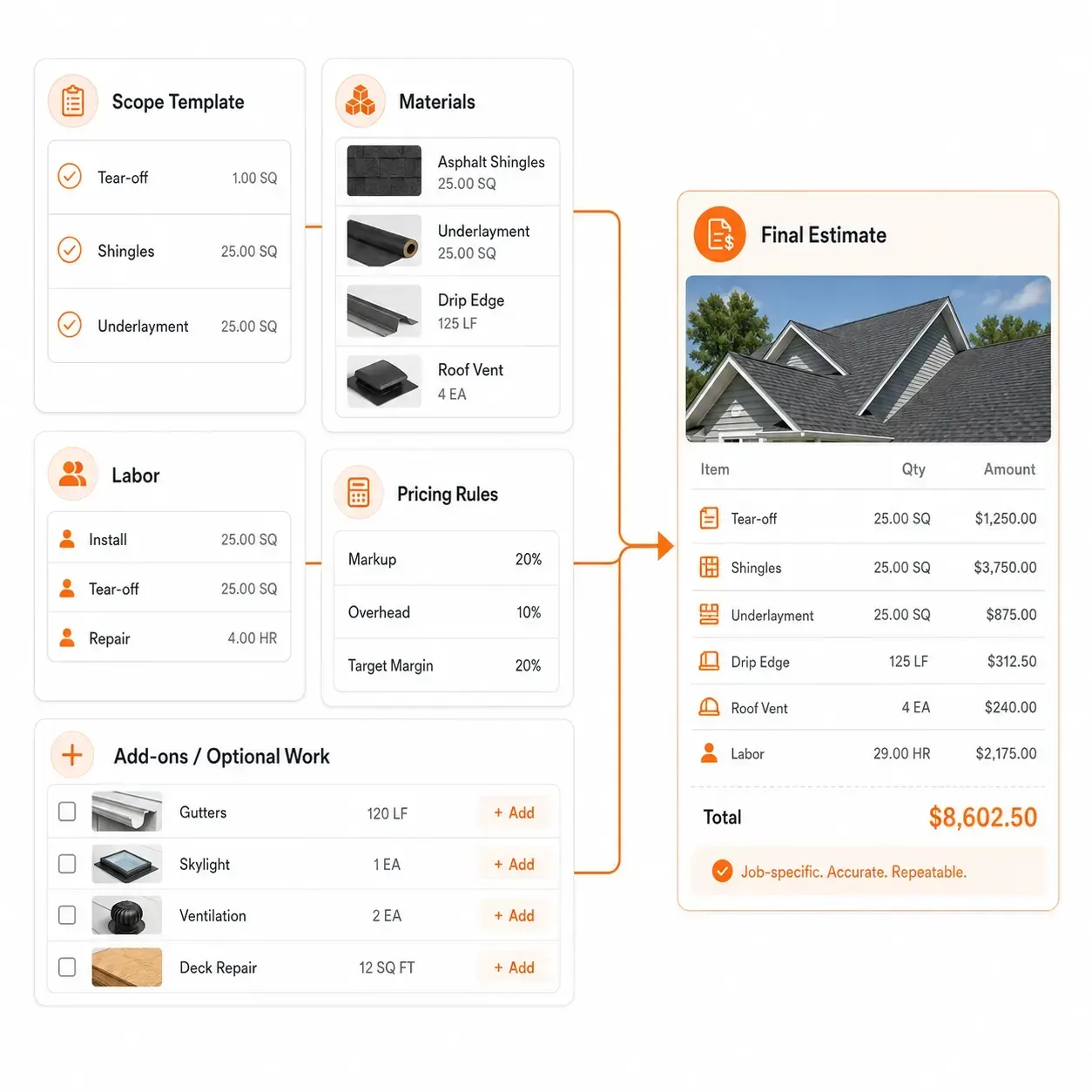
Roofing Estimating & Proposal Software
Turn property and roof information into the scope, quantities and pricing required to sell the work.
- Roof Measurements
- Scope of Work
- Material & Labor Costing
- Markup & Margin
- Good / Better / Best Options
- Proposal & Approval
Roofing Project Management Software
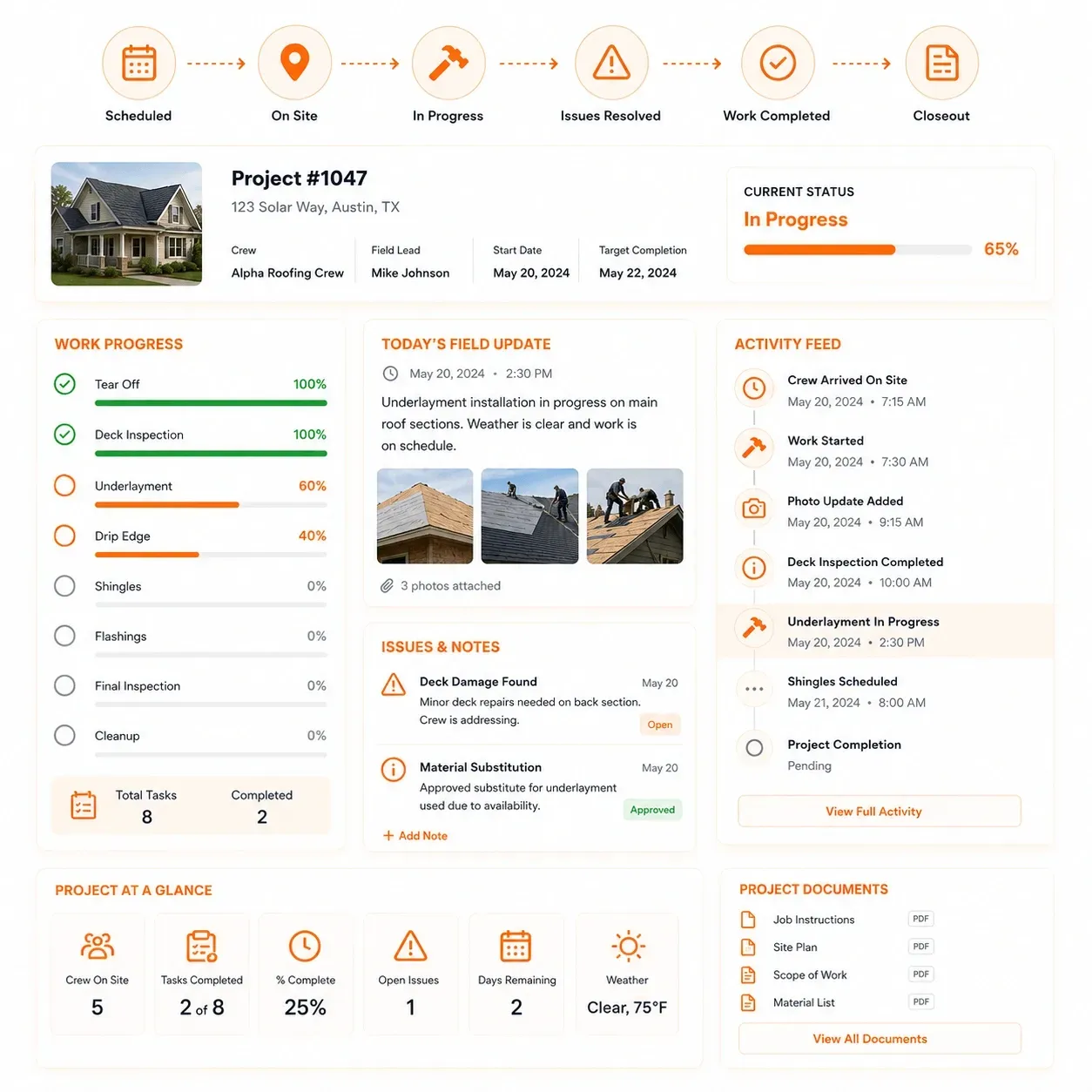
Move approved roofing jobs through production readiness, scheduling, field execution and final closeout.
- Production Readiness
- Work Orders
- Materials & Deliveries
- Crews & Subcontractors
- Scheduling & Mobile Field
- Job Costing & Closeout
Sunbase Roofing Software Implementation
Set Up Sunbase Roofing Software Around Your Existing Roofing Workflow
1. Understand Your Process
Review how roofing jobs currently move from lead through production and closeout.
2. Configure the roofing workflow
Set up job stages, fields, responsibilities and required approvals.
3. Connect Your Systems
Configure the integrations and data connections your team needs.
4. Launch With Your Team
Set up users and permissions across sales, office, production and field teams.
Roofing Software FAQs
Questions Roofers Ask Before Choosing Roofing Software
What software does a roofing company actually need?
Most roofing companies need software across several parts of the business:
CRM & Lead Management | Property Records | Roof Inspections | Estimating | Proposals | Work Orders | Materials | Crew & Subcontractor Scheduling | Field Operations | Invoicing | Payments | Job Costing | Reporting
Some contractors use separate specialist tools for each function. Others use a broader roofing platform and keep specialist measurement, supplier, accounting or insurance systems connected where needed.
What should I look for when choosing roofing software?
Look beyond the feature list and follow one roofing job through the software.
A strong roofing platform should support the movement from:
Lead → Property → Inspection → Estimate → Proposal → Sold Job → Work Order → Materials → Crew → Installation → Invoice → Payment → Job Cost
Also evaluate mobile access, workflow automation, integrations, reporting, subcontractor management and how easily information moves between sales and production.
How is roofing software different from a general CRM?
A general CRM primarily manages contacts, leads, deals and follow-ups.
Roofing software adds the operational information behind the opportunity, including the property, roof inspection, measurements, estimate, proposal, work order, material requirements, crews, subcontractors, field progress and job costs.
A roofing company may still use CRM functionality, but the workflow continues well beyond the signed contract.
Is it better to use one roofing platform or several specialist tools?
Both approaches can work.
Specialist systems may still be useful for aerial measurements, supplier pricing, insurance estimating, accounting or other specialized functions. The problem occurs when every system maintains a separate version of the roofing job.
For many contractors, the practical approach is:
Core Roofing Platform + Specialist Tools Where Needed
The important question is whether customer, property and job information can move between those systems without repeated manual entry.
Can roofing software manage work orders, crews and subcontractors?
Yes. Sunbase Roofing Software can support workflows around work orders, crew assignments, subcontractors, installation dates, job requirements and field completion.
Production teams can use this information to see who is responsible for each job, when the work is scheduled and whether the requirements needed for installation are ready.
What should roofing crews be able to access from a mobile app?
Field users should be able to access the information needed to complete the assigned roofing work without searching through office systems.
This may include:
Property Address | Approved Scope | Work Order | Roof Details | Materials | Schedule | Tasks | Photos | Instructions | Customer Notes
Field teams should also be able to return relevant progress updates, photos, issues and completion information to the project record.
Can roofing software help with storm restoration, insurance claims and supplements?
Yes. Roofing companies handling storm-restoration work may need additional workflows for damage documentation, claim information, estimates, supplements, approvals and production.
A configurable roofing platform can keep those steps associated with the property and job rather than forcing storm-related work through the same workflow as a standard retail roof replacement.
Can roofing software handle customer financing?
Yes. Customer financing can be included within the sales and proposal workflow so roofing reps can present financing alongside project pricing and other proposal options.
The typical flow can be:
Estimate → Proposal → Pricing / Financing Options → Customer Selection → Approval
The specific financing workflow depends on the financing providers and connections used by the roofing company.
Can roofing software manage invoices and payments?
Yes. Sunbase Roofing Software can connect invoicing and payment activity to the roofing job so financial progress can be viewed alongside project costs and completion.
A complete financial view may include:
Estimate → Actual Cost → Invoice → Payment → Revenue → Gross Profit → Margin
This makes it easier to understand not only whether the roof was completed, but whether the job has been billed, paid and delivered at the expected margin.
How does roofing software help track which jobs are profitable?
Roofing job costing compares what the work was expected to cost with what was actually spent.
Useful cost categories include:
Materials | Labor | Subcontractors | Equipment | Additional Work | Change Orders | Other Job Costs
These can then be compared against:
Revenue | Gross Profit | Final Margin
This helps roofing companies identify where material, labor or production costs changed from the original estimate.
Can roofing software support both residential and commercial roofing?
Yes. The underlying customer, property and project information can remain consistent while the workflow changes by job type.
For example:
Residential Replacement
Inspection → Estimate → Contract → Installation
Commercial Roofing
Site Assessment → Bid → Procurement → Milestones → Field Execution → Closeout
The same platform can also support repairs, preventive maintenance, storm restoration and multi-site roofing operations when the workflows are configured accordingly.
Can I keep QuickBooks, measurement software and other roofing tools I already use?
Potentially, yes.
Moving to roofing software does not necessarily mean replacing every specialist tool that already works for your company.
Sunbase Roofing Software can support connections through available:
Native Integrations | APIs | Webhooks | Automation | Custom Connections
Before implementation, identify which measurement, supplier, accounting, communication and other systems need to remain and what information needs to move between them.
How much does roofing software cost?
Roofing software pricing depends on factors such as number of users, required capabilities, integrations, workflow configuration and implementation requirements.
Sunbase Roofing Software plans start at $59/user/month, with final pricing depending on the configuration your roofing company needs.
When comparing platforms, also consider the total cost of separate systems you may otherwise need for:
CRM + Estimating + Proposals + Production + Field Tools + Invoicing + Reporting
When has a roofing company outgrown spreadsheets or disconnected software?
Common warning signs include:
Leads or follow-ups being missed
Property information stored in several places
Estimates being disconnected from production
Material orders managed separately
Crews receiving job details through texts or calls
Managers asking individual employees for job status
Invoices and job costs being reconciled manually
The same customer or project information being entered repeatedly
If your team cannot quickly answer where the job stands, who owns the next action and whether the project is profitable, the operation may need a more connected roofing system.
What should I ask during a roofing software demo?
Ask the vendor to show one roofing job moving through the entire system, rather than demonstrating isolated features.
Ask to see:
How a new lead becomes a customer and property record
How inspection and measurement information reaches the estimate
How the estimate becomes a proposal
How financing or customer options are handled
How the approved job becomes a work order
How materials and suppliers are managed
How crews and subcontractors are scheduled
What field users can access from mobile
How storm claims or supplements are handled
How invoices and payments are connected to the job
How estimated and actual costs are compared
Which integrations are native and which require configuration
A useful roofing software demo should show how the roofing job actually moves from lead to completed and paid project, not simply how many features the platform has.
Ready to Run Your Roofing Business on
One Platform?
Manage customer, property, estimating, work orders, materials, crews, production and financial performance around the same roofing workflow.
Plans start at $59/user/month · No long-term contracts required · Cancel any time