
Roofing contractors who add solar do not usually lose roof jobs. They lose them in the gap between the roof and the solar install, the two-day window where a crew is waiting, a permit is stalled, or a customer has not heard from anyone and starts to wonder if they made a mistake.
That gap is a scheduling problem on the surface, but underneath, it is almost always a CRM problem. The system running the job was built for a single trade, and a roof-plus-solar job needs two. This is what that failure actually looks like in practice, and what software built for it does differently.
Why Your Roofing CRM Software Must Manage Both Roofing and Solar
If you have added solar to your roofing business and the operational cracks are already showing, the problem is likely not your team or your subcontractors but the architecture of the CRM running your jobs.
This guide covers the specific gaps in standard roofing CRM software, the failures those gaps produce on combination jobs, and what a system built for cross-trade job management actually looks like, especially when you weigh the broader advantages and disadvantages of CRM for contractors.
Key Takeaways
- Standard roofing CRM software is built for one trade, but a roof-plus-solar job needs two, and the gap between them is where most coordination failures happen.
- A CRM built for solar coordination needs multi-phase job records, subcontractor portal access, and automated milestone communication as core features, not add-ons.
- Coordination overhead grows with every combination of jobs added, and the cost shows up in rescheduling, stalled financing draws, and customer callbacks.
- Transitioning to a cross-trade CRM can be done in a phased rollout by validating the new workflow on live jobs before full cutover.
The Coordination Problem Nobody Warned You About When You Added Solar
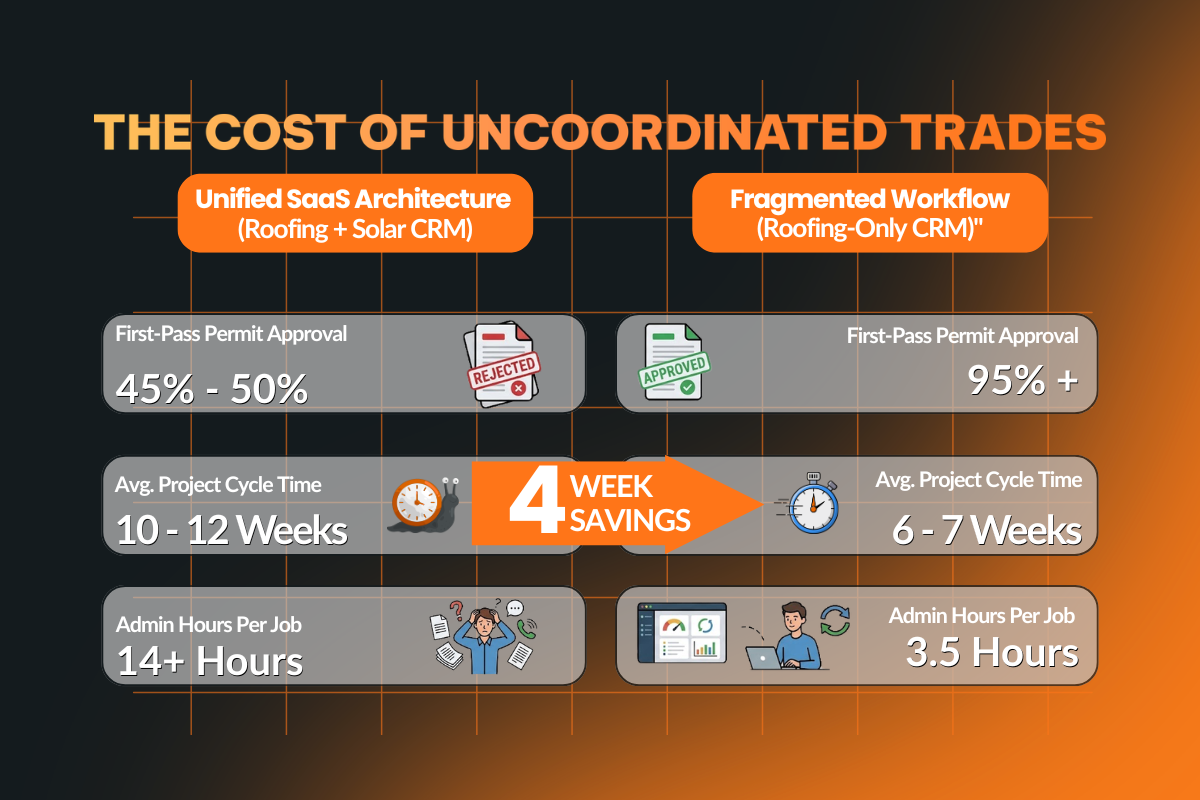
Adding solar to a roofing business looks straightforward on paper, with the same customer, the same roof, and a single bundled contract.
But what most roofing contractors are not told is that a combination job runs on a completely different logic than a roofing-only job, and most roofing software was never built to support it.
The failures that follow are the standard outcome when a two-trade job is managed through a single-trade system. Here is the exact sequence:
- The customer signs a bundled contract with one job, price, and expected experience from a single roofing company.
- The roofing job is created in the CRM as a standalone record, with no solar phase attached, because the system lacks the architecture to support it.
- The solar subcontractor is contacted separately by phone or email, resulting in no shared job record, visibility into the roofing schedule, or a structured handoff process.
- The solar permit is applied for before anyone has confirmed that the structural deck assessment from the roofing phase has been completed and documented. The permit is delayed or rejected.
- The roofing crew finishes the job without any handoff note, photos of attachment, or notification to the solar subcontractor that the job site is ready.
- The solar crew arrives on site, finds a flashing condition that remains unresolved, and cannot proceed, leading to rescheduling and costs accumulating.
- The customer calls to ask why there are two separate crews, why the timeline has changed, and why nobody has been in touch.
Every one of these failures is a handoff that the CRM should have managed automatically. These failures occurred because the roofing CRM was not built to connect two trades on a single job record, so every handoff between them became a manual task, and manual tasks are easily forgotten.
Understanding why this keeps happening requires getting specific about what a roofing-only CRM can and cannot do on a combination job.
What a Roofing-Only CRM Cannot Do on a Combination Job?
What you might discover after a few combination jobs is that the workarounds do not scale, and the failures they produce are not one-off mistakes but structural.
Here are the four gaps in standard roofing CRM software that make cross-trade job management impossible without manual intervention at every step.
1. Single-Trade Job Records
Standard roofing CRM software builds job records around the roofing scope and nothing else, with no native architecture for a secondary trade phase.
Solar ends up tracked in a separate system, and job status across both trades is never visible in one place.
For operations managers running multiple combination jobs simultaneously, this means constantly switching between systems to get a picture that should be available in a single view.
2. No Sequential Phase Dependency
A roof-solar job has a mandatory sequence that cannot be skipped: the structural deck assessment must be completed before the solar permit is filed, and the roofing phase must be finished before the solar crew can mount.
Standard roofing CRMs have no mechanism to enforce this sequence. It holds only as long as the right person remembers to check, and on a busy job with multiple active projects running in parallel, that is not a reliable system.
3. No Subcontractor-Facing Job Visibility
When solar is handled by a subcontractor, they need access to specific job details: roofing materials, rafter spacing, penetration locations, and completion status.
A CRM without a subcontractor portal forces the contractor to manually pull this information and forward it with each handoff.
This is where most combination job coordination breaks down because the process depends entirely on one person remembering to do something, rather than the system surfacing it automatically.
4. Separate Customer Communication Streams
Customers who sign a bundled contract expect to hear from one company, on one timeline, with one consistent update thread.
When roofing communication comes from one source and solar updates come from another, or do not come at all, customers fill the silence with phone calls and frustration.
For a roofing company trying to build a reputation for professionalism, fragmented communication tools undermine the job, even when the physical work is done correctly.
These gaps produce recurring failures that roofing contractors running combination jobs on single-trade CRM software experience predictably, and the cost of those failures adds up fast.
What are The Five Coordination Failures That Cost Roofing-Solar Contractors Real Money?
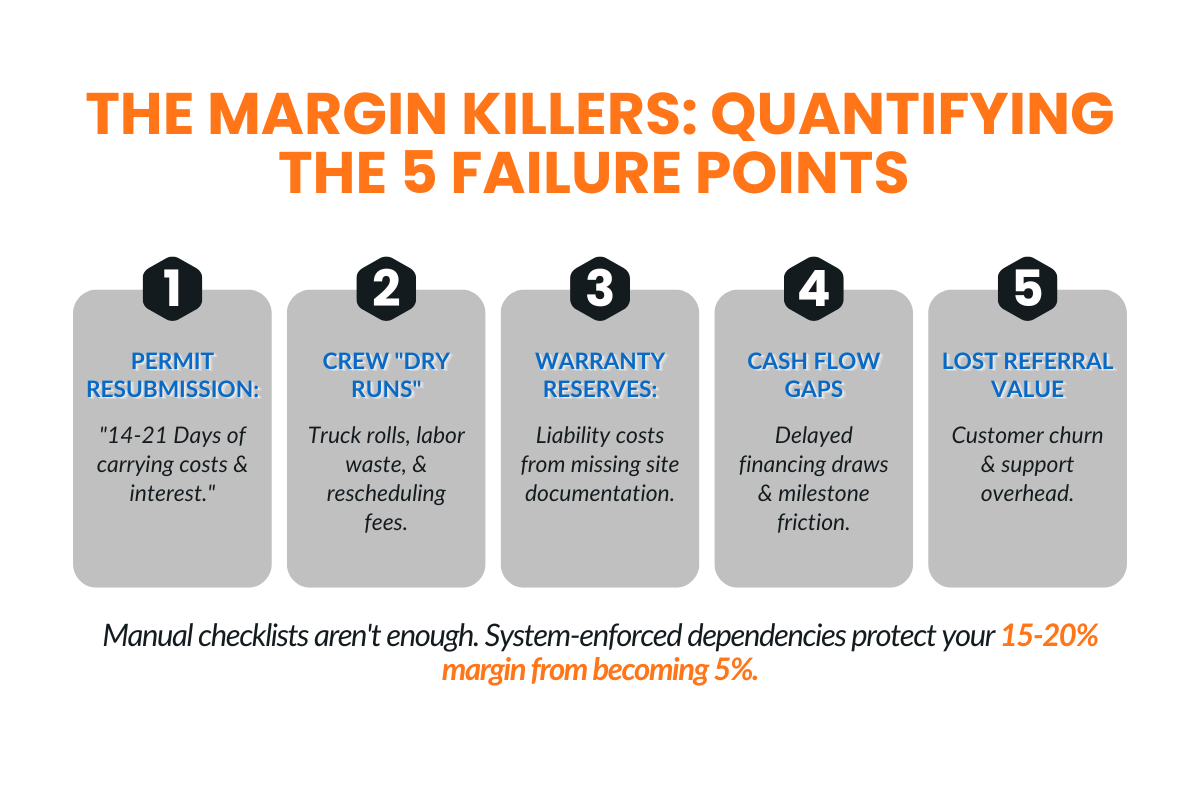
Every combination job managed through a single-trade CRM carries the same risks. The following five failures are predictable when roofing and solar are coordinated manually, and each has a direct cost attached.
Failure 1: Permit Application Before Structural Sign-Off
The solar permit cannot be filed without documentation from the roofing phase. When the roofing CRM lacks a mechanism to confirm that this documentation exists before the permit application proceeds, contractors file early and are rejected, adding weeks to the typical solar panel installation timeline.
The average resubmission delay runs 14 to 21 days, which is three weeks of carrying cost on a job that cannot close, a financing draw that cannot be triggered, and a customer wondering why their project has stalled.
Without proper job management built into the system, this sequence repeats on every combination job until someone builds a manual checklist to catch it.
Failure 2: Solar Crew Arrival Before Roofing Completion
This is the most common and most expensive coordination failure on combination jobs.
The solar subcontractor is scheduled based on an expected roofing completion date.
If the roofing job runs a day or two long, and the solar crew arrives at a job site that is not ready. Mobilization costs are incurred, and rescheduling creates a backlog on other jobs.
The customer, who expected a seamless handoff between trades, is now watching two crews try to coordinate on their property.
Most roofing contractors running solar have experienced this sequence more than once before they recognize it as a project management problem rather than a scheduling problem.
Failure 3: Flashing and Penetration Documentation Not Transferred
The solar installation crew needs specific information from the roofing phase to do their job correctly: roofing material type, rafter spacing, underlayment spec, and the location of any planned penetrations.
Without a structured document management system tied to the job record, this information either does not get captured at all or sits in the roofing job file with no way to surface it to the subcontractor.
The result is either an on-site delay while the crew waits for answers, or a proceed-without-documentation decision that creates liability and warranty problems later, exposing how crucial reliable project management software for installers and EPCs can be on combination jobs.
Other roofing apps handle document storage, but without it being tied directly to the job record and accessible to the solar crew, the documentation gap remains.
Failure 4: Customer Financing Approval Gaps
Bundled roof-solar projects are increasingly financed, and the draw schedule is tied directly to project milestones, a pattern that mirrors how EPCs evaluate the best contractor CRM in 2026 around financing, tracking, and execution capabilities.
When those milestones are not tracked on a single platform, draw requests arrive late, payment processing is delayed, customers receive confusing notices from the financing partner, and the contractor's relationship with the lender begins to suffer.
Cash flow on a combination job depends on milestone documentation being communicated automatically.
Many roofing contractors do not connect their cash flow problems on combination jobs to this specific gap until they have run several jobs through the same process.
Performance tracking across both trades within a single system makes draw timing predictable.
Failure 5: Post-Install Warranty Confusion
A combination job produces two separate warranties: one for the roof and one for the solar installation. When these are managed separately, without unified communication tools connecting both records to a single customer file, customers cannot quickly identify who to call when something goes wrong.
Neither can the contractor, when a warranty question comes in six months after the job closed. A roofing company that cannot confidently and immediately answer a basic warranty question signals disorganization to a customer who may have already referred friends and family based on the quality of the installation.
Each of these failures has the same root cause: a CRM that was not designed to hold a two-trade job in a single record with enforced dependencies between phases.
The question is what a system built on a single platform, designed specifically for this workflow, actually looks like in practice.
What a Roofing CRM Must Do to Handle Solar: The Non-Negotiable Capabilities?
These are the seven capabilities that separate CRM software built for cross-trade job management from roofing software that was built for one trade and stretched to cover two.
1. Multi-Phase Job Records With Sequential Dependencies
A CRM built for combination jobs holds roofing and solar in a single job record, with phase two locked until phase one milestones are confirmed complete, reflecting the core benefits and features of a dedicated solar CRM applied to roof-plus-solar workflows.
This one architectural requirement eliminates the two most expensive coordination failures on combination jobs: permit applications filed before structural sign-off, and solar crews dispatched to a job site before roofing is finished.
Without sequential dependencies enforced at the system level, the sequence holds only as long as someone remembers to check, which is not a reliable foundation for job management at any volume.
2. Subcontractor Portal Access
Solar subcontractors need controlled access to the job record, not full CRM access, but enough to view their phase milestones, access phase-specific documents, and update completion status directly without a phone call or email to the contractor.
When the CRM requires the contractor to manually extract and forward job details at every handoff, adding more combination jobs to the pipeline increases coordination overhead proportionally.
A subcontractor portal removes that dependency and turns a manual process into an automated one.
3. Document Management by Phase and Trade
The job record needs separate, organized document libraries for each phase, roofing photos, material orders, inspection reports, solar drawings, electrical specs, permit filings, all within a single job record.
Any team member or subcontractor accesses exactly what they need without sorting through a shared file dump.
Aerial measurements taken during the estimation phase should reside in the same record as the post-installation documentation, making them accessible throughout the job lifecycle without switching between other roofing apps or external storage tools, a core promise of Sunbase all-in-one software for contractors.
4. Automated Milestone-Based Customer Communication
Customer updates should be triggered automatically when milestones are completed, like roof installation complete, solar permit approved, installation scheduled, and inspection passed, sent from a single unified thread that the customer experiences as one coherent project.
This is one of the most underleveraged communication tools in roofing CRM software.
Proactive, automated updates eliminate the anxiety gap that produces random afternoon phone calls and replace it with a customer experience that signals organization without requiring anyone on the team to remember to send a message.
5. Integrated Permit Tracking
All permit statuses, roofing permit, solar building permit, and electrical permit, are tracked within the job record with status fields, issue dates, inspection scheduling, and expiration tracking.
For roofing companies managing combination jobs across multiple locations, centralized permit tracking within the CRM is the difference between a process that scales and one that requires a dedicated person to manually chase permit status on every active job, which is why many turn to roofing CRM software to organize leads and projects.
6. Financing Draw Milestone Triggers
When project milestones are completed and documented in the CRM, the system should automatically notify the financing partner and flag the draw as eligible.
This removes the manual step of someone having to remember to contact the lender after each milestone and makes the cash flow for combination jobs predictable.
For roofing contractors running several combination jobs simultaneously, the gap between automated draw triggers and manual draw reporting shows up directly in monthly cash flow, and it compounds as job volume grows.
7. Unified Post-Install Record With Combined Warranty Documentation
After installation is complete, the job record should produce a single, unified post-installation document containing both warranties, inspection certificates, aerial measurements, project photos, and a full project summary.
Captured with e-signatures within the same system, accessible via a customer portal, and available on demand when a warranty question comes in months later.
This is what closes a combination job cleanly, not two separate close-out packets from separate systems, but one record that covers everything the customer and the contractor need.
These seven capabilities narrow the software field considerably. Most roofing CRM software on the market today covers some of them.
Few cover all seven as core job-management architecture rather than as bolt-on features.
That distinction is what separates a CRM that handles combination jobs from one that merely tolerates them.
How to Implement a Cross-Trade CRM Without Breaking Active Jobs?
The biggest mistake contractors make when changing systems is trying to switch everything at once. That usually sounds efficient on paper, but not in real life because a better rollout is slower, more controlled, and built around real jobs, not just software setup.
The goal should not be to “go live” as fast as possible but to make sure the new workflow actually works before the old one is removed.
Phase 1: Map the Workflow Before Touching the Software (Week 1)
Start by documenting the exact sequence of tasks and handoffs for a full roofing-and-solar job. That includes everything from signed contract to roof work, solar prep, permits, inspections, financing steps, and final closeout.
This matters because the CRM should reflect how the job actually runs, not how the software happens to be structured by default. That process map becomes the foundation for the job template inside the CRM.
Phase 2: Build the Job Template From the Map (Weeks 2–3)
Once the workflow is mapped, turn it into a multi-phase job template inside the CRM. Each stage should reflect the real execution flow, including roofing, solar, permitting, financing, and customer communication.
At this stage, the goal is to structure the team's needs as a working template that reflects the job as closely as possible.
Before using it on live work, test the template against one completed historical job. That helps you catch missing stages or unclear ownership before the rollout starts touching active revenue.
Phase 3: Run Parallel Systems on Three Live Jobs (Weeks 4–6)
Instead of cutting over fully, run the new CRM workflow alongside the existing system for three active jobs. This gives the team a controlled way to compare what the new process captures versus what still lives outside it.
This phase is where the real gaps show up. If a permit step gets missed, a crew handoff is unclear, or a financing trigger is not reflected properly, fix it here while the old system is still acting as backup.
That is what keeps active jobs from getting disrupted and helps smaller teams validate the kind of solar CRM options for small businesses.
Phase 4: Subcontractor Onboarding (Weeks 7–8)
Once the internal workflow is holding up, bring subcontractors into the process. Give each solar subcontractor access to the portal and make it clear how job visibility, phase updates, and milestone tracking will work.
This part cannot stay optional. If subcontractors are still updating progress through texts, calls, or emails, the workflow is not really centralized.
The CRM should become the single place where milestone updates live within the system and be tied to scheduling readiness. That is what makes adoption stick and keeps handoffs from falling apart later.
In practice, this kind of rollout works better because it respects how messy active operations actually are, because you are not trying to force a clean software launch onto an unclean process, but building the system around the way the work already moves, then tightening it step by step.
How Platforms Like Sunbase Help Align Roofing and Solar Workflows?
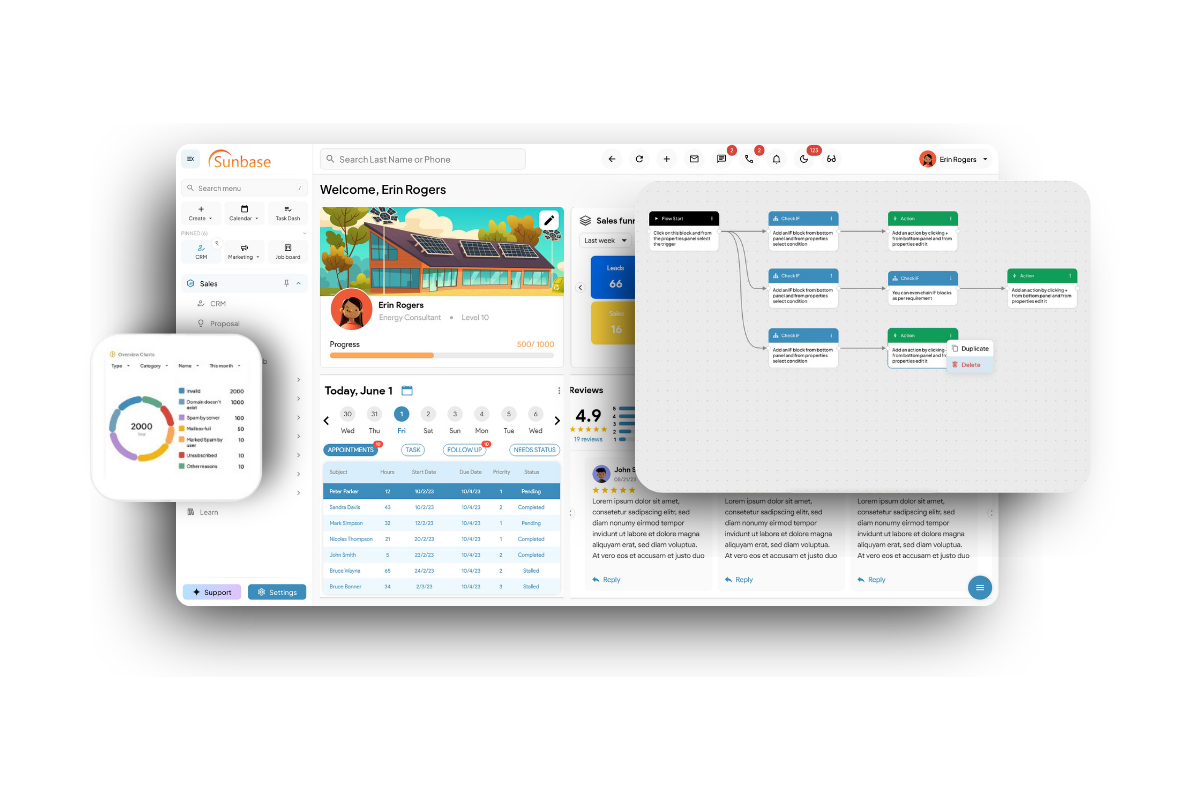
Once roofing contractors start managing both trades, the biggest challenge is usually not lead generation. It is what happens after the job gets sold.
That is where platforms like Sunbase become more useful than a standard single-trade CRM.
1. Unified Lead Management for Dual Pipelines
Instead of splitting roofing and solar opportunities across separate tools, Sunbase helps teams manage both in one system. That gives sales teams a single view of the customer while keeping roofing and solar workflows connected from the start.
It also reduces the usual data silos that show up when one team is tracking roof replacement needs and another is handling solar follow-up somewhere else.
2. Precision Measurements Without Extra Site Visits
For roof-plus-solar jobs, teams need layout context, slope details, and inputs to support solar planning and to run accurate solar-proposal software.
With integrated satellite measurement tools, contractors can review roof dimensions and solar-related site data in the same workflow. That helps teams move faster, avoid duplicate effort, and reduce the need for extra site visits early in the process.
3. Specialized Proposal and Design Tools
Sunbase makes it easier to generate combined roofing and solar proposals in one branded document.
Instead of presenting the roof project and the solar project as two separate conversations, contractors can show total project cost, scope, and expected value in a way that feels more complete and easier for the customer to understand.
4. End-to-End Project and Field Coordination
Once the deal closes, execution gets more complex. Roofing material deliveries, installation schedules, permit progress, inspections, and PTO milestones all need to stay on track without one phase creating delays for the next. Sunbase helps teams coordinate those moving parts in one place.
5. Seamless Sales-to-Operations Handoff
With Sunbase, signed contracts can trigger the next steps automatically, including work orders for the roofing crew and solar electricians. That creates a cleaner transition from sale to execution and makes it easier to keep both trades aligned as the job moves forward.
Conclusion
The problem is not that roofing contractors are adding solar. The problem is that most systems were never built to handle what happens after that decision.
As more contractors take on combination jobs, the gap between what their CRM can track and what the job actually requires gets harder to ignore. What looks manageable at low volume starts breaking once there are more jobs, more handoffs, and more people involved. That is why this is becoming a real software issue across the roofing industry.
The best roofing workflows are about keeping roofing and solar aligned throughout execution, without relying on workarounds or someone having to remember to chase the next step.
For many roofers, that shift is already happening. The question is whether your current system can keep up with it.
See How Sunbase Handles Roofing + Solar in One Workflow
If your team is managing roofing and solar across separate tools, manual updates, and too many handoffs, that friction only gets worse as volume grows.
Sunbase helps you keep both trades connected in one system, so your team can move jobs forward with less confusion and fewer delays.
Book a demo to see how Sunbase can help you manage roofing and solar together.
FAQs
Q1: What is the best CRM for roofing contractors who also do solar?
The best roofing CRM is one that manages roofing and solar in one job record with phase tracking, permits, subcontractor access, and customer updates.
Q2: Can roofing CRM software improve the sales process for roofing and solar jobs?
Yes, it can improve the sales process by keeping estimates, contracts, follow-ups, and handoffs connected in one system.
Q3: What CRM features matter most for roofing and solar coordination?
The most important CRM features are multi-phase workflows, milestone tracking, permit management, subcontractor visibility, and unified communication.
Q4: Is project management software enough for roofing and solar jobs?
Basic project management software can track tasks, but it usually lacks the trade-specific workflows and handoffs needed for roof-plus-solar jobs.
Q5: Do large roofing companies need different CRM capabilities?
Yes, large roofing companies usually need stronger automation, subcontractor coordination, and multi-job visibility to manage volume without delays.
Q6: Do roofing teams need mobile apps for field coordination?
Yes, mobile apps help crews access job details, upload photos, update milestones, and stay aligned from the field.
One Platform.
Zero Chaos.
Run Your Entire Business in One Platform
Sunbase replaces your CRM, proposals, scheduling, job tracking, and reporting tools — all inside one clean, connected platform.
About Sunbase
The All-In-One Platform to Run Your Entire Business
Sunbase helps you organize operations, streamline daily workflows, and manage everything - from first customer contact to final project deliver- in one connected system.
Our Mission
- Organize your business.
- Optimize your workflow.
- Automate your dailytasks
Why Businesses Choose Sunbase
One Connected Workflow
Replace scattered tools and manual processes with a single platform that brings together your team, tasks, customers, jobs, and performance data.
🌎 Global Presence
Serving the United States, Canada, India, LATAM, Australia, and 10+ international markets.
👥 11,000+ Users
Trusted by contractors, installers, project managers, sales teams, and field technicians.
🏗️ Built for All Sizes
From small contracting teams to fast-growing enterprises, Sunbase adapts to your workflow.
Stop Managing Your Business Manually. Automate It.
Sunbase automates workflows, reduces mistakes, and helps your team get more done - without hiring extra staff or juggling multiple tools.
Still Managing Your Business Across Multiple Tools?
Bring your CRM, proposals, projects, and operations into one platform built for contractors.