
If you're running a roofing company with 5 to 30 employees, you've probably already invested in software. A CRM here, an estimating tool there, a scheduling app your project manager swears by, and a separate invoicing system your bookkeeper refuses to give up.
The result? Four or five tools that don't talk to each other, data that lives in five different places, and a business that runs slower than it should - even though you're paying for all of it.
This is the most common software problem in the roofing industry right now. And the fix isn't adding another app. It's choosing the right platform from the start, based on what actually moves the needle for a contractor business your size.
This guide breaks down the seven features that genuinely matter in roofing software - not a feature checklist padded for SEO, but the seven capabilities that determine whether a roofing business runs efficiently or spends half its time managing tools instead of jobs.
Key Takeaways
- Roofing software matters most for what it consolidates, not any single standalone feature: CRM, estimating, proposals, scheduling, project management, invoicing, and reporting all need to share data.
- A roofing-specific CRM should track property records and insurance claim stages, not just generic contacts and deals.
- Disconnected estimating and proposal tools create manual copy-paste errors — the exact place errors shouldn't live.
- Real-time job costing (not 30-day-old numbers) is what separates growing roofing companies from plateauing ones.
- The real evaluation question isn't "does this feature exist", it's "does this reduce the number of tools my team needs to operate?"
Why Most Roofing Software Evaluations Go Wrong for Roofing Contractors
Most roofing company owners evaluate software by comparing feature lists or watching a demo. That’s a reasonable starting point, but it misses the real question:
Does this platform reduce the number of tools my team needs to operate - or does it just add another one?
According to research by FMI Corporation, construction professionals spend nearly 35% of their time on non-productive tasks, including chasing job updates, managing paperwork, and manual scheduling.
Industry data also shows 67% of contractors use enterprise or accounting software, 63% use estimating tools, and 61% rely on cloud-based systems to run their business, reflecting a clear shift away from paper and spreadsheets. For roofing companies in the 5–30 employee range, that’s not a field productivity problem - it’s a systems problem. The fix is integration, not more software.
The companies that get the most out of roofing business software are the ones that consolidate: fewer logins, fewer data handoffs, fewer places for things to fall through the cracks.
With that lens, here are the seven features that actually matter.
Feature 1: A CRM Built for Roofing Workflows (Not Generic Sales Teams)
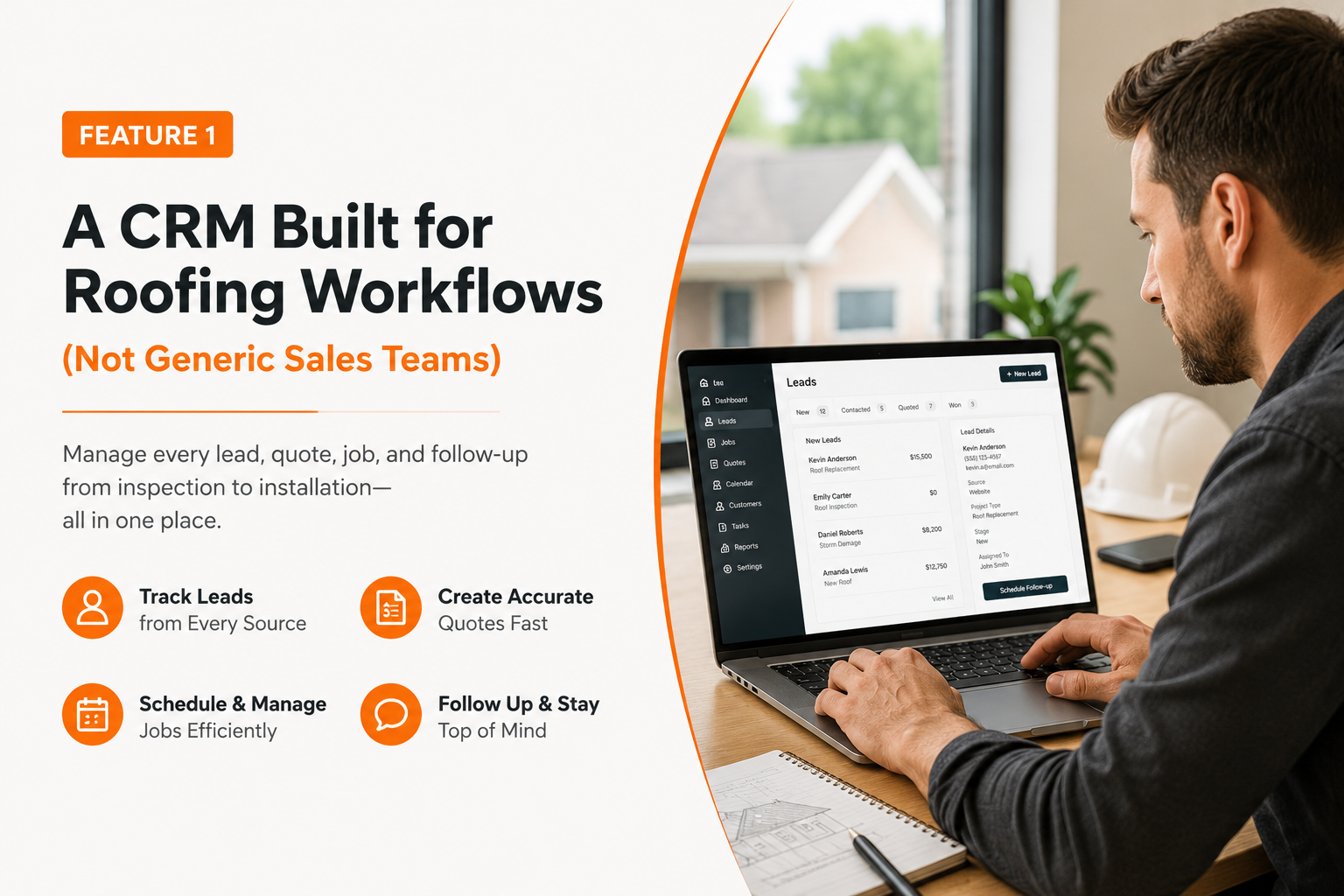
A generic CRM is built for software salespeople making 50 calls a day. A roofing operation looks nothing like that.
Your leads come from storm canvassing, referrals, insurance claims, and inbound calls. Each lead has a property, not just a contact. Some homeowners are going through insurance - which means your pipeline stage isn't just "proposal sent"; it's "waiting on adjuster," "supplement filed," or "approved and scheduled."
A roofing CRM needs to handle that complexity out of the box - not through workarounds you build yourself.
What to look for specifically:
- Property-level records, not just contact records
- Insurance claim tracking built into the pipeline
- Inspection scheduling tied to the CRM, not a separate calendar
- Lead-to-job conversion visibility across the full pipeline
- Notes and photo storage at the job level
If you're currently running your customer database in a spreadsheet or a generic CRM that wasn't built for contractors, there's a real cost in missed follow-ups, duplicate entries, and time spent rebuilding context every time someone touches a file.
Feature 2: Estimating and Roof Measurements That Produce Numbers You Can Stand Behind
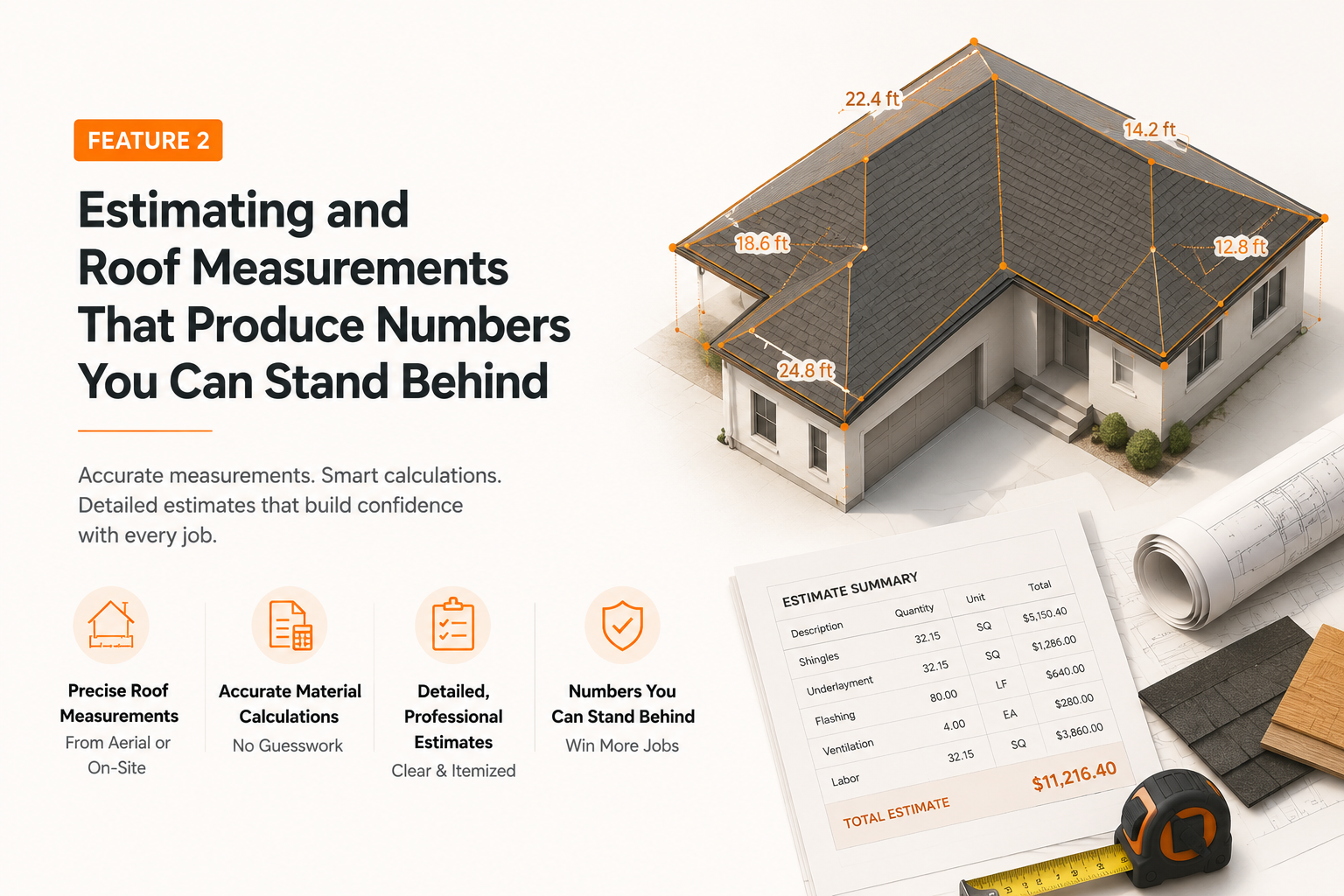
Bad estimates are one of the fastest ways to erode profit in a roofing business. Estimate too low, and you eat the difference. Estimate too high, and you hand the job to a competitor.
The problem with most standalone estimating tools - or worse, spreadsheet templates - is that they require manual updates every time material prices shift. Labor costs change. Supplier pricing changes. Roofing companies that update their cost data irregularly are essentially flying blind on margin.
Good roofing estimating software should give you:
- Material and labor cost breakdowns by project type
- The ability to adjust scope on the fly - especially for insurance jobs
- Margin control built into the estimate, not added as an afterthought
- A clean handoff from estimate to proposal without re-entering data
That last point is more important than it sounds. If your estimating tool and proposal tool are separate, someone on your team is manually copying numbers from one into the other. That's where errors live. And those errors show up in your proposals, which is exactly the wrong place for them.
Feature 3: Proposals That Close - Not Just PDFs You Email Out
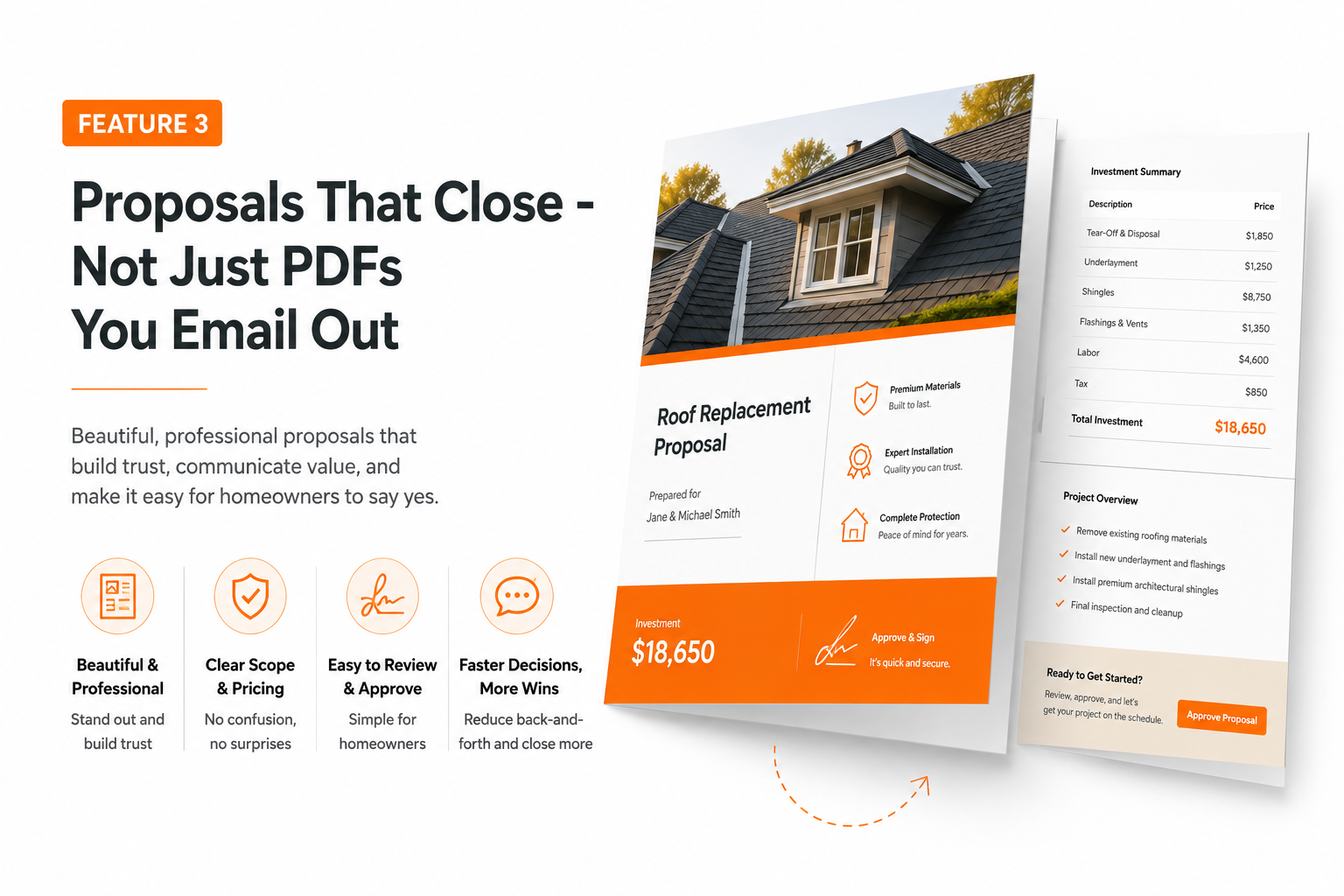
A roofing proposal is a sales document. It needs to look professional, communicate scope clearly, and make it as easy as possible for the homeowner to say yes. Polished, professional proposals also help contractors win more work.
Most roofing companies are still emailing Word docs or PDFs that the homeowner prints, signs, scans, and emails back. In 2026, that process loses deals to competitors who make approval frictionless.
Your roofing proposal software should produce a document that:
- Looks professional without requiring a designer
- Clearly documents scope, materials, and pricing
- Supports digital signature and contract approval for faster approval from the field or a phone
- Tracks whether it’s been opened and when
The conversion impact is real. Proposals with digital approval workflows close faster - homeowners can sign from their phone the same day you leave the property, which helps close more jobs instead of letting the process go cold over a week of back-and-forth. Stronger customer communication also comes from automated SMS and email updates that keep homeowners informed about delays or completion milestones.
When your estimating and proposal tools are connected - same platform, same data - the proposal builds from the estimate automatically. No copy-paste. No version confusion. No emailing the wrong draft.
Feature 4: Scheduling and Crew Dispatch That Prevents Double-Booking
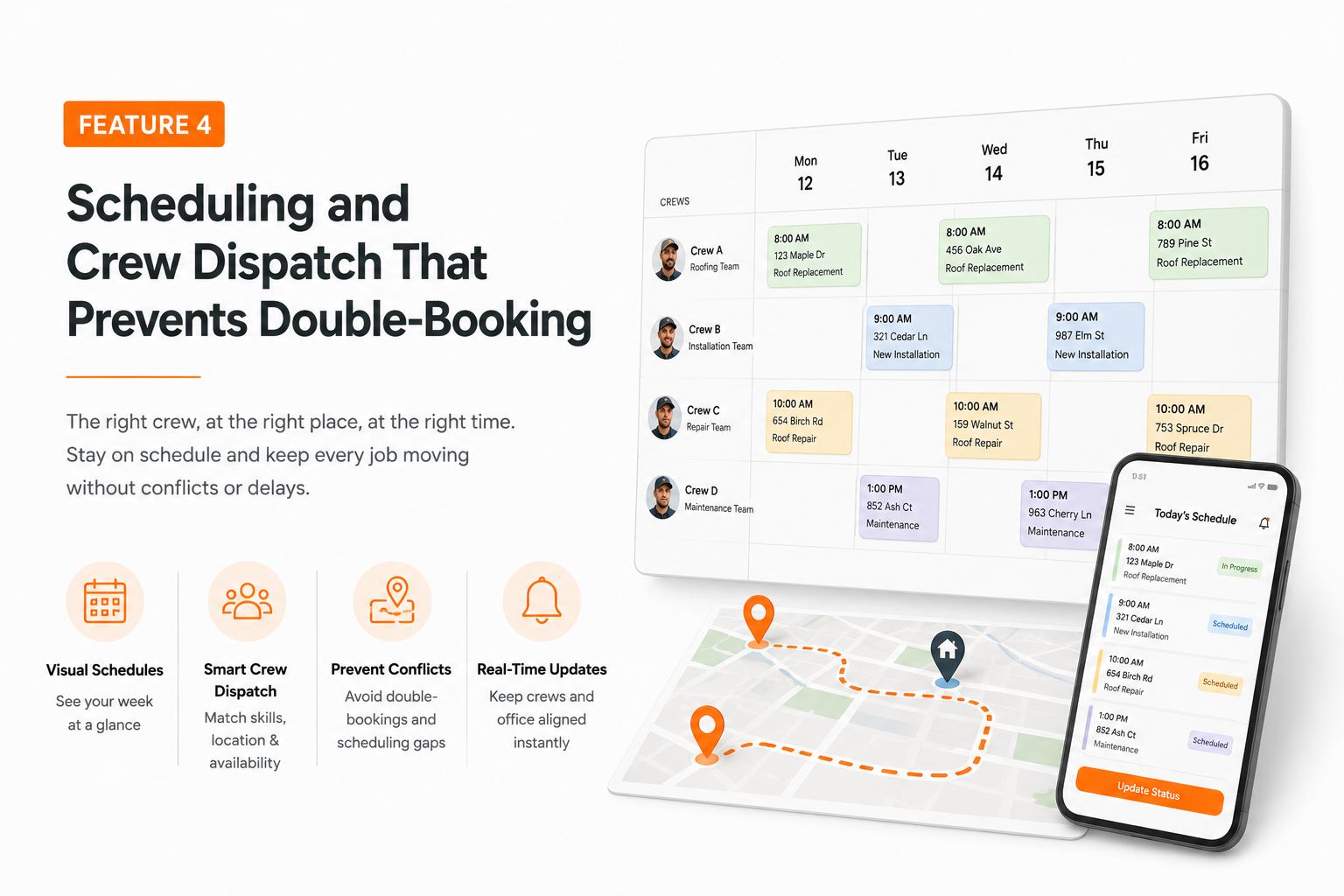
Crew scheduling is where roofing operations break down most visibly. A crew gets double-booked. A job gets pushed without notifying the homeowner. A sub shows up to a site that isn’t ready. Materials arrive on a day the crew isn’t
there.
These problems are fixable - but not with a shared Google Calendar.
Scheduling in a roofing context means:
- Using software to assign jobs to specific crews (or subs) on specific dates
- Blocking availability automatically when a crew is assigned
- Triggering customer notifications when schedule changes happen
- Coordinating material delivery timing against crew availability for roofing jobs
The marketing and sales management tools in platforms like Sunbase extend into operational scheduling - so your sales board and your production board are speaking to each other. When a job moves from “proposal approved” to “scheduled,” your ops team sees it immediately.
For companies in the 10–30 employee range running multiple crews simultaneously, the ability to see crew availability, job tracking, and job status in a single view is the difference between a schedule that holds and one that requires daily firefighting.
Everything from lead to schedule depends on these functions staying connected rather than requiring a manual handoff at each step. Worth seeing how Sunbase's roofing software keeps CRM, estimating, and scheduling on one shared record before evaluating the remaining features in isolation.
Feature 5: Project Management That Gives Field and Office the Same View
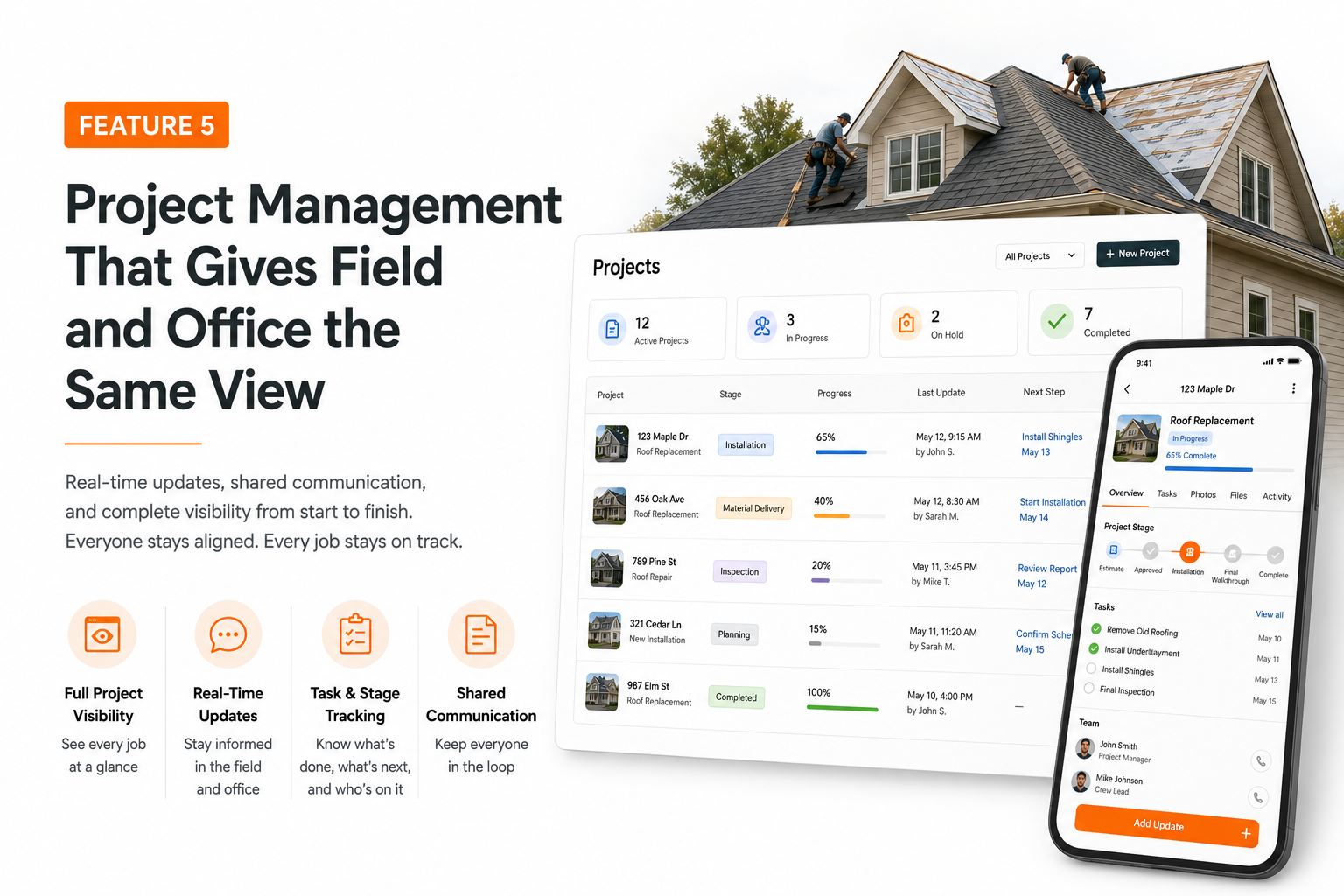
This is the feature that most roofing companies underestimate - until they've lived without it and dealt with the consequences.
The core problem: your project manager is in the office, your crew is on the roof, your homeowner has a question about the timeline, and nobody has the same information. The office calls the crew. The crew isn't sure about a detail.
The homeowner gets a callback tomorrow. Meanwhile, the job behind this one is starting to slip.
Roofing project management software solves this by giving every stakeholder access to the same job record in real time - status, photos, notes, materials, punch list items, and completion milestones.
What this looks like in practice:
- Production boards showing every active job and its current stage
- Work orders that crew leads can update from the field
- Job costing that updates as labor and materials are logged
- Profitability visibility at the individual job level - not just at month-end
Job costing in particular is a feature that separates growing companies from plateauing ones. If you don't know your actual cost-per-job until 30 days after it closes, you're making pricing decisions based on memory and gut feel. Real-time job costing tells you which job types are actually profitable - and which ones just feel profitable because they're high-revenue.
Feature 6: Invoicing and Payment Collection Built Into the Same System
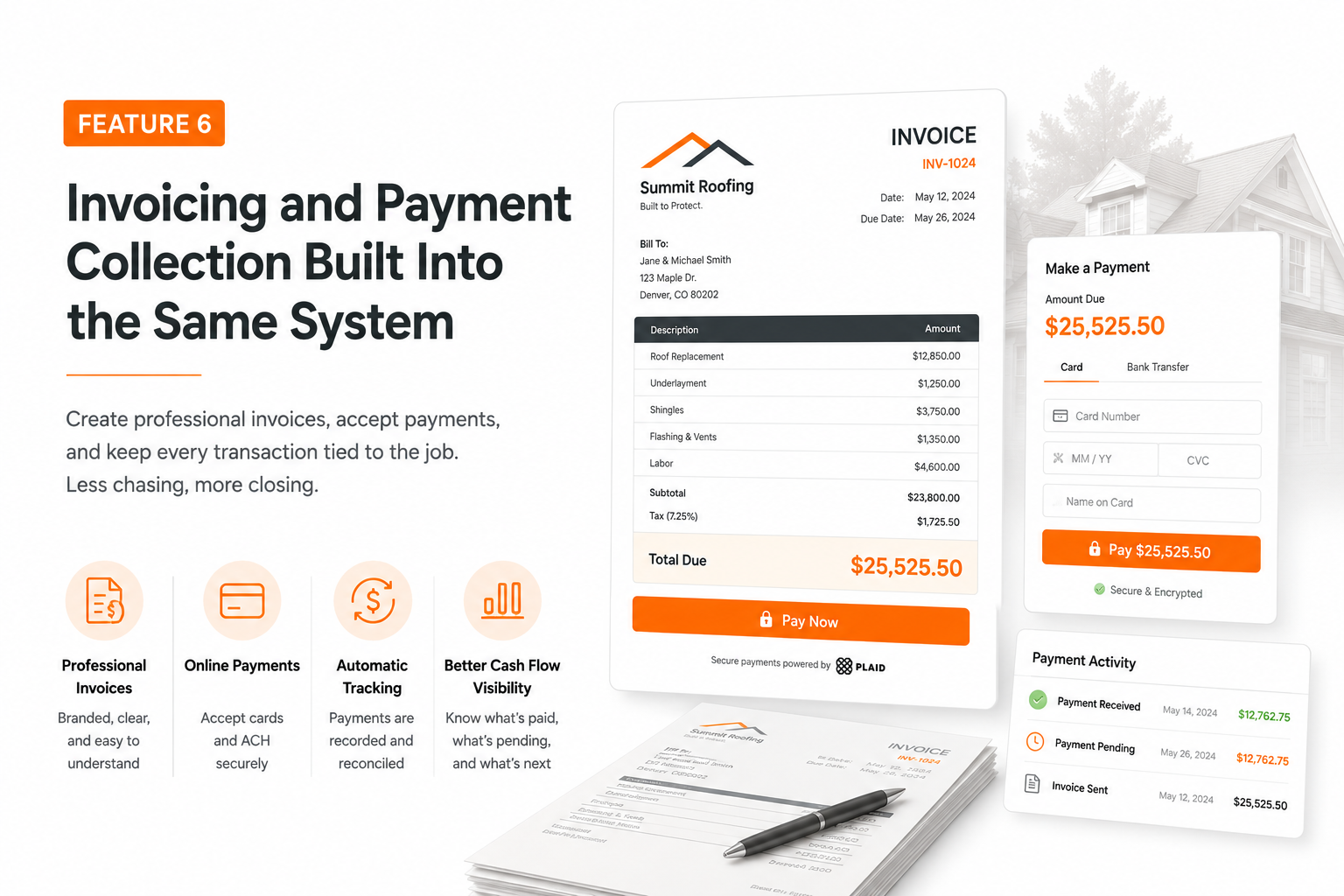
Most roofing companies treat invoicing as a back-office function completely separate from operations, even though many roofing businesses already rely on separate invoicing or accounting tools. The job completes, someone in the office generates an invoice in QuickBooks, emails it out, and then waits.
That wait costs real money. A roofing company running 15–20 jobs per month with invoices sitting unpaid for 2–3 weeks is carrying significant cash flow risk - especially during storm season when job volume spikes.
The right financial management software for a roofing business should:
- Generate invoices automatically from completed job records
- Support online payment collection (not just email-and-wait)
- Tie deposits and progress payments to project milestones
- Integrate with your accounting system to prevent double entry
When invoicing is disconnected from project management, invoices go out late, include wrong scope, or reference jobs that haven’t been fully completed. All of those create friction with homeowners and delay payment.
The operational efficiency gains from connecting invoicing to job completion are immediate and measurable - and for a growing roofing company, cash flow predictability is one of the most important levers for funding growth.
Feature 7: Reporting That Shows You Where the Business Actually Stands
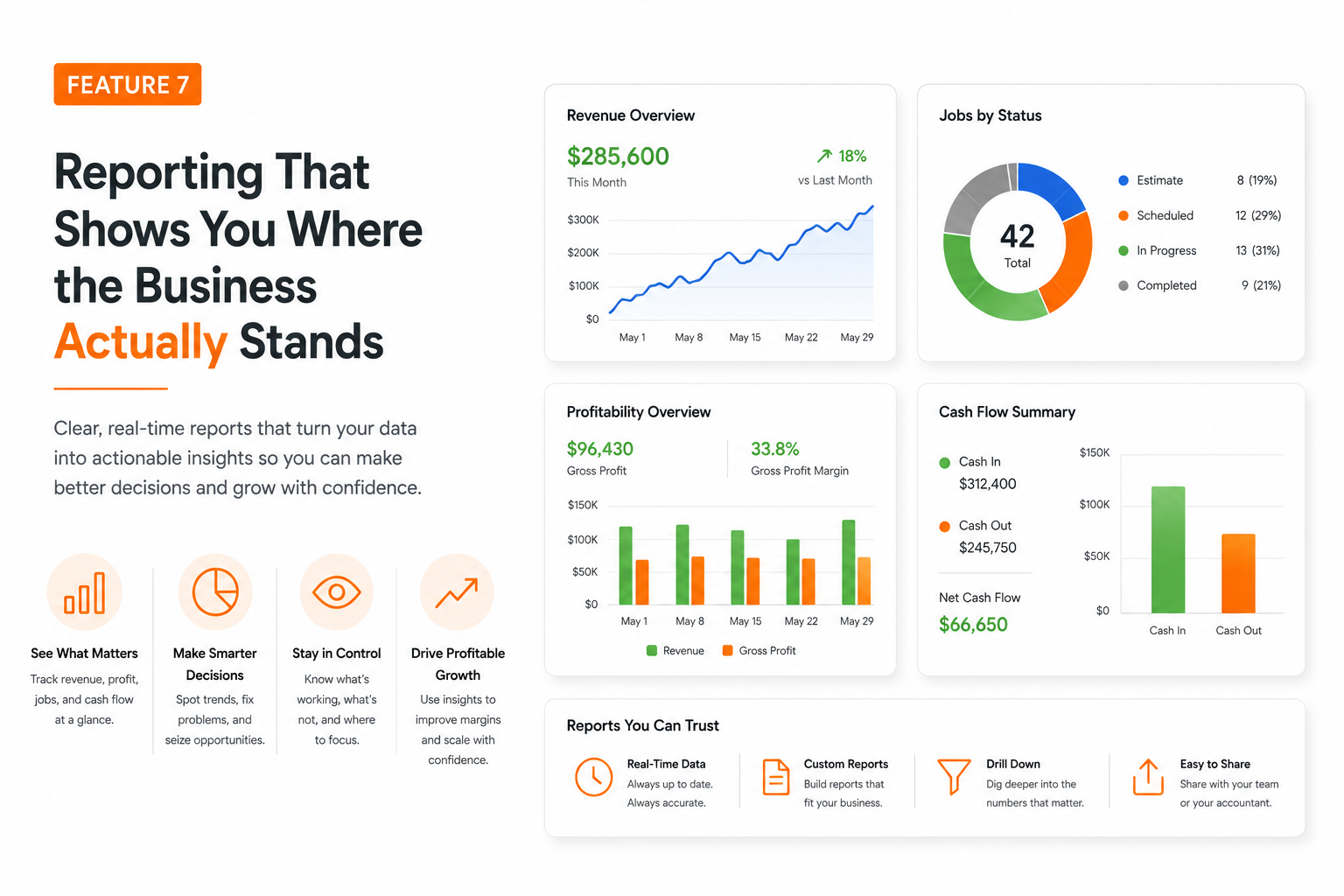
Most roofing company owners review their financials with their accountant once a month - which means they’re running the business on 30-day-old information. By the time a problem shows up in the numbers, it’s been happening for weeks.
Good reporting in roofing software closes that gap. The right dashboard reporting tools give you a real-time view of:
- Revenue by job type, crew, or sales reps
- Close rate by lead source
- Average job value over time
- Materials cost as a percentage of revenue
- Outstanding invoices and collection timing
- Pipeline value at each stage
For a company in the 5–30 employee range, these numbers drive every meaningful decision - which markets to canvass, which crew to expand, whether to take on a commercial account, how to price the next storm season, and how residential and commercial work is performing.
The problem with most reporting in standalone tools is that the data is siloed. Your CRM shows pipeline. Your estimating tool shows quote volume. Your accounting system shows revenue. None of them are talking to each other, so you’re stitching together a picture from three different dashboards - and the picture is always incomplete, with less visibility into how teams manage jobs.
Consolidated reporting - where one platform generates insights from CRM, project management, and financial data simultaneously - is what makes the difference between running a business reactively and running it with actual visibility.
The Tool Sprawl Problem: Why Integration Matters More Than Individual Features
Here’s the honest evaluation framework: when you’re comparing roofing software options, choosing the right roofing software is really about how well the core functions work together, not just which standalone features exist. Some of those standalone tools are genuinely excellent at their specific function.
But every time you add a tool to your stack, you’re also adding:
- A data handoff that has to happen manually (or doesn’t happen at all), which increases reliance on external tools
- A login your team needs to maintain
- A place for information to fall out of sync
- A subscription cost
- An onboarding burden for every new hire
The roofing companies that run the tightest operations - consistent margins, predictable cash flow, crews that show up where they’re supposed to - aren’t necessarily using the best CRM and the best estimating tool and the best project management app separately. They’re using a platform where those functions are built to work together, helping them manage jobs more efficiently. For small and growing teams, that often means replacing scattered apps with simple tools.
That’s the actual ROI of integrated roofing software: not any single feature, but the elimination of the gaps between features.
Fact: The roofing software market is projected to reach approximately USD 1.98 billion by 2032, indicating significant growth in the industry.
Roofing Software Buyer's Guide: Quick Comparison Checklist
Use this when evaluating any roofing software platform and comparing the key features of each option:
| Feature | What to Ask |
|---|---|
| CRM | Does it support property records, insurance tracking, and pipeline stages built for roofing? |
| Estimating | Can you update material costs easily? Are measurement tools, estimate templates, and proposal creation built in? |
| Proposals | Does it support digital approval? Is scope documentation built in? |
| Scheduling | Can you assign crews and track availability without double-booking? |
| Project Management | Do field and office teams see the same job data in real time? |
| Invoicing | Does invoicing connect to job completion? Is online payment supported? |
| Reporting | Do dashboards pull from CRM, operations, and financials in one view? |
If the answer to most of these is “through an integration” or “you’d need to export that,” that’s a sign the platform was built as separate modules rather than one connected system - and you’ll feel that friction daily.
Bottom Line: Buy for Integration, Not Features
Every platform on the market will show you a feature list that sounds comprehensive. The real question isn't whether the features exist - it's whether they work together.
The seven capabilities covered in this guide - CRM, estimating, proposals, scheduling, project management, invoicing, and reporting - only deliver their full value when they're connected. When a lead moves through your pipeline, gets estimated, goes to proposal, converts to a job, gets scheduled and completed, and triggers an invoice without anyone re-entering data at each stage, that's when the ROI of roofing software becomes real and measurable.
For a deeper look at what this looks like in practice, how digital transformation is reshaping roofing operations is worth reading alongside this guide - it covers the broader operational shift that platforms like this enable.
Ready to see all seven features in one platform built for roofing contractors?
See How Sunbase Handles All 7 - Book a Demo →
Sunbase is roofing business software built for contractors managing 5 to 30 employees - covering the full workflow from lead capture and estimating to project management, invoicing, and reporting in one connected platform. No duct-taped integrations. No tool sprawl.
Frequently Asked Questions: Roofing Software
What is roofing software?
Roofing software is a platform designed to help roofing contractors manage their core business operations - including leads, estimates, proposals, crew scheduling, project tracking, invoicing, and reporting - in one connected system. It's built specifically for the workflows of roofing companies, unlike generic CRMs or project management tools.
What's the best roofing software for small contractors?
The best roofing software is one that handles CRM, estimating, and job management without requiring multiple integrations. Platforms like Sunbase are designed for roofing companies in the 5–30 employee range - covering the full workflow without the enterprise complexity (or price point) of tools built for large commercial operations.
How much does roofing business software typically cost?
Pricing varies significantly based on features and company size. Most roofing software platforms charge per user per month, typically ranging from $50 to $200+ per user depending on the feature set. The more useful comparison isn't the subscription cost - it's the cost of the disconnected tools the platform replaces, plus the operational cost of managing those tools separately.
Do I need separate software for estimating and project management?
You don't have to - and in most cases, you're better off not doing so. When estimating and project management are in the same platform, job data flows from estimate to proposal to production without manual handoffs. Separate tools mean separate data entry, version mismatches, and more surface area for errors.
How long does it take to implement roofing software?
Implementation timeline depends on the platform and the complexity of your current data. Most roofing companies in the 5–30 employee range can get a platform like Sunbase operational within a few weeks - including data migration, team training, and initial configuration. Platforms designed for mid-size contractors typically have shorter onboarding timelines than enterprise systems.
One Platform.
Zero Chaos.
Run Your Entire Business in One Platform
Sunbase replaces your CRM, proposals, scheduling, job tracking, and reporting tools — all inside one clean, connected platform.
About Sunbase
The All-In-One Platform to Run Your Entire Business
Sunbase helps you organize operations, streamline daily workflows, and manage everything - from first customer contact to final project deliver- in one connected system.
Our Mission
- Organize your business.
- Optimize your workflow.
- Automate your dailytasks
Why Businesses Choose Sunbase
One Connected Workflow
Replace scattered tools and manual processes with a single platform that brings together your team, tasks, customers, jobs, and performance data.
🌎 Global Presence
Serving the United States, Canada, India, LATAM, Australia, and 10+ international markets.
👥 11,000+ Users
Trusted by contractors, installers, project managers, sales teams, and field technicians.
🏗️ Built for All Sizes
From small contracting teams to fast-growing enterprises, Sunbase adapts to your workflow.
Stop Managing Your Business Manually. Automate It.
Sunbase automates workflows, reduces mistakes, and helps your team get more done - without hiring extra staff or juggling multiple tools.
Still Managing Your Business Across Multiple Tools?
Bring your CRM, proposals, projects, and operations into one platform built for contractors.