
Solar Project Management Software
for
Installation-to-PTO Operations
*Contact us for a quote based on your team size
The Platform
WHAT IS SOLAR PROJECT MANAGEMENT SOFTWARE?
Solar project management software is a digital tool that helps solar teams manage and track projects from approved sale through permitting, installation, inspection and permission to operate (PTO).
Sunbase Solar Project Management Software acts as the operational record for each active solar project, showing where the project is, what must happen next, who is responsible, what documents or materials are required and what is preventing the project from progressing.
More Than Generic Project Management Software
Why Solar Projects Need More Than a Standard Project Management Tool
Solar projects depend on more than tasks and deadlines. Each installation moves through technical approvals, equipment dependencies, permitting, field work, inspections and utility requirements before it can reach PTO.

Sunbase Solar Project Management Software connects these solar-specific stages within the same project workflow, including:
- Site survey, engineering and design requirements.
- Permit preparation, submission and approval.
- Equipment and BOM coordination.
- Installation readiness and scheduling.
- Inspection status, corrections and rework.
- Utility interconnection and required documentation.
- Permission to operate and final project completion.
- Owners, deadlines, blockers and next actions at every stage.
This gives solar teams visibility into what stage the project is in, what is holding it up and what must happen next, rather than managing the installation as a collection of unrelated tasks.
Complete Solar Project Workflow
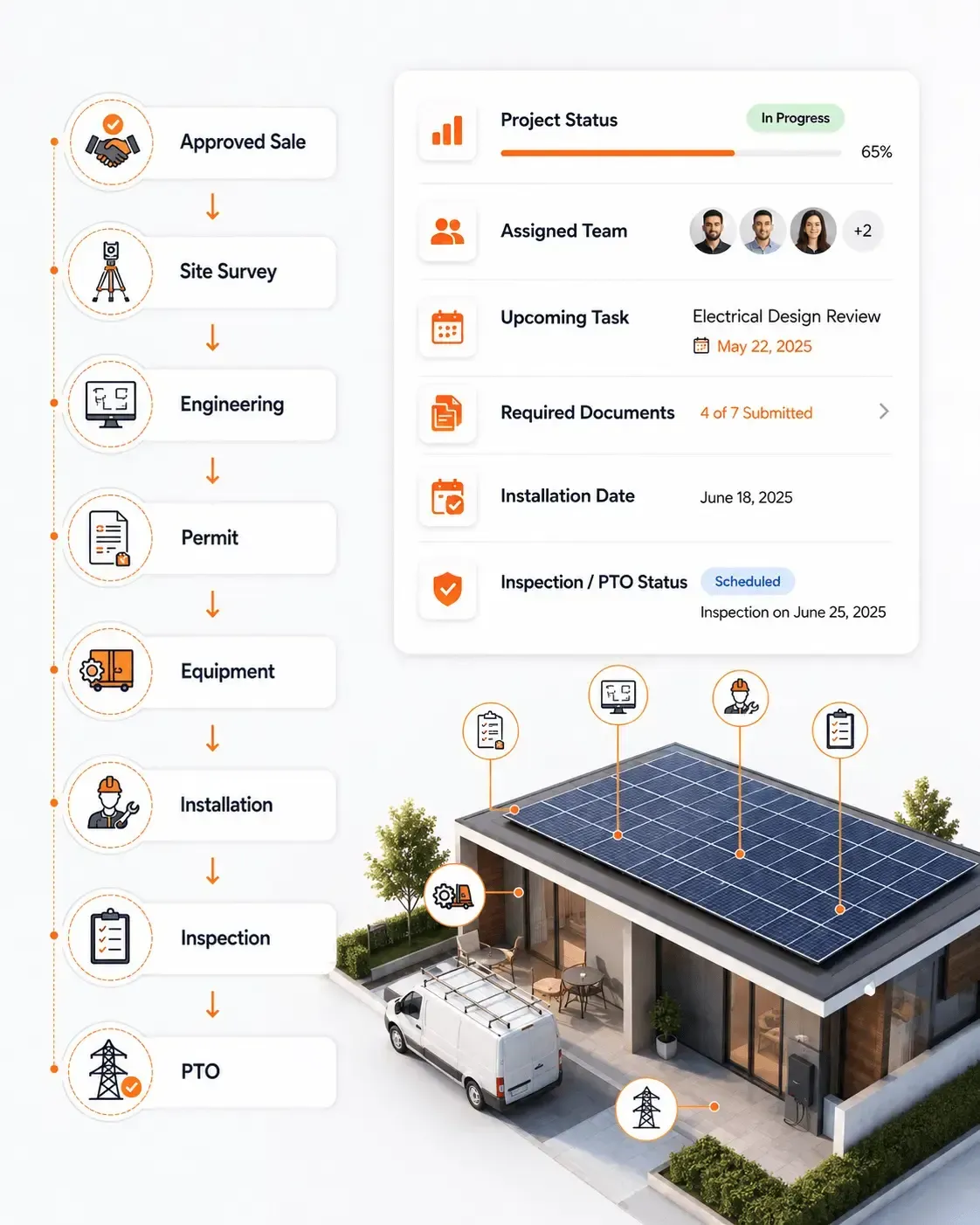
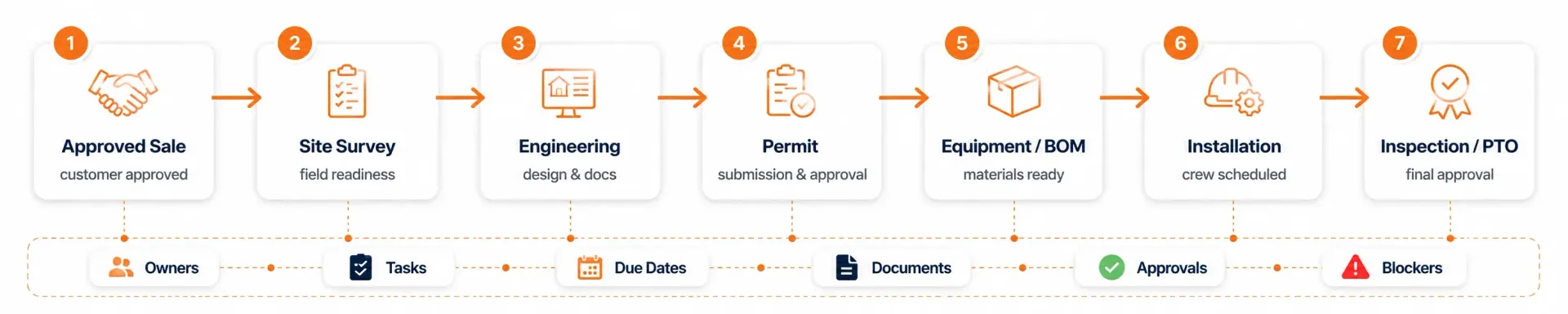
Track the Solar Project From Approved Sale to Permission to Operate
Sunbase Solar Project Management Software gives operations teams a structured workflow for moving each approved solar project through the stages required for completion.
Solar Project Management Capabilities
Manage the Operational Work Behind Every Solar Project
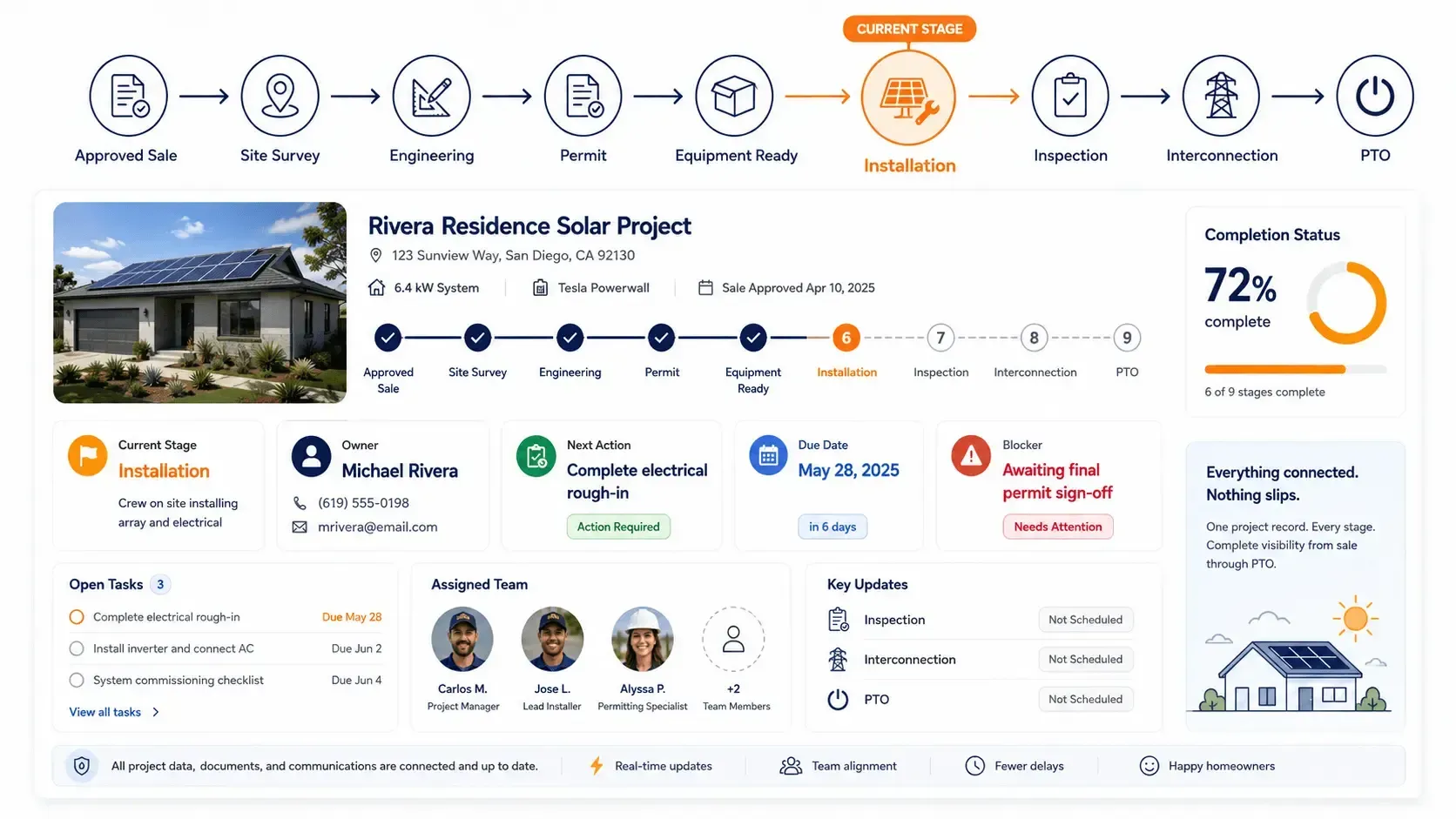
Sunbase Solar Project Management Software brings the core activities required to move a solar project from handoff through completion into one connected workflow.
Project Stages & Milestones
Define and track each stage of the project, including survey, engineering, permitting, installation, inspection and PTO.
Tasks & Responsibilities
Assign tasks to the right team members, set due dates and make ownership clear at every stage.
Permits & Approvals
Track permit submissions, approval status, required documents and outstanding actions.
Installation Scheduling
Coordinate installation dates, crews, project readiness and field requirements before work begins.
Equipment & BOM
Keep required modules, inverters, batteries and other project materials connected to the installation workflow.
Documents & Project Files
Store contracts, engineering files, permits, inspection records, photos and other project documents within the project record.
Inspections & Corrections
Record inspection results, identify failed items, assign corrective work and track reinspection through completion.
Interconnection & PTO
Manage utility submissions, interconnection requirements and final permission-to-operate status.
Project Visibility & Reporting
See project stage, owner, deadlines, blockers and outstanding work across individual projects or the wider pipeline.
Solar Project Stages, Tasks & Milestones
Keep Every Solar Project Moving to the Next Stage
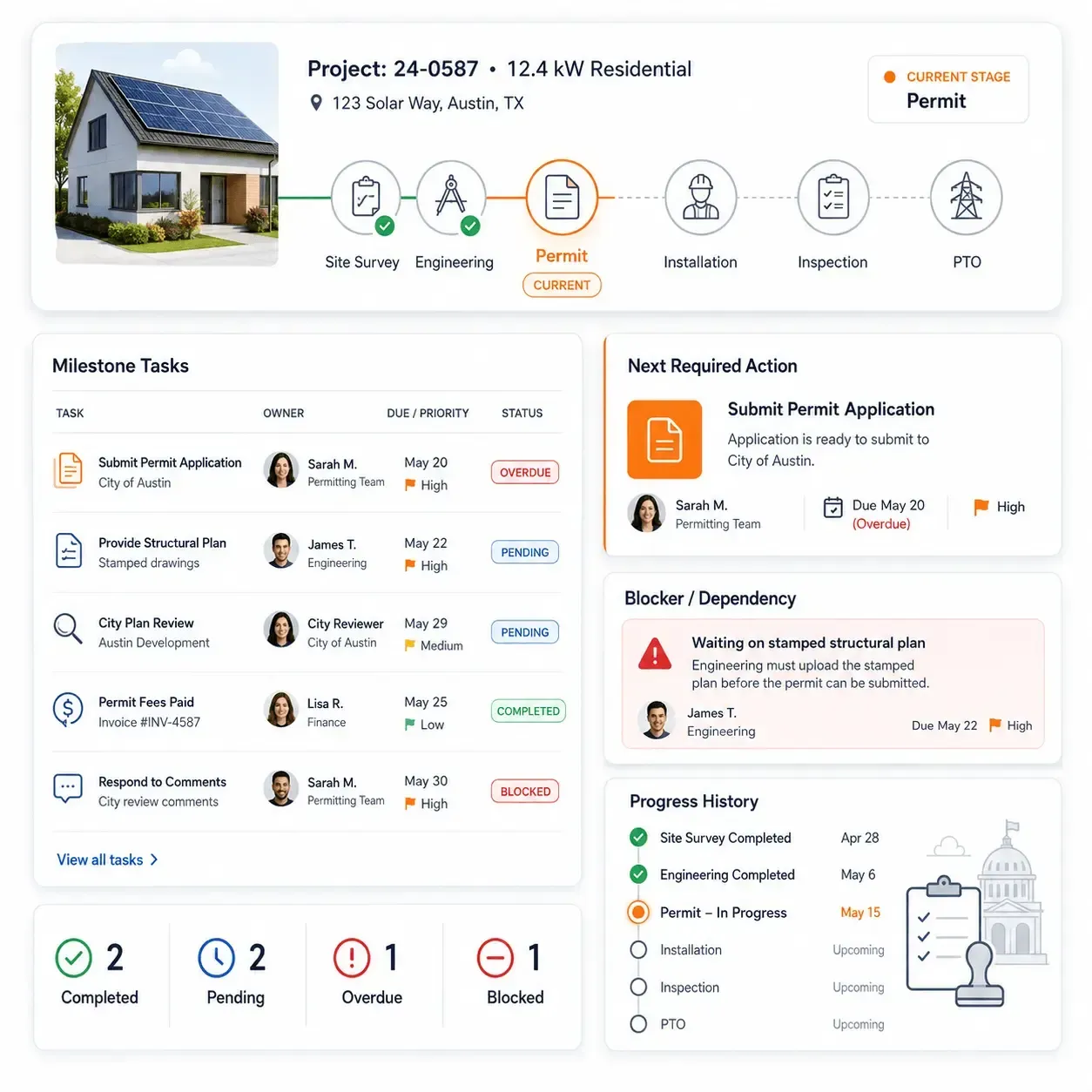
Sunbase Solar Project Management Software helps operations teams break each project into clear stages, milestones and actions so work does not stall between departments.
- Configure project stages around your installation workflow.
- Create milestone-based tasks for surveys, engineering, permits, installation, inspections and PTO.
- Assign each task to a responsible user, team or department.
- Set due dates, priorities and dependencies between activities.
- Track completed, pending, overdue and blocked work.
- Trigger the next required action when a project reaches a new stage.
- Maintain a clear history of project progress and completed milestones.
- Give managers visibility into projects that are delayed or waiting on action.
Each project shows
where it is now, what must happen next, who owns the action and what is preventing it from moving forward.
Permitting, Documents & Approvals
Keep Permits and Project Documents Moving With the Installation
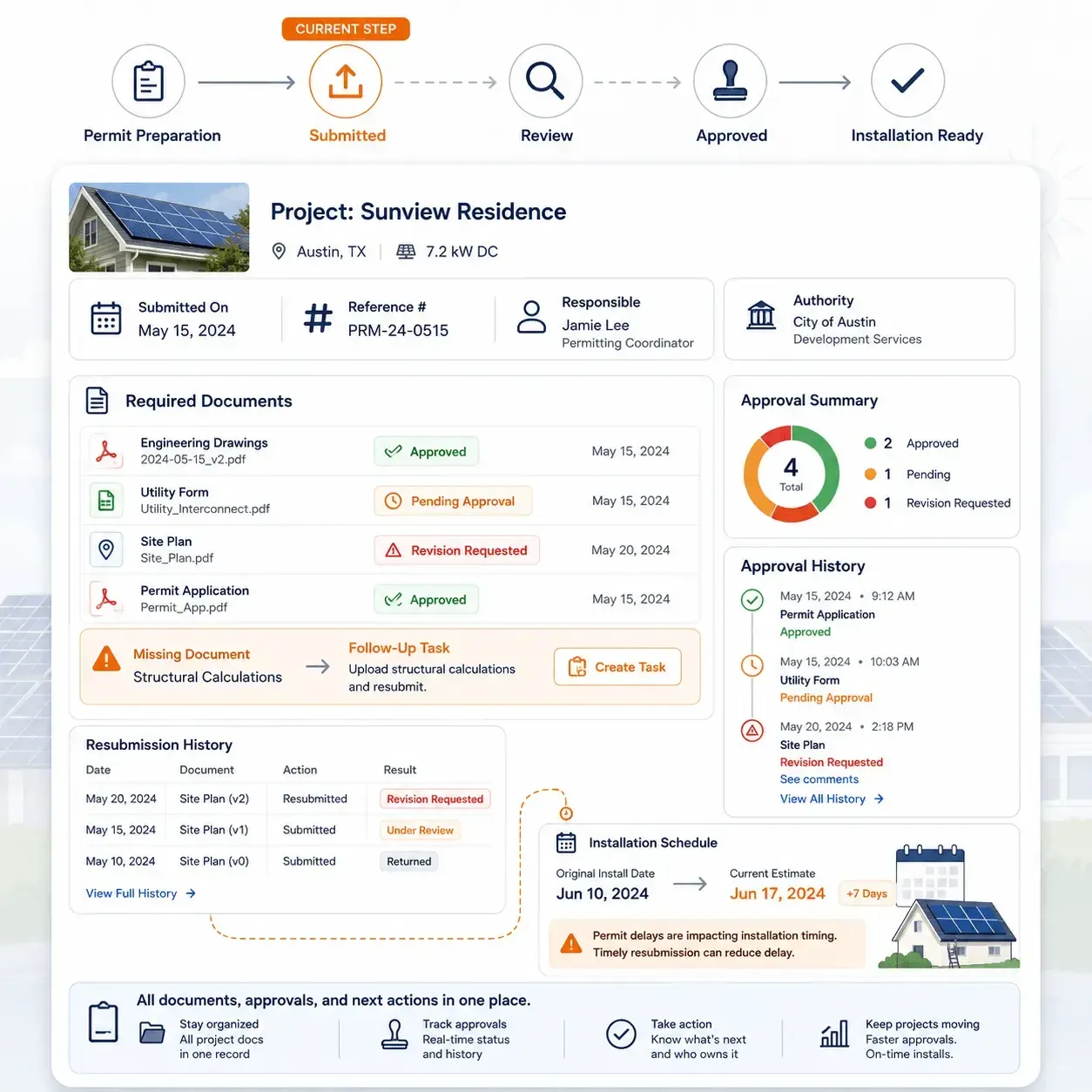
Sunbase Solar Project Management Software helps teams track the documents, submissions and approvals required before a solar project can move to installation and completion.
- Track permit preparation, submission and approval status.
- Record submission dates, reference numbers and responsible team members.
- Store engineering drawings, permits, utility forms and supporting documents.
- Identify missing documents or information holding up the project.
- Assign follow-up tasks when revisions or additional documentation are requested.
- Track resubmissions and approval history within the project record.
- Keep approved documents available to installation and operations teams.
- Make permit or approval delays visible before they affect the installation schedule.
Teams can see
what has been submitted, what is approved, what is still pending and what action is required next without managing permit status through separate spreadsheets or email threads.
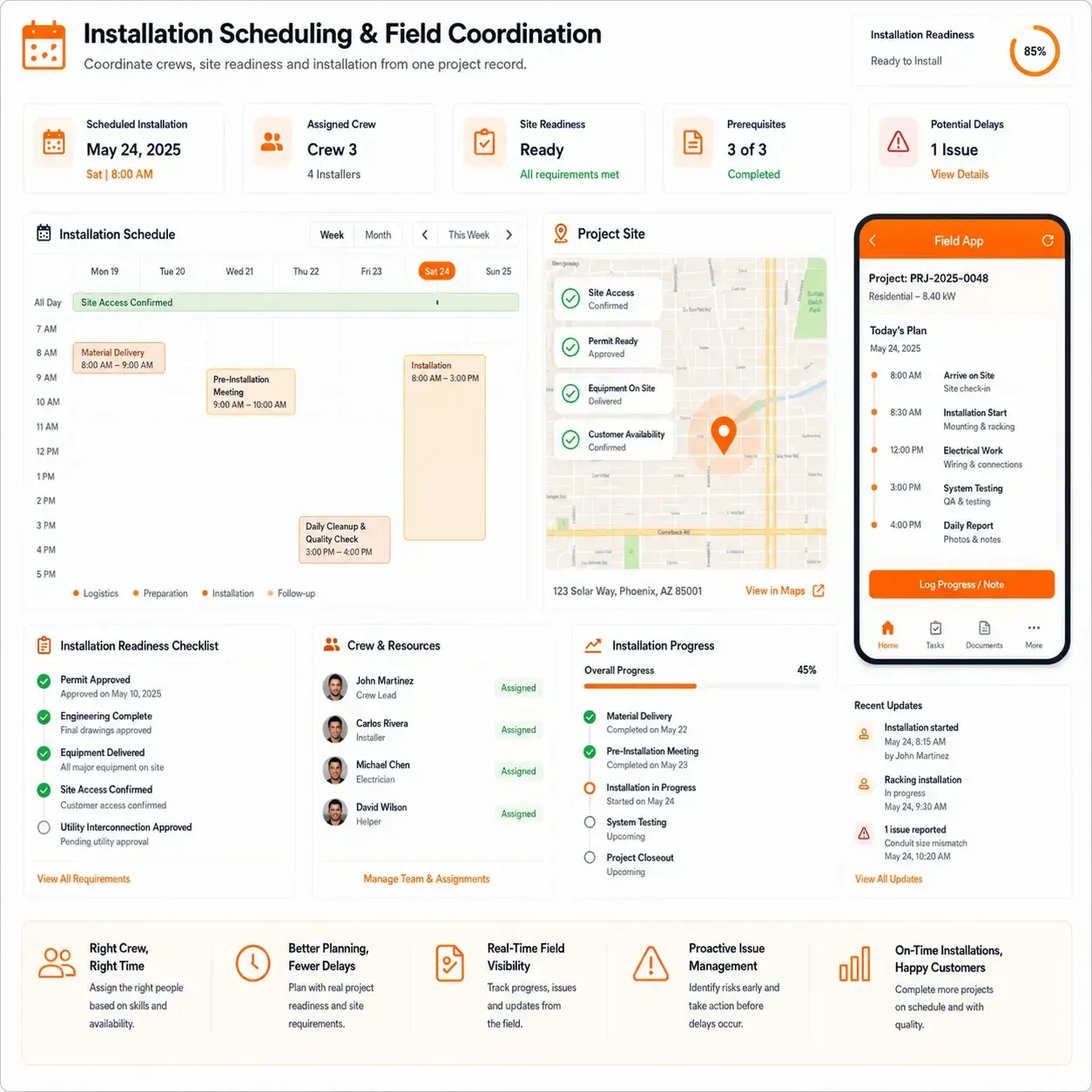
Installation Scheduling & Field Coordination
Coordinate Crews, Site Readiness and Solar Installation
Sunbase Solar Project Management Software helps operations teams coordinate the people, materials and site requirements that must come together before installation begins.
- Schedule installation dates against project readiness.
- Assign crews, installers or responsible field teams.
- Confirm permit, design and equipment readiness before scheduling.
- Track site access, customer availability and installation requirements.
- Keep installation instructions, drawings and project documents accessible to the field team.
- Record installation progress, photos, notes and issues from the project record.
- Reschedule work when weather, equipment or site conditions cause delays.
- Track incomplete work and follow-up actions through installation completion.
Operations teams can see
whether the project is ready to install, when the work is scheduled, who is responsible and what could delay completion.
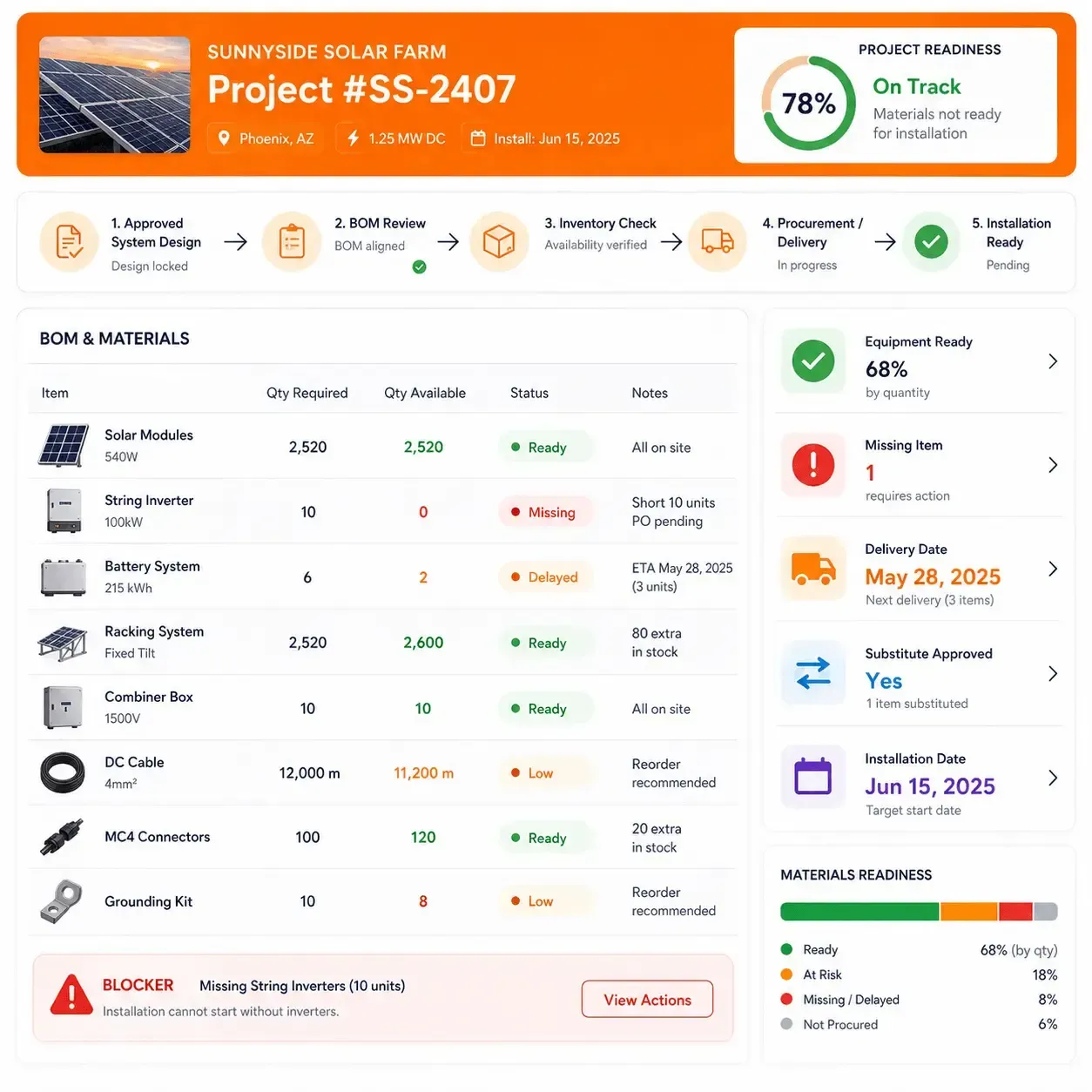
Equipment, BOM & Inventory Coordination
Keep Project Materials Aligned With the Installation Plan
Sunbase Solar Project Management Software helps operations teams connect the approved system configuration with the equipment and materials required to complete the installation.
- Keep the project BOM connected to the approved system design.
- Track required modules, inverters, batteries and other components.
- Check material availability before installation is scheduled.
- Identify missing, delayed or substituted equipment.
- Coordinate procurement and inventory requirements with project timelines.
- Record approved equipment changes without losing the project history.
- Make material-related blockers visible to operations teams.
- Confirm equipment readiness before crews are dispatched.
This helps prevent projects from reaching the installation date without the
correct equipment, complete BOM or required materials available.
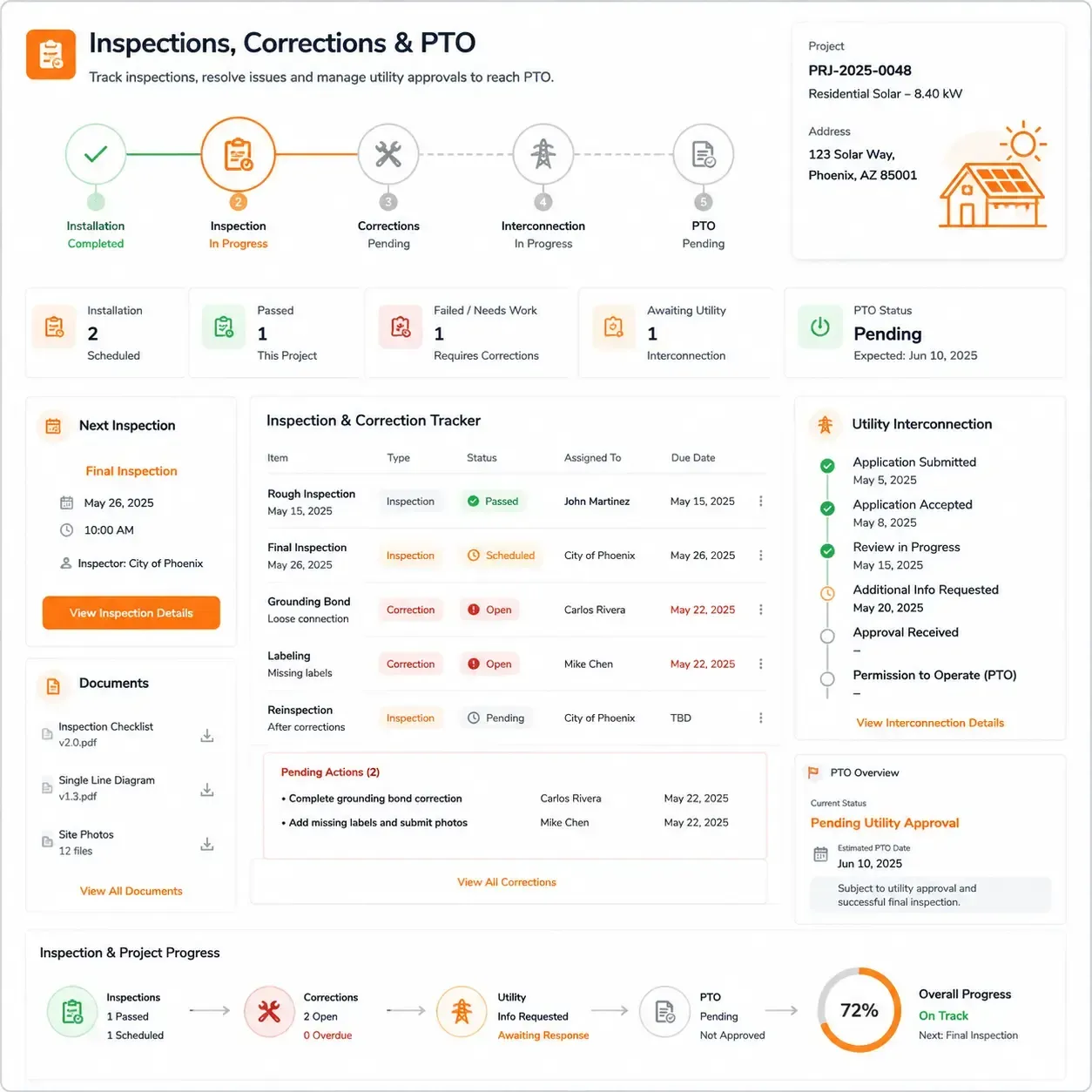
Inspections, Corrections & PTO
Track the Final Steps From Installation to Permission to Operate
Sunbase Solar Project Management Software helps teams manage the post-installation work required to move a completed system through inspection, correction and utility approval.
- Schedule and track required inspections.
- Record inspection results and approval status.
- Capture failed items, deficiencies and required corrective work.
- Assign correction tasks to the responsible team.
- Track reinspection dates and outcomes.
- Manage utility interconnection submissions and outstanding requirements.
- Keep inspection documents, photos and approval records connected to the project.
- Track permission-to-operate status through final project completion.
Operations teams can quickly see
which projects passed inspection, which require corrections, what is waiting on the utility and which systems have received PTO.
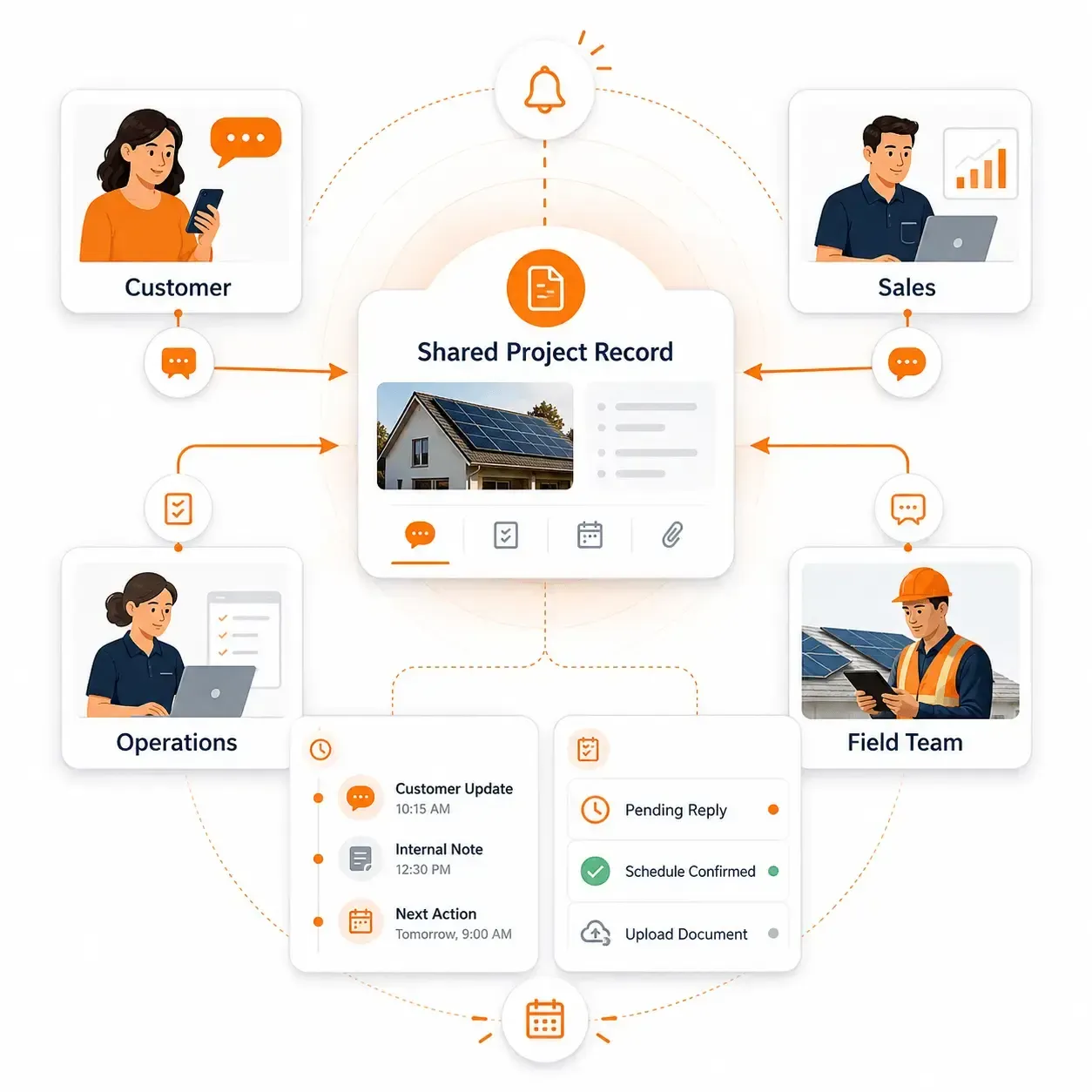
Customer & Internal Communication
Keep Project Updates Connected Across Teams and Customers
Sunbase Solar Project Management Software keeps project communication connected to the same record so sales, operations, field teams and customers are working from the latest project status.
- Keep project notes, updates and internal comments connected to each job.
- Record important customer communication and project decisions.
- Notify responsible teams when a project moves to the next stage.
- Coordinate requests for documents, approvals or missing information.
- Keep installation, inspection and scheduling updates visible to relevant teams.
- Track unresolved questions and follow-up actions.
- Give teams access to the latest project status before contacting the customer.
- Maintain a history of important project activity from handoff through PTO.
This reduces the need to search through separate emails, messages and spreadsheets to understand
what was communicated, what changed and what needs to happen next.
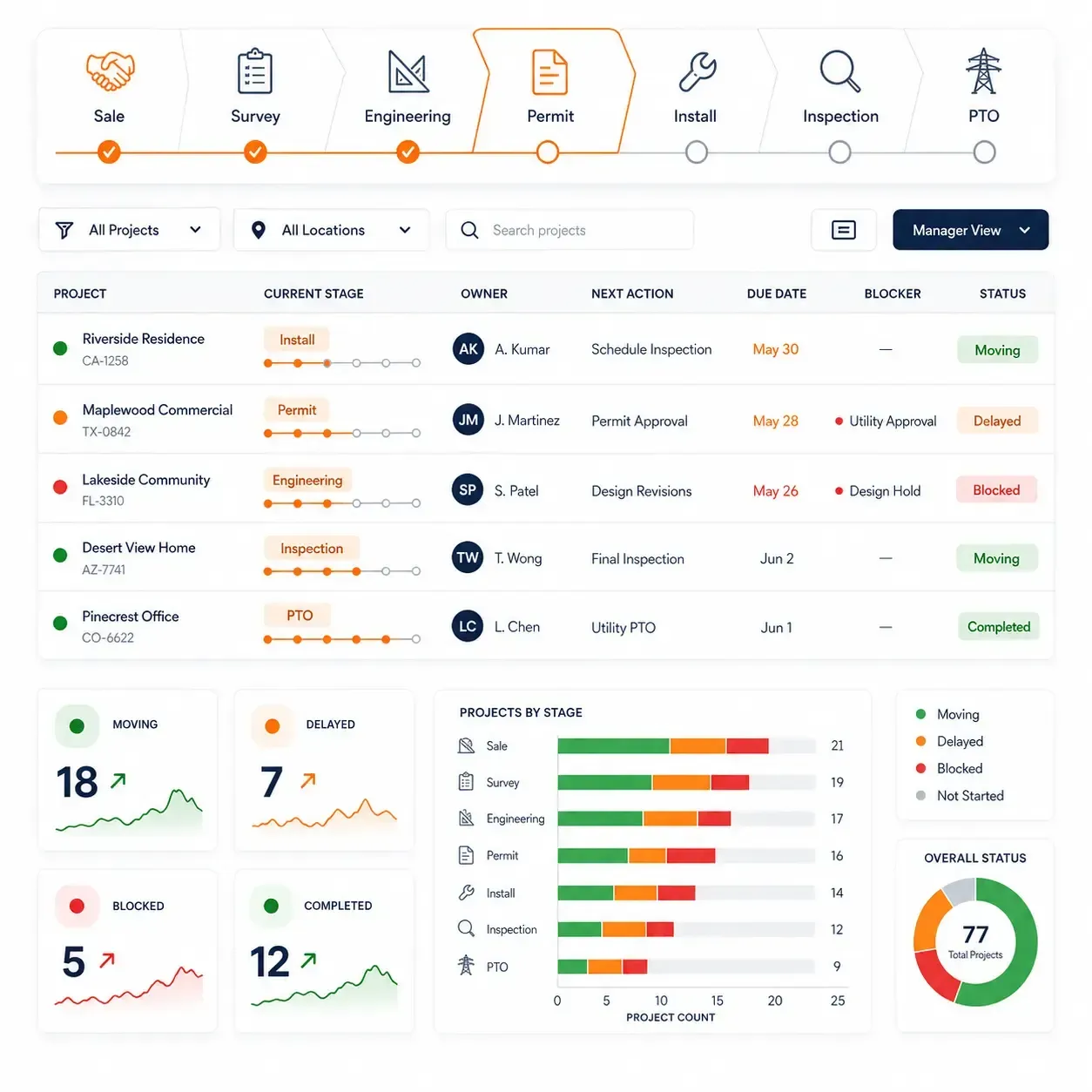
Project Visibility & Reporting
See What Is Moving, Delayed or Blocking Completion
Sunbase Solar Project Management Software gives operations managers a clear view of project progress across the installation pipeline, not just individual task lists.
- Track projects by stage, owner, team, location or completion status.
- See upcoming milestones, overdue tasks and missed deadlines.
- Identify projects waiting on permits, equipment, inspections or utility action.
- Monitor installation schedules and completion progress.
- Surface stalled projects and unresolved blockers.
- Review workload and responsibility across teams.
- Compare project movement across branches, territories or project types.
- Use operational reporting to understand where projects are slowing down.
Give Managers Clear Accountability
Each project can show:
Current Stage | Assigned Owner | Next Action | Due Date | Days in Stage | Blocker | Overall Status
Sales-to-Project Handoff
Move Approved Projects Into Operations Without Rebuilding the Record
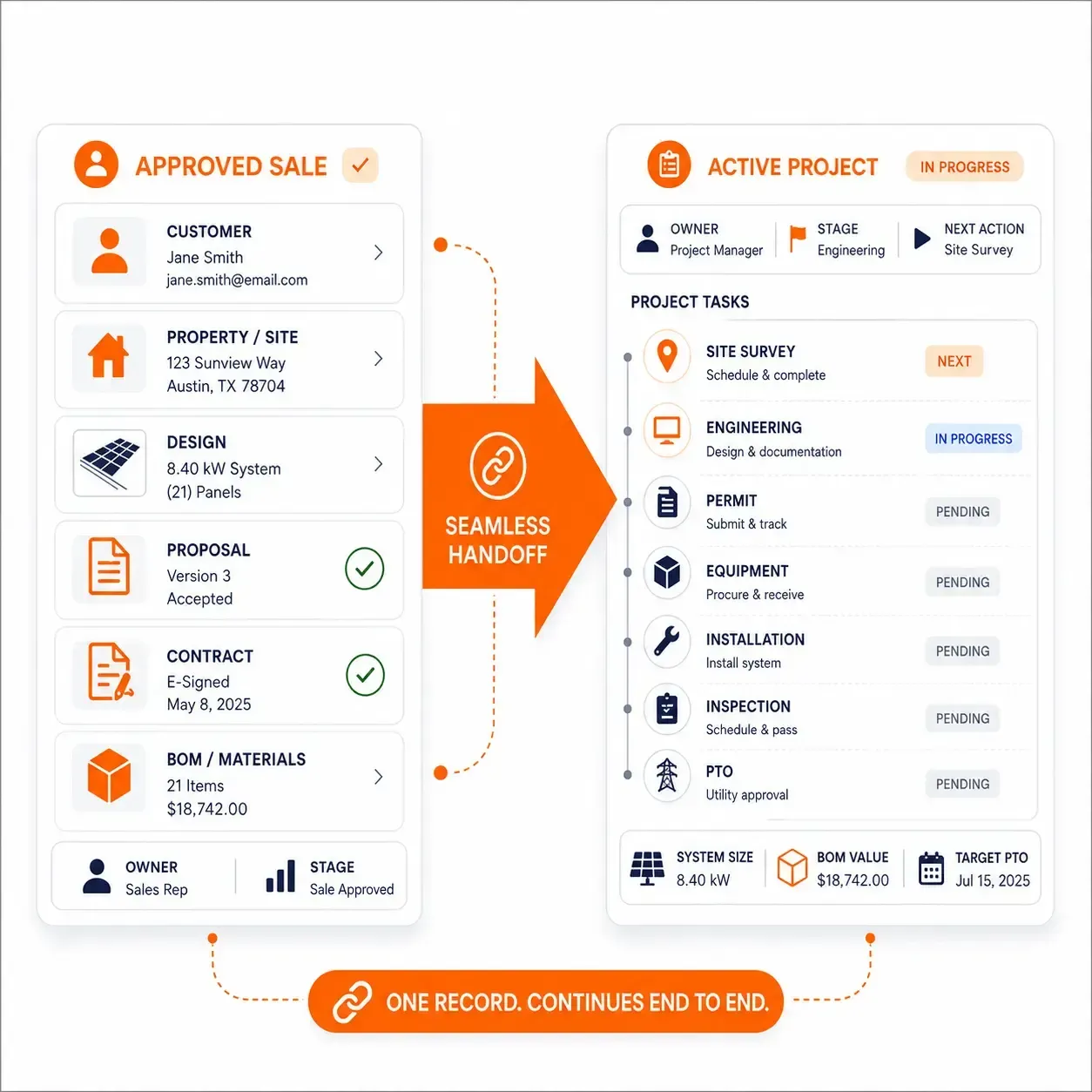
Sunbase Solar Project Management Software keeps the information collected during sales connected when an opportunity becomes an active installation project.
- Carry forward customer and property information.
- Use the approved PV design, system size and equipment configuration.
- Keep the accepted proposal, pricing and contract details attached to the project.
- Transfer BOM and installation requirements into operations.
- Preserve site notes, documents and customer commitments from the sales process.
- Create the required operational stages, tasks and responsibilities at handoff.
- Give project teams access to the latest approved information before work begins.
- Reduce duplicate data entry between sales, design and operations.
The project team starts with the
approved customer, technical and commercial information already collected, rather than recreating the project after the sale.
Sunbase project management Software vs Generic Project Management Software
Manage the Solar Workflow, Not Just Tasks
Generic project management tools are designed around tasks, boards and deadlines. Sunbase Solar Project Management Software is structured around the actual stages, dependencies and operational requirements of a solar installation.
Generic Project Management Software
- Tracks tasks, due dates and assignees.
- Requires custom setup for solar-specific project stages.
- Permits, inspections and PTO may need separate tracking.
- Design, proposal and BOM data often come from other systems.
- Installation readiness may depend on manual checklists.
- Sales-to-operations handoff often requires data re-entry.
- Project blockers can be difficult to connect to the actual solar workflow.
- Tracks the project from approved sale through PTO.
- Supports survey, engineering, permitting, installation and inspection stages.
- Keeps equipment and BOM requirements connected to the project.
- Tracks approvals, corrections, interconnection and utility requirements.
- Connects schedules, responsibilities, documents and blockers.
- Carries approved sales, design and proposal information into operations.
- Gives managers visibility into project stage, next action and completion risk.
Configuration & Team Collaboration
Configure Project Workflows Around How Your Solar Team Operates
Sunbase Solar Project Management Software treats every task as part of a
solar project lifecycle, rather than managing installation work as an isolated list of activities.
Design | BOM | Documents | Owners | Schedule | Blockers | Approvals
Solar Project Use Cases
Manage Residential, Commercial and EPC Solar Projects
Sunbase Solar Project Management Software can support different project types while keeping stages, responsibilities, documents and completion requirements connected to one workflow.
Residential Solar
Manage high volumes of rooftop projects through survey, permitting, equipment readiness, installation, inspection and PTO.
Commercial Solar
Coordinate larger projects with more documentation, engineering requirements, equipment dependencies, approvals and installation milestones.
Solar EPC Projects
Manage multi-stage engineering, procurement and construction workflows across technical teams, vendors, field crews and project managers.
Solar Distributors
Coordinate equipment requirements, orders, availability and fulfillment against the projects and contractor customers they support.
Solar Field Service Teams
Manage site visits, service requests, assigned technicians, field tasks, photos, documentation and follow-up work.
Multi-Location & Dealer Operations
Standardize project workflows across branches, territories or dealer networks while maintaining visibility into each project's status and responsible team.
Sunbase Solar Software Pricing
Solar Software Pricing Based on Your Team and Workflow
Sunbase Solar Software plans start at $59 per user per month.
Pricing is based on the number of users, required modules, workflow configuration, reporting requirements and implementation support.
Pricing May Depend On
- Number of users.
- Selected Sunbase modules.
- Sales and project workflow requirements.
- Required configuration.
- Integration requirements.
- Business size and operating structure.
Sunbase can be configured around the tools your team needs rather than forcing every business into the same fixed feature package.
Pricing & Implementation
Configure Sunbase Around Your Solar Project Workflow
Sunbase plans start at $59 per user per month, with final pricing based on the number of users, selected modules, workflow requirements, configuration and integrations.
1. Workflow Review
Map the existing process from sales handoff through survey, permitting, installation, inspection and PTO.
2. Project Configuration
Configure stages, milestones, tasks, dependencies, approvals, project statuses and completion requirements.
3. Data & Document Setup
Prepare existing project records, documents, templates and other information required for the new workflow.
4. Training & Launch
Train teams around their responsibilities, test the configured workflow and move active projects into the agreed process.
Implementation is structured around the way the solar company already delivers projects, rather than forcing every organization into the same predefined process.
Questions About Sunbase Solar Project Management Software
What is solar project management software?
Solar project management software is used to coordinate the operational stages required to move a sold solar system from project handoff through installation and permission to operate.
It connects activities such as site surveys, engineering, permitting, equipment readiness, installation, inspections, utility interconnection and PTO with the people, documents and deadlines responsible for moving the project forward.
What does Sunbase Solar Project Management Software do?
Sunbase Solar Project Management Software gives solar operations teams one project record for managing the work between an approved sale and completed installation.
The record can connect project stages, tasks, documents, equipment requirements, schedules, permits, inspections, utility activity and responsible team members so teams can see the current stage, next action and outstanding work for each project.
What stages of a solar installation can Sunbase Solar Project Management Software manage?
Sunbase Solar Project Management Software can structure the operational workflow around the actual stages a solar company uses to deliver projects.
A typical workflow can include:
Approved Sale → Site Survey → Engineering → Permitting → Equipment Readiness → Installation → Inspection → Interconnection → PTO
Companies can configure the stages and required actions around residential, commercial or EPC project processes rather than using one fixed workflow for every installation.
How does Sunbase Solar Project Management Software move a solar project from sales into operations?
Sunbase Solar Project Management Software keeps the approved project information connected when a solar opportunity moves from sales into operations. Customer and property details, the approved PV design, proposal, equipment information, documents and other agreed project information can remain associated with the project record.
Operations therefore begin with the information already approved during the sales process instead of creating a second project record from scratch.
How does Sunbase Solar Project Management Software track solar project tasks and milestones?
Sunbase Solar Project Management Software connects individual tasks to the stage of the solar project they are intended to complete. A permitting task, for example, belongs to the permitting stage rather than existing as an unrelated to-do item.
Teams can associate work with owners, due dates, milestones and project status, making it easier to determine what must happen next and who is responsible for it.
How does Sunbase Solar Project Management Software manage solar permitting?
Sunbase Solar Project Management Software keeps permitting activity connected to the installation project rather than tracking it in a separate spreadsheet. Teams can organize permit documents, submission activity, responsible users, requested revisions, outstanding requirements and approval status within the project workflow.
Once the required permit work is complete, the project can proceed to the next operational stage according to the company's configured process.
What can a solar operations manager track in Sunbase Solar Project Management Software?
A solar operations manager can use Sunbase Solar Project Management Software to understand both the current condition of an individual project and the movement of projects across the installation pipeline.
Relevant operational information can include:
Project Stage | Responsible Team | Next Action | Due Date | Permit Status | Equipment Readiness | Installation Status | Inspection Status | Blocker | PTO Status
This provides an operational view rather than only a list of tasks.
What is the difference between Sunbase Solar Project Management Software and generic project management software?
Generic project management software organizes work around tasks, boards and deadlines;
Sunbase Solar Project Management Software organizes work around the lifecycle of a solar installation.
Instead of starting with a blank project board, Sunbase can structure operations around:
Survey → Engineering → Permit → Equipment → Installation → Inspection → Interconnection → PTO
Customer, design, proposal, equipment and operational information can remain connected as the project progresses through those stages.
Can solar project workflows be customized in Sunbase Solar Project Management Software?
Sunbase Solar Project Management Software can be configured around the stages, responsibilities and approval requirements a solar company already uses. Residential, commercial, EPC, dealer or multi-location operations do not necessarily need to follow identical processes.
Companies can structure project stages, responsibilities and required actions around their operating model while retaining centralized visibility across projects.
How long does solar project management software implementation take?
Sunbase solar project management software implementation time depends on how much of the company's existing project-delivery process needs to be configured or migrated. Factors include workflow complexity, project stages, users and roles, active project data, documents and required integrations.
Implementation typically progresses through workflow review → configuration → data preparation → testing → team training → launch.
Ready to Improve
Solar Project Delivery?
Configure Sunbase Solar Project Management Software around the way your team manages residential, commercial and EPC solar projects.
Plans start at $59/user/month · No long-term contracts required · Cancel any time